AI Assistant
Notifications
Clear all

[Solved] missing php translation code in class-template.php

6 Posts
2 Users
0 Reactions
1,957 Views
Markus
Posts: 12
Customer
Topic starter
Translate
English
Spanish
French
German
Italian
Portuguese
Russian
Chinese
Japanese
Korean
Arabic
Hindi
Dutch
Polish
Turkish
Vietnamese
Thai
Swedish
Danish
Finnish
Norwegian
Czech
Hungarian
Romanian
Greek
Hebrew
Indonesian
Malay
Ukrainian
Bulgarian
Croatian
Slovak
Slovenian
Serbian
Lithuanian
Latvian
Estonian
(@mahi)
Member
Joined: 3 years ago
[#10858]

Hi,

wpforo Private Messages : plugin version 3.0.1

File wpforo-private-messages/includes/class-template.php : Line 210 is not translation ready.
It would be nice to modify this line for the next plugin version.

'You have %d new messages'

should be replaced with

__( 'You have %d new messages', 'wpforo_pm' )

Same for the second part on the same line ( 'You have %d new message' ).

Line 396 : Another translation code is missing

wpforo_phrase( 'last activity: %s', false )

should be replaced with

wpforo_phrase( __( 'last activity: %s', 'wpforo_pm' ), false )

thank you


5 Replies
Posts: 4245
 Tom
Admin
Translate
English
Spanish
French
German
Italian
Portuguese
Russian
Chinese
Japanese
Korean
Arabic
Hindi
Dutch
Polish
Turkish
Vietnamese
Thai
Swedish
Danish
Finnish
Norwegian
Czech
Hungarian
Romanian
Greek
Hebrew
Indonesian
Malay
Ukrainian
Bulgarian
Croatian
Slovak
Slovenian
Serbian
Lithuanian
Latvian
Estonian
(@tomson)
Famed Member
Joined: 11 years ago

Hi @mahi,

All phrases in wpforo_phrase() function go through the __() function as well, so there should not be such code:

wpforo_phrase( __( 'last activity: %s',


Reply
4 Replies
 Tom
Admin
(@tomson)
Joined: 11 years ago

Famed Member
Posts: 4245
Translate
English
Spanish
French
German
Italian
Portuguese
Russian
Chinese
Japanese
Korean
Arabic
Hindi
Dutch
Polish
Turkish
Vietnamese
Thai
Swedish
Danish
Finnish
Norwegian
Czech
Hungarian
Romanian
Greek
Hebrew
Indonesian
Malay
Ukrainian
Bulgarian
Croatian
Slovak
Slovenian
Serbian
Lithuanian
Latvian
Estonian

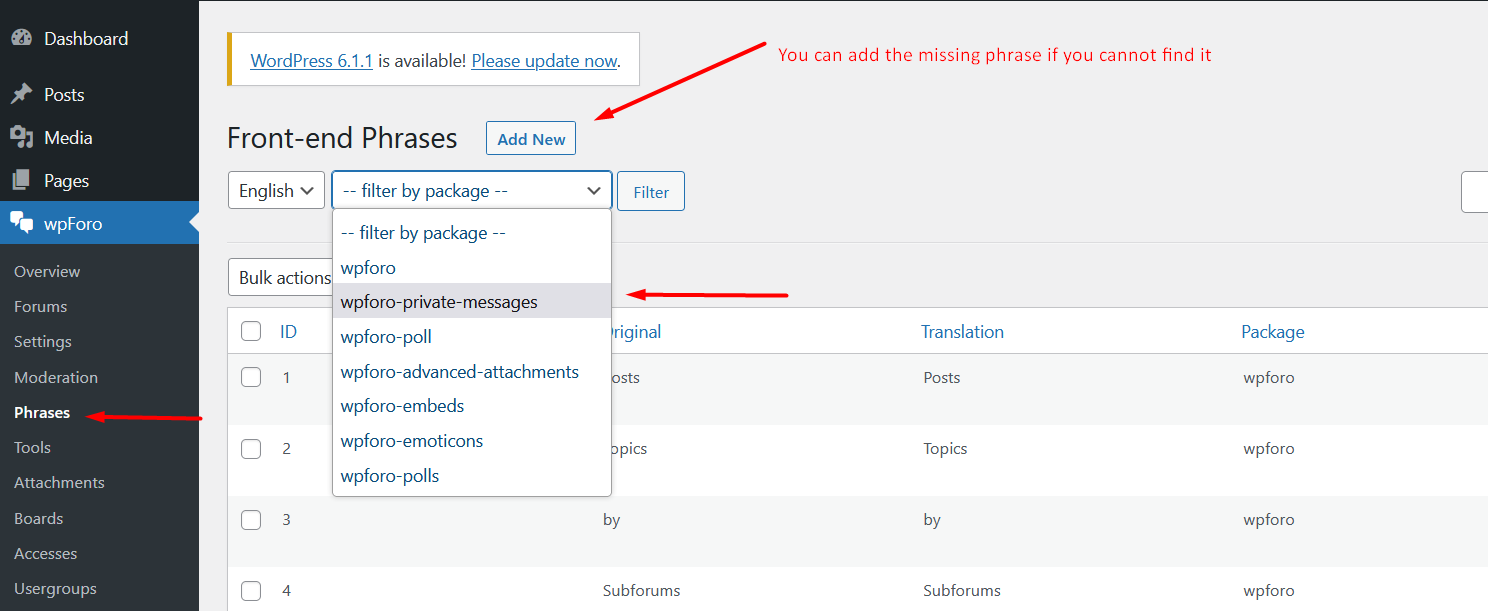
You can find or add any phrase in wpForo > Phrases admin page using corresponding filter in the drop-down.

Screenshot 333

Reply
Markus
Customer
(@mahi)
Joined: 3 years ago

Member
Posts: 12
Translate
English
Spanish
French
German
Italian
Portuguese
Russian
Chinese
Japanese
Korean
Arabic
Hindi
Dutch
Polish
Turkish
Vietnamese
Thai
Swedish
Danish
Finnish
Norwegian
Czech
Hungarian
Romanian
Greek
Hebrew
Indonesian
Malay
Ukrainian
Bulgarian
Croatian
Slovak
Slovenian
Serbian
Lithuanian
Latvian
Estonian

@tomson 

Unfortunaletly not everything is translated from English. There remains some translations to do.

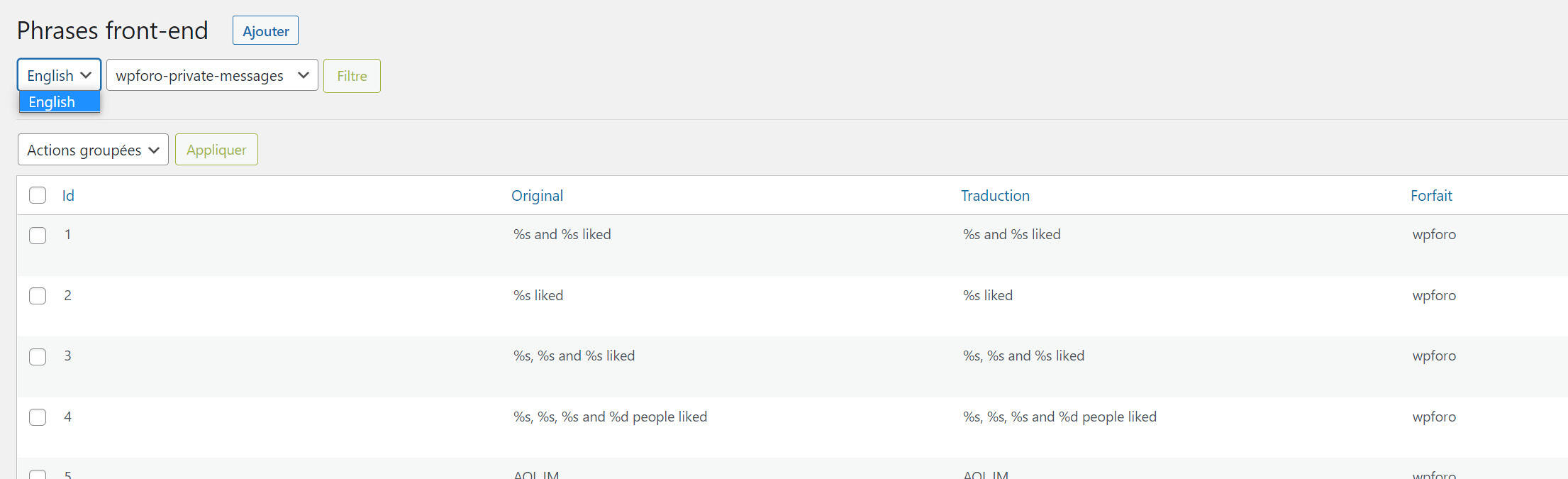
I'm running Wordpress in French. In the backoffice wpForo => Phrases it's impossible to load the French translation (see screenshot). So the only way I work right now is to patch the php files.

What am I missing ? Why are some expressions not translated ?

thank you

screenshot phrases


Reply
 Tom
Admin
(@tomson)
Joined: 11 years ago

Famed Member
Posts: 4245
Translate
English
Spanish
French
German
Italian
Portuguese
Russian
Chinese
Japanese
Korean
Arabic
Hindi
Dutch
Polish
Turkish
Vietnamese
Thai
Swedish
Danish
Finnish
Norwegian
Czech
Hungarian
Romanian
Greek
Hebrew
Indonesian
Malay
Ukrainian
Bulgarian
Croatian
Slovak
Slovenian
Serbian
Lithuanian
Latvian
Estonian

@mahi,

you don't need to load France, you should edit a phrase and insert the language value you want. if you cannot find a phrase, you should add it with the identical English phrase as "phrase key" and the translated version as "phrase value".

In other words, Phrases are not attached to any language, thy work with current language, so if you change them they'll be changed on the frontend as well. But only front-end.


Reply
Markus
Customer
(@mahi)
Joined: 3 years ago

Member
Posts: 12
Markus
Translate
English
Spanish
French
German
Italian
Portuguese
Russian
Chinese
Japanese
Korean
Arabic
Hindi
Dutch
Polish
Turkish
Vietnamese
Thai
Swedish
Danish
Finnish
Norwegian
Czech
Hungarian
Romanian
Greek
Hebrew
Indonesian
Malay
Ukrainian
Bulgarian
Croatian
Slovak
Slovenian
Serbian
Lithuanian
Latvian
Estonian

@tomson 

I get it, and its working !

thank you for your prompt answer.


Reply
Share:
Scroll to top