AI Assistant
Notifications
Clear all

Maximum upload file size

7 Posts
4 Users
0 Reactions
5,206 Views
Posts: 37
Topic starter
Translate
English
Spanish
French
German
Italian
Portuguese
Russian
Chinese
Japanese
Korean
Arabic
Hindi
Dutch
Polish
Turkish
Vietnamese
Thai
Swedish
Danish
Finnish
Norwegian
Czech
Hungarian
Romanian
Greek
Hebrew
Indonesian
Malay
Ukrainian
Bulgarian
Croatian
Slovak
Slovenian
Serbian
Lithuanian
Latvian
Estonian
(@peterwangbiz)
Trusted Member
Joined: 8 years ago
[#3036]

My hosting provider has increased the Maximum upload file limit to 1500M, so I go to: Forums > Settings, but when I try to change the "Maximum upload file size" from 256M to 1500M, the system always turns it back to 1.5M (pls see 2 screenshots attached, s1.jpg is the 1st screenshot)

Please advise what should I do, thanks.
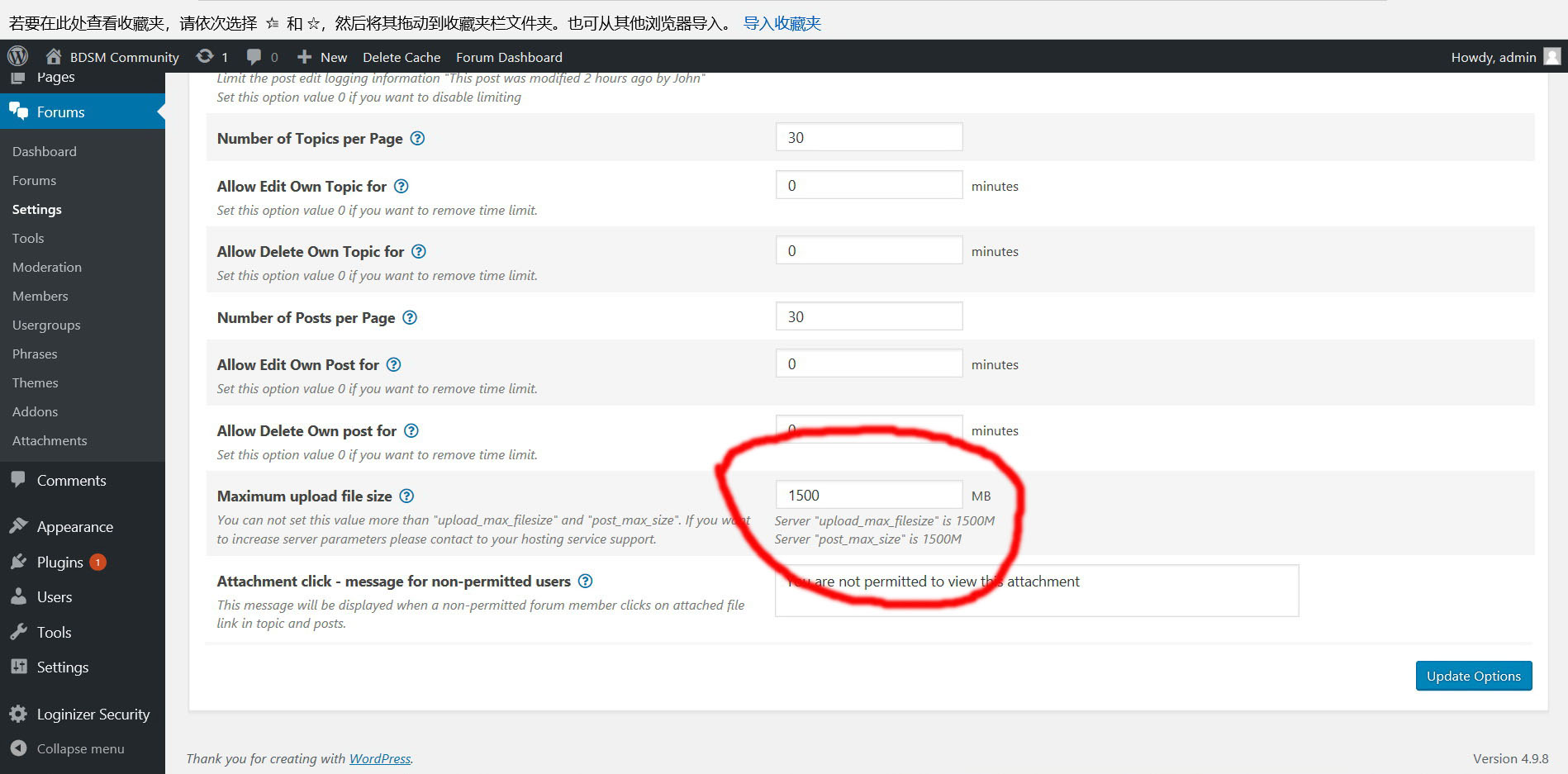
s1
s2


6 Replies
Astghik
Posts: 6645
Admin
Translate
English
Spanish
French
German
Italian
Portuguese
Russian
Chinese
Japanese
Korean
Arabic
Hindi
Dutch
Polish
Turkish
Vietnamese
Thai
Swedish
Danish
Finnish
Norwegian
Czech
Hungarian
Romanian
Greek
Hebrew
Indonesian
Malay
Ukrainian
Bulgarian
Croatian
Slovak
Slovenian
Serbian
Lithuanian
Latvian
Estonian
(@astgh)
Illustrious Member
Joined: 8 years ago

Hi @peterwangbiz,

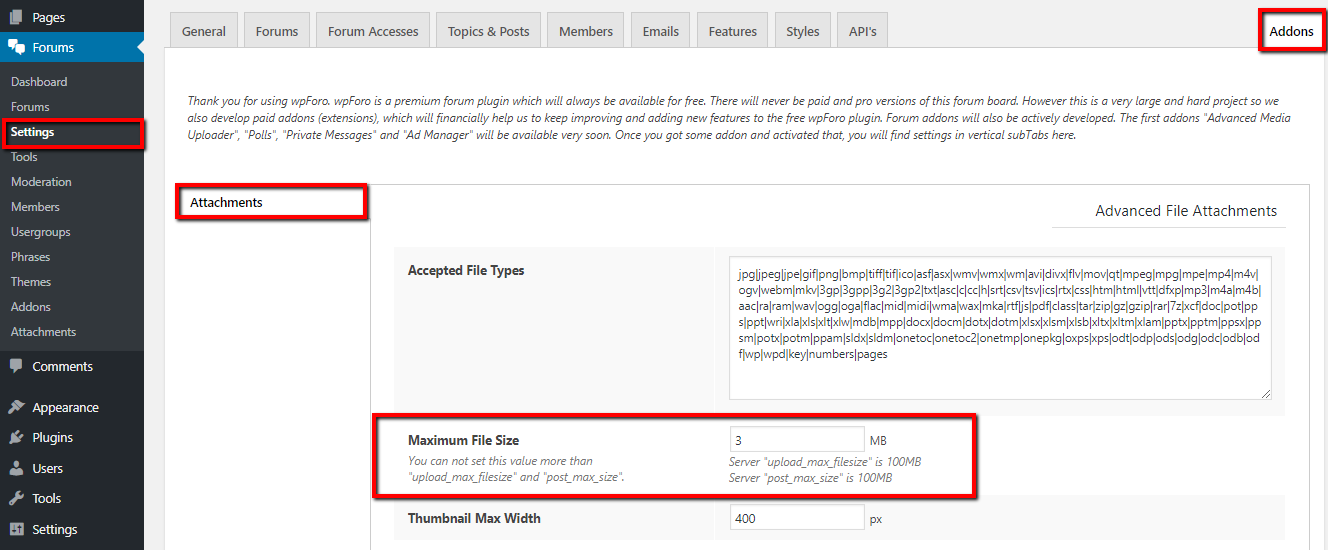
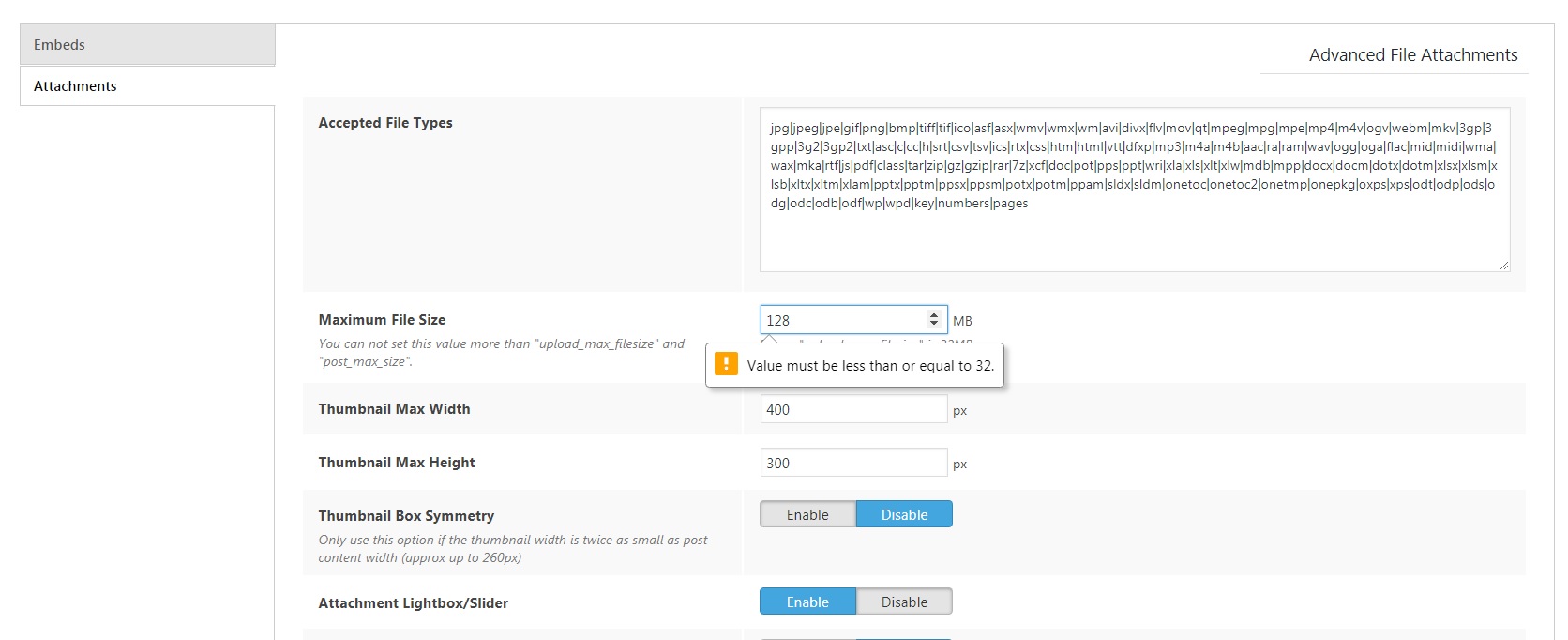
Please navigate to Dashboard > Forums > Settings > Addon > Attachments admin page, increase the "Maximum File Size" options value.

Maximum File Size

Reply
Posts: 8
Customer
Translate
English
Spanish
French
German
Italian
Portuguese
Russian
Chinese
Japanese
Korean
Arabic
Hindi
Dutch
Polish
Turkish
Vietnamese
Thai
Swedish
Danish
Finnish
Norwegian
Czech
Hungarian
Romanian
Greek
Hebrew
Indonesian
Malay
Ukrainian
Bulgarian
Croatian
Slovak
Slovenian
Serbian
Lithuanian
Latvian
Estonian
(@clauberty)
Member
Joined: 9 years ago
Attachment size


hello 

how to be able do mod this 


i moded wp-config.php 

@ini_set( ‘upload_max_size’ , ’200MB’ );
@ini_set( ‘post_max_size’, ’250MB’);
@ini_set( ‘memory_limit’, ’300MB’ );


if i mode .htaccess web page not loading anymore 


from web Statione PHP setting -> edit -> core tab all variables that was 32 set to 128 


what next {green}:nerd:  


Reply
1 Reply
Elvina
(@elvina)
Joined: 7 years ago

Support
Posts: 1403
Translate
English
Spanish
French
German
Italian
Portuguese
Russian
Chinese
Japanese
Korean
Arabic
Hindi
Dutch
Polish
Turkish
Vietnamese
Thai
Swedish
Danish
Finnish
Norwegian
Czech
Hungarian
Romanian
Greek
Hebrew
Indonesian
Malay
Ukrainian
Bulgarian
Croatian
Slovak
Slovenian
Serbian
Lithuanian
Latvian
Estonian

@clauberty,


You should ask your hosting service to increase PHP max upload size and max post size.

Also, you can read this article:

http://www.wpbeginner.com/wp-tutorials/how-to-increase-the-maximum-file-upload-size-in-wordpress/


Reply
Posts: 8
Customer
Translate
English
Spanish
French
German
Italian
Portuguese
Russian
Chinese
Japanese
Korean
Arabic
Hindi
Dutch
Polish
Turkish
Vietnamese
Thai
Swedish
Danish
Finnish
Norwegian
Czech
Hungarian
Romanian
Greek
Hebrew
Indonesian
Malay
Ukrainian
Bulgarian
Croatian
Slovak
Slovenian
Serbian
Lithuanian
Latvian
Estonian
(@clauberty)
Member
Joined: 9 years ago
Posted by: @elvina

You should ask your hosting service to increase PHP max upload size and max post size.

well all this is on synology and all setting in php was modified but no success {green}:tears:  


Reply
1 Reply
Elvina
(@elvina)
Joined: 7 years ago

Support
Posts: 1403
Translate
English
Spanish
French
German
Italian
Portuguese
Russian
Chinese
Japanese
Korean
Arabic
Hindi
Dutch
Polish
Turkish
Vietnamese
Thai
Swedish
Danish
Finnish
Norwegian
Czech
Hungarian
Romanian
Greek
Hebrew
Indonesian
Malay
Ukrainian
Bulgarian
Croatian
Slovak
Slovenian
Serbian
Lithuanian
Latvian
Estonian

@clauberty,

For farther support, please let us know wpForo Advanced Attachments add-on version you use.


Reply
Posts: 8
Customer
Translate
English
Spanish
French
German
Italian
Portuguese
Russian
Chinese
Japanese
Korean
Arabic
Hindi
Dutch
Polish
Turkish
Vietnamese
Thai
Swedish
Danish
Finnish
Norwegian
Czech
Hungarian
Romanian
Greek
Hebrew
Indonesian
Malay
Ukrainian
Bulgarian
Croatian
Slovak
Slovenian
Serbian
Lithuanian
Latvian
Estonian
(@clauberty)
Member
Joined: 9 years ago

wpforo-advanced-attachments-1.2.3


Reply
Share:
Scroll to top