
AI Assistant
Notifications
Clear all

Remove empty space above Comment Text Area

3 Posts
2 Users
0 Reactions
2,508 Views
(@spontis)
Trusted Member
Joined: 9 years ago
Posts: 50
Topic starter
Translate
English
Spanish
French
German
Italian
Portuguese
Russian
Chinese
Japanese
Korean
Arabic
Hindi
Dutch
Polish
Turkish
Vietnamese
Thai
Swedish
Danish
Finnish
Norwegian
Czech
Hungarian
Romanian
Greek
Hebrew
Indonesian
Malay
Ukrainian
Bulgarian
Croatian
Slovak
Slovenian
Serbian
Lithuanian
Latvian
Estonian
  [#2566]

By default, there is a space between the Header and the Comment Text Area, where Social Logins will shown or Logged-In Users can Log Out. I don't use the Social Login Feature. As you can see in the Screenshot, there is a large Space between Header and Comment Text Area.

Is it possible to remove this? Maybe in the Next Update you can add a if/then coding to this area, that will remove the DIV when Social Logins are OFF and no User is loggend in?
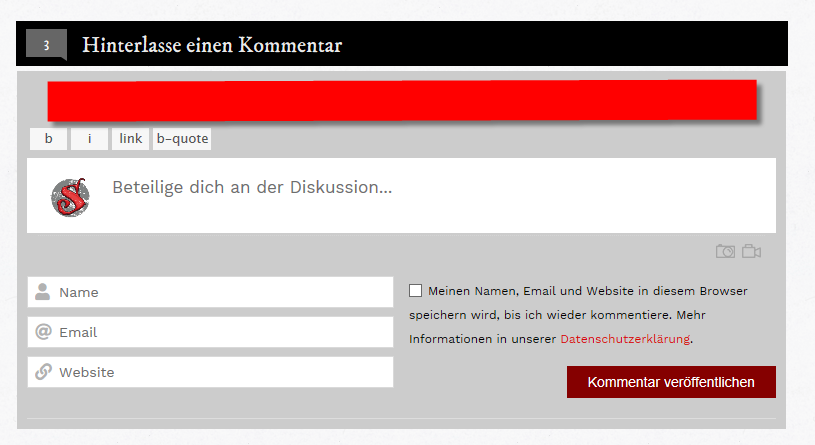

unused space


Quote
Astghik
(@astgh)
Illustrious Member Admin
Joined: 8 years ago
Posts: 6645
Translate
English
Spanish
French
German
Italian
Portuguese
Russian
Chinese
Japanese
Korean
Arabic
Hindi
Dutch
Polish
Turkish
Vietnamese
Thai
Swedish
Danish
Finnish
Norwegian
Czech
Hungarian
Romanian
Greek
Hebrew
Indonesian
Malay
Ukrainian
Bulgarian
Croatian
Slovak
Slovenian
Serbian
Lithuanian
Latvian
Estonian
 

Hi Spontis,

please use the following CSS code. Put it in Dashboard > Comments > Setting > Styling > "Custom CSS Code" textarea. Delete all caches, do CTRL+F5 on frontend: 

#wpcomm .wpdiscuz-form-top-bar{
displaynone;
}


ReplyQuote
(@spontis)
Trusted Member
Joined: 9 years ago
Posts: 50
Topic starter
Translate
English
Spanish
French
German
Italian
Portuguese
Russian
Chinese
Japanese
Korean
Arabic
Hindi
Dutch
Polish
Turkish
Vietnamese
Thai
Swedish
Danish
Finnish
Norwegian
Czech
Hungarian
Romanian
Greek
Hebrew
Indonesian
Malay
Ukrainian
Bulgarian
Croatian
Slovak
Slovenian
Serbian
Lithuanian
Latvian
Estonian
 

Thanks! Your Suggestion will solve the Problem, but opens a new one, because i want to keep the form-top-bar for logged-in Users. Is there a way to make the top-bar more dynamic? Like:

"if no user is logged in, and if social-logins are off, hide form-top-bar"

Anyway. I will use your Workaround, cause logged-in Users can logout via the Admin-Bar from wordpress. Thanks 😉


ReplyQuote
Share:
Scroll to top