AI Assistant
Notifications
Clear all

[Solved] How to remove the "via tenor" overlay which makes many gifs unusable?

5 Posts
2 Users
1 Reactions
2,090 Views
Posts: 5
Customer
Topic starter
Translate
English
Spanish
French
German
Italian
Portuguese
Russian
Chinese
Japanese
Korean
Arabic
Hindi
Dutch
Polish
Turkish
Vietnamese
Thai
Swedish
Danish
Finnish
Norwegian
Czech
Hungarian
Romanian
Greek
Hebrew
Indonesian
Malay
Ukrainian
Bulgarian
Croatian
Slovak
Slovenian
Serbian
Lithuanian
Latvian
Estonian
(@johannes-mertens)
Member
Joined: 5 years ago
[#12123]
gifexample

Hello,

how to remove the "via tenor" overlay? It seems to be put on top by wpdiscuz on loading of the frontend page, since i can see the gif without the overlay in the wordpress backend. I searched the settings, but couldn't find a toggle for it.

Thank you.

Johannes


4 Replies
Astghik
Posts: 6645
Admin
Translate
English
Spanish
French
German
Italian
Portuguese
Russian
Chinese
Japanese
Korean
Arabic
Hindi
Dutch
Polish
Turkish
Vietnamese
Thai
Swedish
Danish
Finnish
Norwegian
Czech
Hungarian
Romanian
Greek
Hebrew
Indonesian
Malay
Ukrainian
Bulgarian
Croatian
Slovak
Slovenian
Serbian
Lithuanian
Latvian
Estonian
(@astgh)
Illustrious Member
Joined: 8 years ago

@johannes-mertens,

This is just a small CSS conflict with the theme or other plugins. Please leave the example URL where we can see the issue to allow us to debug it and provide a solution for you.


Posts: 5
Customer
Topic starter
Translate
English
Spanish
French
German
Italian
Portuguese
Russian
Chinese
Japanese
Korean
Arabic
Hindi
Dutch
Polish
Turkish
Vietnamese
Thai
Swedish
Danish
Finnish
Norwegian
Czech
Hungarian
Romanian
Greek
Hebrew
Indonesian
Malay
Ukrainian
Bulgarian
Croatian
Slovak
Slovenian
Serbian
Lithuanian
Latvian
Estonian
(@johannes-mertens)
Member
Joined: 5 years ago

Hi @Astghik,

our page is our internal Intranet which cannot be accessed externally.

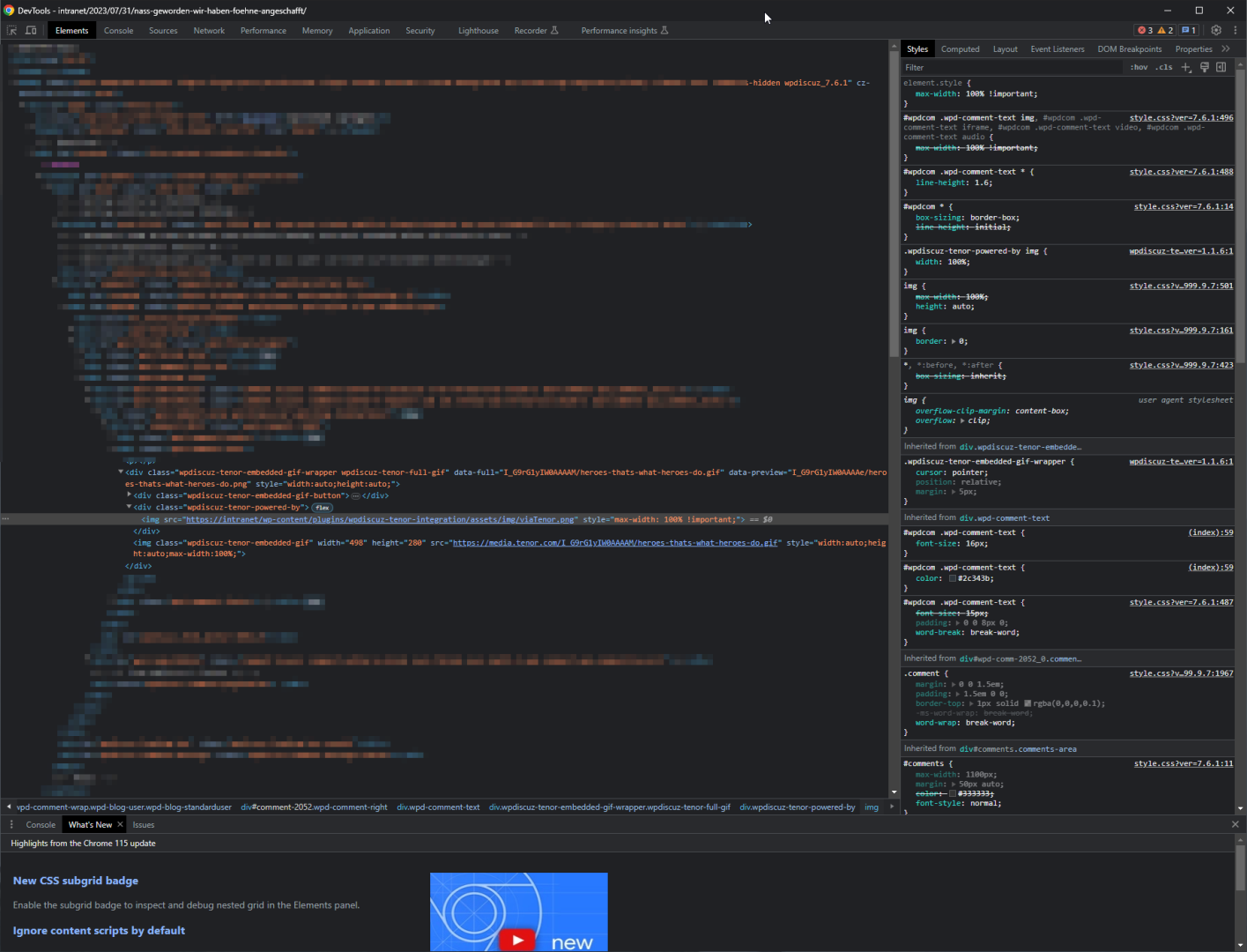
Here's a screenshot for you:  

devtools screen

I'd be happy to provide more details if you need anything else.

An ideal solution for us, would just be to be able to disable the "via Tenor" overlay completely, or alternatively give it a max-width in percentage.

Actually your information that this is handled via an overlay and CSS will be enough to fix it for myself, but I'd still be happy if we could get an official solution.

Thank you.

Johannes


1 Reply
Astghik
Admin
(@astgh)
Joined: 8 years ago

Illustrious Member
Posts: 6645
Translate
English
Spanish
French
German
Italian
Portuguese
Russian
Chinese
Japanese
Korean
Arabic
Hindi
Dutch
Polish
Turkish
Vietnamese
Thai
Swedish
Danish
Finnish
Norwegian
Czech
Hungarian
Romanian
Greek
Hebrew
Indonesian
Malay
Ukrainian
Bulgarian
Croatian
Slovak
Slovenian
Serbian
Lithuanian
Latvian
Estonian

@johannes-mertens,

Try this CSS code: 

#wpdcom .wpdiscuz-tenor-powered-by {
      max-width: 10%;
}

It should solve the issue.

Put the code in the "Custom CSS code" textarea, located in the Dashboard > wpDiscuz > Settings > Styles & Colors admin page.

You can change the red-marked value as you wish. 

Please don't forget to delete the caches before checking.


Posts: 5
Customer
Topic starter
Translate
English
Spanish
French
German
Italian
Portuguese
Russian
Chinese
Japanese
Korean
Arabic
Hindi
Dutch
Polish
Turkish
Vietnamese
Thai
Swedish
Danish
Finnish
Norwegian
Czech
Hungarian
Romanian
Greek
Hebrew
Indonesian
Malay
Ukrainian
Bulgarian
Croatian
Slovak
Slovenian
Serbian
Lithuanian
Latvian
Estonian
(@johannes-mertens)
Member
Joined: 5 years ago

@Astghik Thank you. I did it like this:

#wpdcom .wpdiscuz-tenor-powered-by {visibility: hidden;}

That works for us. This post can be closed.

Have a nice day

Johannes


Share:
Scroll to top