Notifications
Clear all

Limited Support

Our support team is currently on holiday from December 25, 2025 to January 7, 2026, and replies may be delayed during this period.

We appreciate your patience and understanding while our team is away. Thank you for being part of the gVectors community!

Merry Christmas and Happy Holidays! 🎄

[Solved] Font Awesome not working when addon is activated

6 Posts
3 Users
1 Reactions
6,348 Views
Posts: 3
Customer
Topic starter
(@geebee100)
Member
Joined: 7 years ago

Hi

When I activate the either "Comment Search" and/or the "Widgets" addon, then Font Awesome icons on my website is suddenly displayed as little squares. The moment I deactivate these addons, the icons are displayed normally.

For clarity, this happens for these addons independently of each other. 

Any advice? I saw this post on the main forum, but the solution is too technical for me. However, if the problem relates to my site only (and not to the addons) then I will get someone to fix it. I just wanna make sure that this is not a bug in the addons.


I'm using a CSSIgniter theme called Pinfinity, using Elementor PRO as page builder - if it is of any relevance.

Thanks in advance for your help!

Gerhard



5 Replies
Astghik
Posts: 6580
Admin
(@astgh)
Illustrious Member
Joined: 8 years ago

Hi @geebee100,

Please let us know the versions of the wpDiscuz plugin and wpDiscuz add-ons.

Also please leave some screenshots of this issue. 


Posts: 3
Customer
Topic starter
(@geebee100)
Member
Joined: 7 years ago

Hi,

wpDiscuz 5.31

wpDiscuz Comment Search 1.3.0 

wpDiscuz Widgets 1.3.1

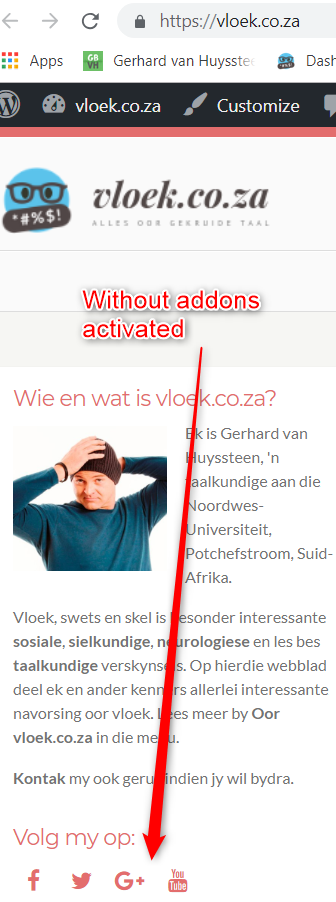
Attached are screenshot without these two addons activated, plus addons with them activated.

WithoutAddons
WithAddons

Astghik
Posts: 6580
Admin
(@astgh)
Illustrious Member
Joined: 8 years ago

Hi @geebee100,

The problem comes from your current active theme, it loads old Font Awesome version, however wpDiscuz and all wpDiscuz addons using Font Awesome 5 new classes. And if you enable the add-ons the conflict occurs. Please contact your theme support and ask them to update Font Awesome version. 


Posts: 3
Customer
Topic starter
(@geebee100)
Member
Joined: 7 years ago

Hi,

Thanks. The problem was indeed with my theme. It has now been resolved by adding the following to my child theme's additional CSS:


.fa{
font:normal normal normal 14px/1 FontAwesome;
font-weight:normal;
}


Gerhard


Page 1 / 2
Share:
Scroll to top