
AI Assistant
Notifications
Clear all

[Solved] Need help with Button CSS Please

2 Posts
1 Users
0 Reactions
1,801 Views
(@tk42dan)
Member Customer
Joined: 9 years ago
Posts: 4
Topic starter
Translate
English
Spanish
French
German
Italian
Portuguese
Russian
Chinese
Japanese
Korean
Arabic
Hindi
Dutch
Polish
Turkish
Vietnamese
Thai
Swedish
Danish
Finnish
Norwegian
Czech
Hungarian
Romanian
Greek
Hebrew
Indonesian
Malay
Ukrainian
Bulgarian
Croatian
Slovak
Slovenian
Serbian
Lithuanian
Latvian
Estonian
  [#1964]

Hello! I had previously used some CSS to style the comment submit button (resting and hover) and the Subscribe/Notify button (resting and hover) as I liked. Recently, however, I noticed that the styling was messed up. The site is not live, but could someone help me identify the CSS class (or whatever it's called) for these two buttons (both the resting and hover states)? 
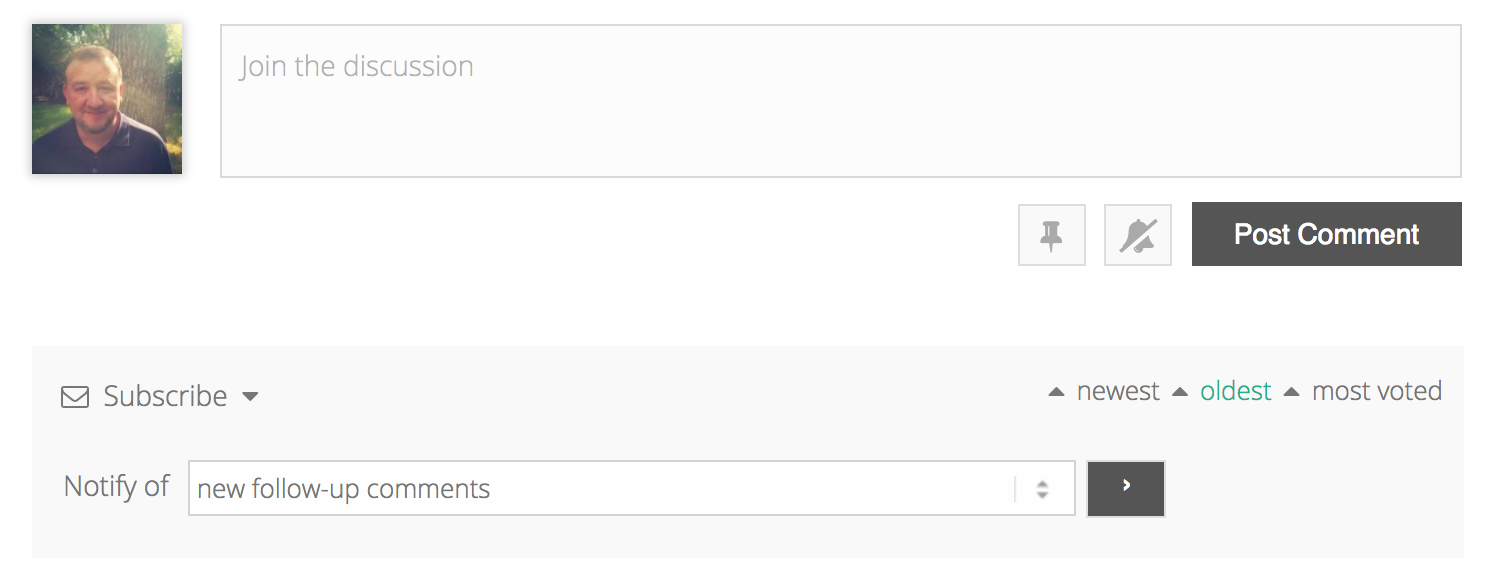
Screen Shot 2018 02 09 at 5.35.56 PM

They are both a dark grey in the screenshot (which I hope I attached correctly). If it didn't, here is a link  https://d.pr/i/Eewe35

I previously used .wc_main_comm_form .alt and .wc_main_comm_form .alt:hover and it worked fine. Now it's not. 

Hope that makes some sense and you can help me. Thanks!


Quote
(@tk42dan)
Member Customer
Joined: 9 years ago
Posts: 4
Topic starter
Translate
English
Spanish
French
German
Italian
Portuguese
Russian
Chinese
Japanese
Korean
Arabic
Hindi
Dutch
Polish
Turkish
Vietnamese
Thai
Swedish
Danish
Finnish
Norwegian
Czech
Hungarian
Romanian
Greek
Hebrew
Indonesian
Malay
Ukrainian
Bulgarian
Croatian
Slovak
Slovenian
Serbian
Lithuanian
Latvian
Estonian
 

Well, I got it to work again, but I had to put "!important" behind just about everything. Oh well. 🙂  


ReplyQuote
Share:
Scroll to top