Notifications
Clear all

Limited Support

Our team is currently on holiday, so support will be limited during this period. Response times may be slower than usual, and some inquiries may be delayed. We appreciate your patience and understanding, and we’ll resume our usual support by the end of August.


[Solved] reCAPTCHA Version 2 works partially

14 Posts
3 Users
0 Reactions
1,370 Views
Posts: 22
Customer
Topic starter
(@laurent)
Member
Joined: 7 years ago

Hello,

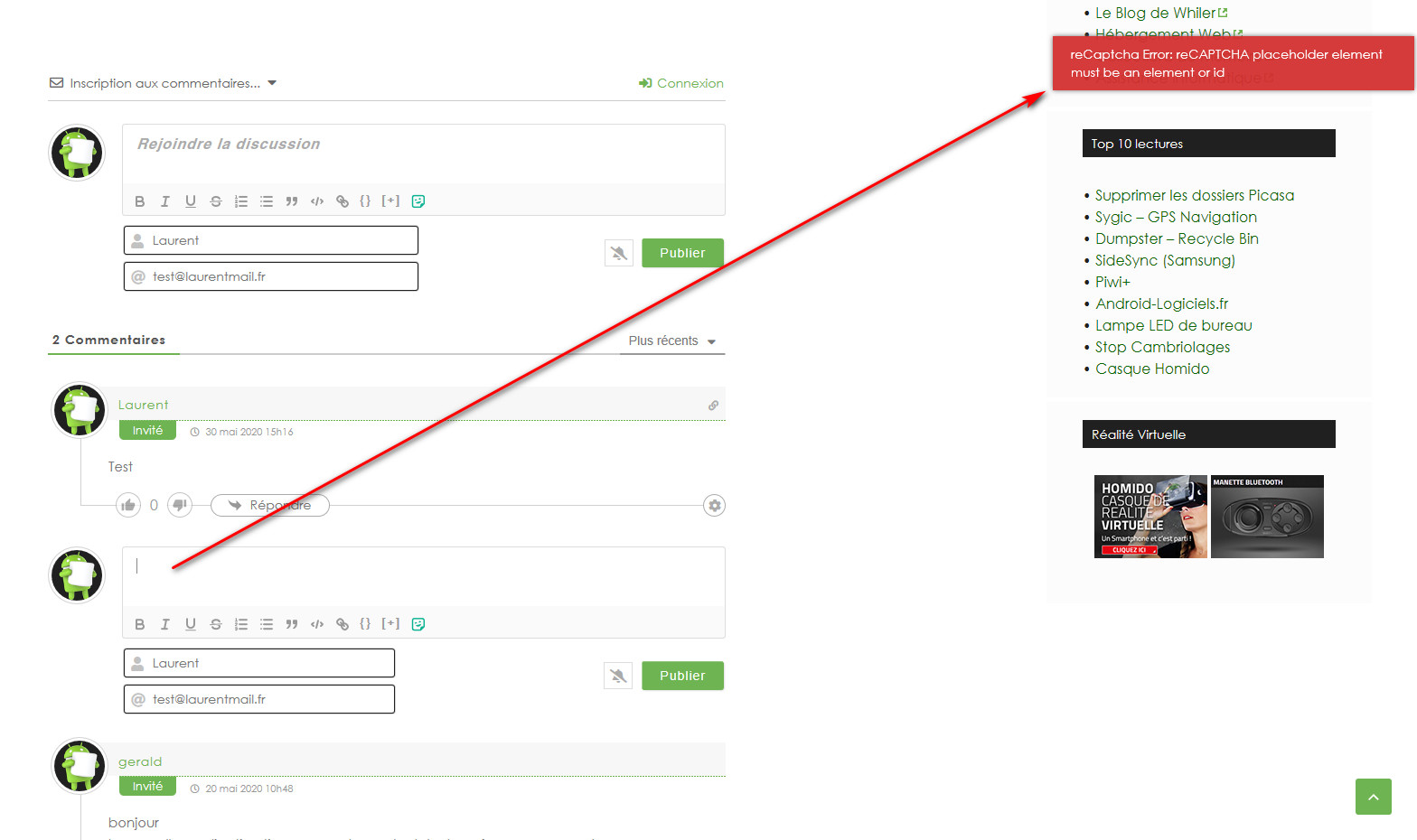
If I enable "reCAPTCHA Version 2" for "Guest" comments, it work on in the "Comment subscriptions section" but not in the "posting of a comment".

Strangely, if reCAPTCHA Version 2 is enabled for "Guest" comments, it is still possible to post a comment while reCAPTCHA Version 2 is not displayed.
On the other hand, if I try to reply to a comment, reCAPTCHA Version 2 is still not displayed and I get an error message.

Sorry for my bad English language, I hope you understand what I write :/
ScreenShot00835
13 Replies
Posts: 22
Customer
Topic starter
(@laurent)
Member
Joined: 7 years ago

I just reactivated the function, I turned it off just before your test.


Reply
1 Reply
(@taron)
Joined: 9 years ago

Active Member
Posts: 10

@laurent

Please clear the WP Rocket cache and test again.

Reply
Posts: 22
Customer
Topic starter
(@laurent)
Member
Joined: 7 years ago

Same.

ScreenShot00836
ScreenShot00837
Reply
3 Replies
 Tom
Admin
(@tomson)
Joined: 10 years ago

Famed Member
Posts: 4233

@laurent,

This requires deeper debugging. Could you please send admin login details to info[at]gvectors.com email address?

Reply
Customer
(@laurent)
Joined: 7 years ago

Member
Posts: 22

@tomson

Sent 😉

Reply
 Tom
Admin
(@tomson)
Joined: 10 years ago

Famed Member
Posts: 4233

Thank you @laurent.

Reply
Posts: 4233
 Tom
Admin
(@tomson)
Famed Member
Joined: 10 years ago

Hi @laurent,

This issue is fixed. You were using two antispam solutions for comment form. Currently, you're using WPBruiser antispam plugin, so we've added a small code to stop reCAPTCHA if the WPBruiser is enabled. If you want to use reCAPTCHA you should disable the WPBruiser  plugin.

Update:

Ok, we disabled WPBruiser option for comments end enabled reCAPTCHA. Now all works fine.

Reply
6 Replies
Customer
(@laurent)
Joined: 7 years ago

Member
Posts: 22

@tomson


Oh, did I waste your time because of WPBruiser? 🙁

Reply
 Tom
Admin
(@tomson)
Joined: 10 years ago

Famed Member
Posts: 4233

@laurent,

No problem, we'll add this change in the core. There are many WPBruiser users, it'll be good for all.

Reply
Customer
(@laurent)
Joined: 7 years ago

Member
Posts: 22

@tomson

Ok, many thanks for your time and great work.
Do you have a Paypal link for a little donation ?

If you need others Admin test, for others customers, don't hesitate to contact me 😉

Thank you very much.

Reply
 Tom
Admin
(@tomson)
Joined: 10 years ago

Famed Member
Posts: 4233

Hi @laurent,

A good review in wpDiscuz plugin page will be the best donation for us.

Thank you very much!

Reply
Customer
(@laurent)
Joined: 7 years ago

Member
Posts: 22

@tomson

It's done. Alas, I couldn't put more than five stars 😀


Reply
 Tom
Admin
(@tomson)
Joined: 10 years ago

Famed Member
Posts: 4233

@laurent,

Nice! Thank you very much, we greatly appreciate it!

Reply
Share:
Scroll to top