Search
Close
AI Search
Classic Search
 Search Phrase:
 Search Type:
Advanced search options
 Search in Forums:
 Search in date period:

 Sort Search Results by:

AI Assistant
Notifications
Clear all

[Solved] wpForo Advanced Attachments - not attaching files

4 Posts
2 Users
0 Reactions
1,165 Views
Posts: 14
Customer
Topic starter
Translate
English
Spanish
French
German
Italian
Portuguese
Russian
Chinese
Japanese
Korean
Arabic
Hindi
Dutch
Polish
Turkish
Vietnamese
Thai
Swedish
Danish
Finnish
Norwegian
Czech
Hungarian
Romanian
Greek
Hebrew
Indonesian
Malay
Ukrainian
Bulgarian
Croatian
Slovak
Slovenian
Serbian
Lithuanian
Latvian
Estonian
(@davidborrink)
Member
Joined: 8 years ago
[#5339]

I'm trying to attach a photo in my forum, and when the files show up in the lower panel but there are no buttons to check to add to the post next to each file I add.

I'm using WP Foro 1.7.0 and wpForo Advanced Attachments 2.0.1 My WordPress version is up to date.

I'm also attaching a screen shot with your instructions to click a right check box to insert, but there are no check boxes. 
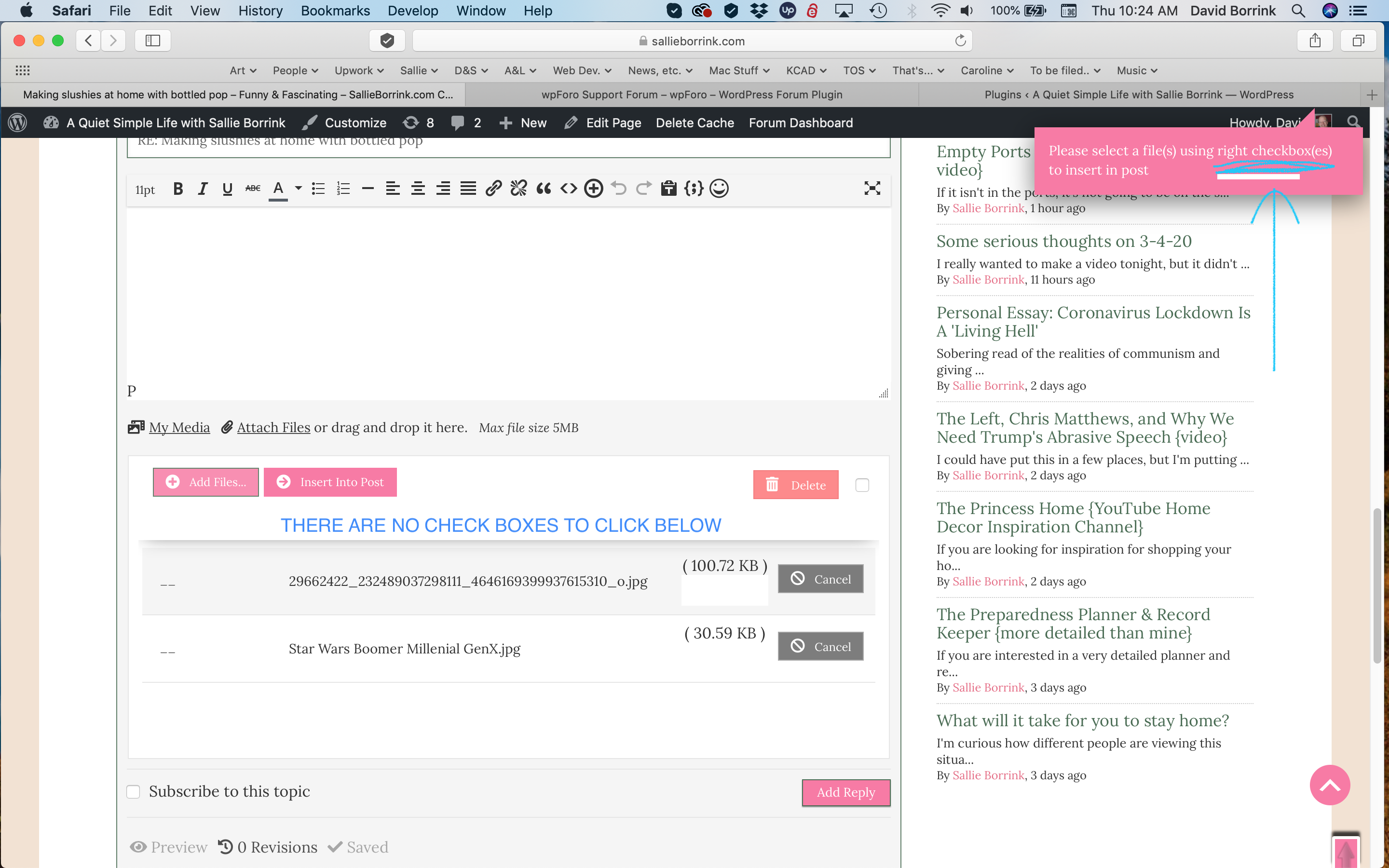
Screen Shot 2020 03 05 at 10.24.23 AM

Okay, when I added this screen shot above, it went directly to this post without a problem. I didn't get a lower panel to choose from. On our site, it's hung up. We cannot add images to our forum posts.

 The forum is at   https://sallieborrink.com  


3 Replies
Astghik
Posts: 6645
Admin
Translate
English
Spanish
French
German
Italian
Portuguese
Russian
Chinese
Japanese
Korean
Arabic
Hindi
Dutch
Polish
Turkish
Vietnamese
Thai
Swedish
Danish
Finnish
Norwegian
Czech
Hungarian
Romanian
Greek
Hebrew
Indonesian
Malay
Ukrainian
Bulgarian
Croatian
Slovak
Slovenian
Serbian
Lithuanian
Latvian
Estonian
(@astgh)
Illustrious Member
Joined: 8 years ago

Hi @davidborrink,

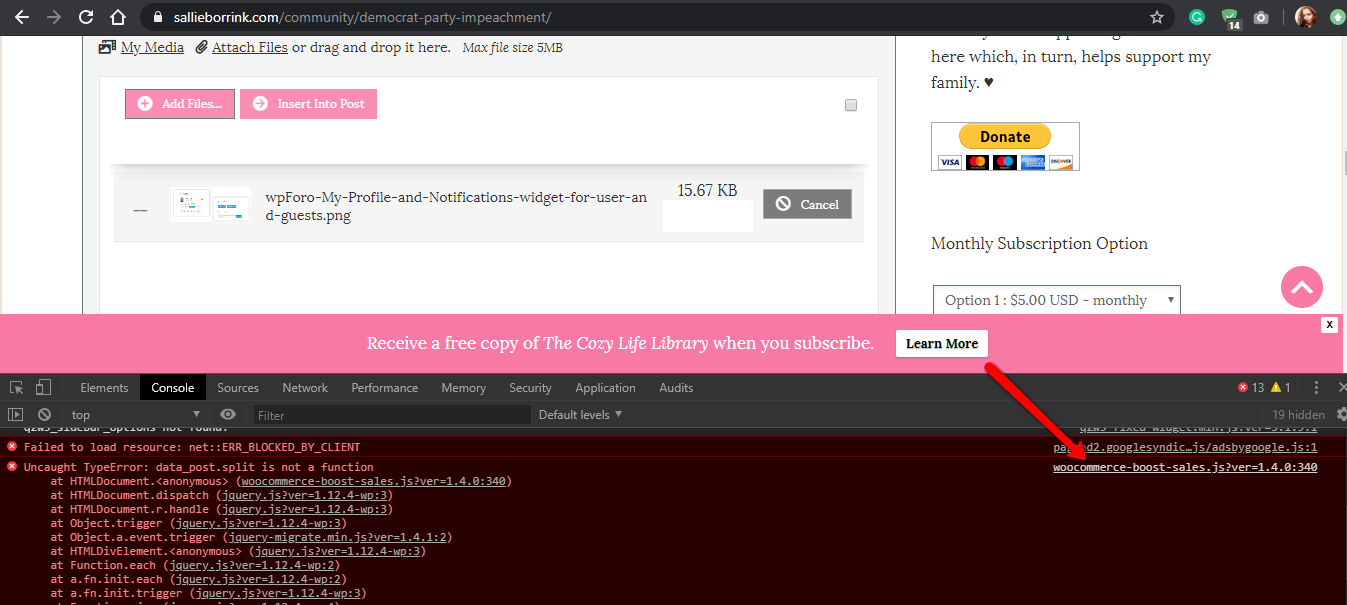
yes we see the js error on your website. Please see the screenshot below. 

Please deactivate the WooCommerce Boost Sales delete all caches and check again.  

Press CTRL+F5 twice on the frontend before checking.

js errors


Posts: 14
Customer
Topic starter
Translate
English
Spanish
French
German
Italian
Portuguese
Russian
Chinese
Japanese
Korean
Arabic
Hindi
Dutch
Polish
Turkish
Vietnamese
Thai
Swedish
Danish
Finnish
Norwegian
Czech
Hungarian
Romanian
Greek
Hebrew
Indonesian
Malay
Ukrainian
Bulgarian
Croatian
Slovak
Slovenian
Serbian
Lithuanian
Latvian
Estonian
(@davidborrink)
Member
Joined: 8 years ago

Thank you. That was the problem. I turned WooCommerce Boost Sales and that allowed pictures to post. That plug-in has an updated version we haven't upgraded to yet, so perhaps that will fix everything.


1 Reply
Astghik
Admin
(@astgh)
Joined: 8 years ago

Illustrious Member
Posts: 6645
Translate
English
Spanish
French
German
Italian
Portuguese
Russian
Chinese
Japanese
Korean
Arabic
Hindi
Dutch
Polish
Turkish
Vietnamese
Thai
Swedish
Danish
Finnish
Norwegian
Czech
Hungarian
Romanian
Greek
Hebrew
Indonesian
Malay
Ukrainian
Bulgarian
Croatian
Slovak
Slovenian
Serbian
Lithuanian
Latvian
Estonian

@davidborrink,

In any case, I'd be better if you contact the plugin support and let them know about the JS error on the console. 


Share:
Scroll to top