AI Assistant
Can't enable Google...
 
Notifications
Clear all

Can't enable Google+ Login

5 Posts
2 Users
1 Reactions
2,411 Views
(@sirajq)
New Member
Joined: 6 years ago
Posts: 3
Topic starter
Translate
English
Spanish
French
German
Italian
Portuguese
Russian
Chinese
Japanese
Korean
Arabic
Hindi
Dutch
Polish
Turkish
Vietnamese
Thai
Swedish
Danish
Finnish
Norwegian
Czech
Hungarian
Romanian
Greek
Hebrew
Indonesian
Malay
Ukrainian
Bulgarian
Croatian
Slovak
Slovenian
Serbian
Lithuanian
Latvian
Estonian
  [#5938]


4


Quote
Topic Tags
(@sirajq)
New Member
Joined: 6 years ago
Posts: 3
Topic starter
Translate
English
Spanish
French
German
Italian
Portuguese
Russian
Chinese
Japanese
Korean
Arabic
Hindi
Dutch
Polish
Turkish
Vietnamese
Thai
Swedish
Danish
Finnish
Norwegian
Czech
Hungarian
Romanian
Greek
Hebrew
Indonesian
Malay
Ukrainian
Bulgarian
Croatian
Slovak
Slovenian
Serbian
Lithuanian
Latvian
Estonian
 

Hi All,

I have followed the instructions here to enable Google + account login for wpDiscuz

and after that what I try to login it shows me this error:

1

Then I added my website URL in the "Authorized JavaScript origins" and it worked I can see the login option to google, but after I login nothing happen and it my website it shows loading icon beside connect with Google +

2
4


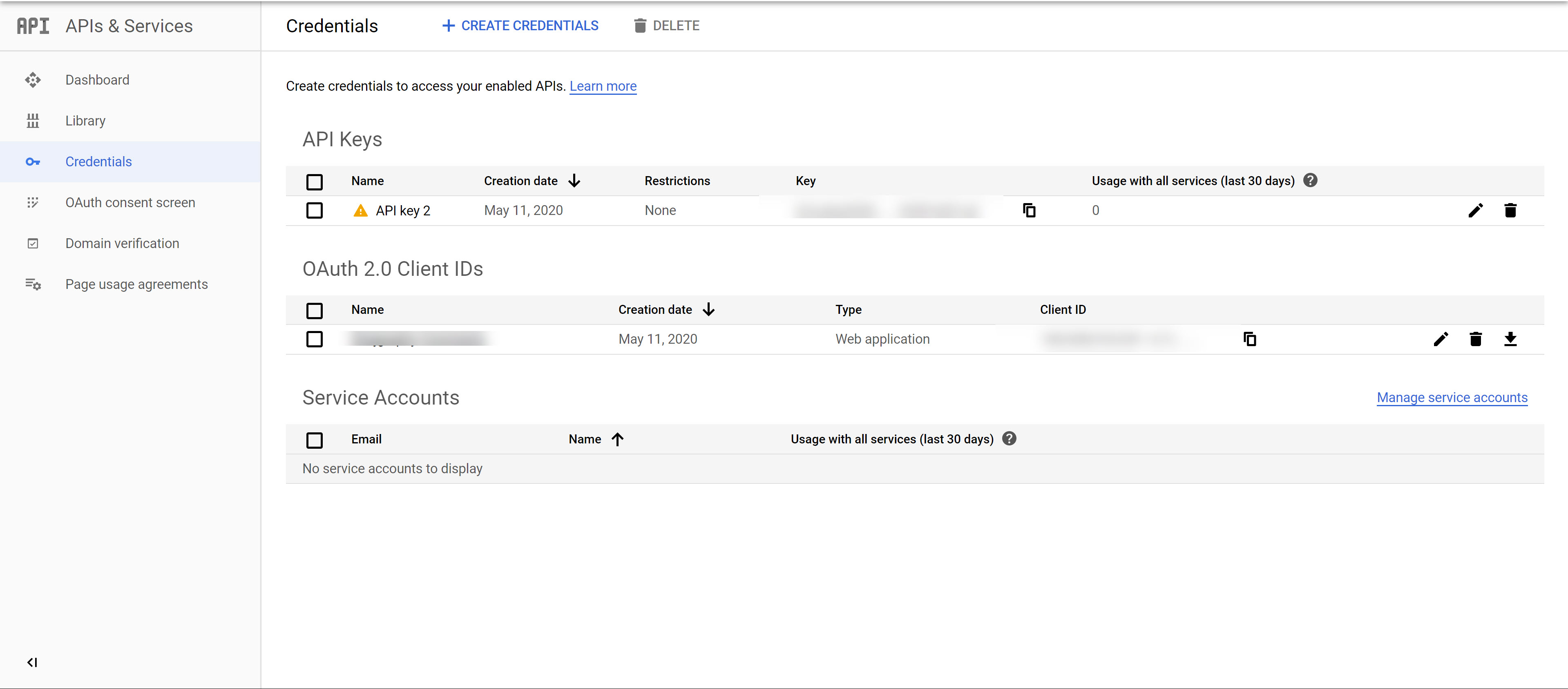
Kindly see this my settings is it correct?
5
6

Also I have added the “Authorised redirect URIs” as below:

https://sirajgraphy.com/wp-admin/admin-ajax.php?action=wpd_login_callback&provider=google


Thanks.


ReplyQuote
Elvina
(@elvina)
Support
Joined: 7 years ago
Posts: 1403
Translate
English
Spanish
French
German
Italian
Portuguese
Russian
Chinese
Japanese
Korean
Arabic
Hindi
Dutch
Polish
Turkish
Vietnamese
Thai
Swedish
Danish
Finnish
Norwegian
Czech
Hungarian
Romanian
Greek
Hebrew
Indonesian
Malay
Ukrainian
Bulgarian
Croatian
Slovak
Slovenian
Serbian
Lithuanian
Latvian
Estonian
 

Hi @sirajq,

Please leave the example URL, and make sure the  Google + social login is enabled, to allow us to check it.


SirajQ reacted
ReplyQuote
(@sirajq)
New Member
Joined: 6 years ago
Posts: 3
Topic starter
Translate
English
Spanish
French
German
Italian
Portuguese
Russian
Chinese
Japanese
Korean
Arabic
Hindi
Dutch
Polish
Turkish
Vietnamese
Thai
Swedish
Danish
Finnish
Norwegian
Czech
Hungarian
Romanian
Greek
Hebrew
Indonesian
Malay
Ukrainian
Bulgarian
Croatian
Slovak
Slovenian
Serbian
Lithuanian
Latvian
Estonian
 

Thank you @elvina for replying,

here is the URL for the connect with Google +:

https://accounts.google.com/signin/oauth/identifier?redirect_uri=storagerelay%3A%2F%2Fhttps%2Fsirajgraphy.com%3Fid%3Dauth392428&response_type=permission%20id_token&scope=email%20profile%20openid&openid.realm&client_id=1062082352201-k7im55dsfc0uamgtacc8n240nh1tf8oc.apps.googleusercontent.com&ss_domain=https%3A%2F%2Fsirajgraphy.com&fetch_basic_profile=true&gsiwebsdk=2&o2v=1&as=aziiEx5JMPH0yfZImUIvDg&flowName=GeneralOAuthFlow


And I made sure it's enabled:

2020 05 11 20 50 55
2020 05 11 20 48 23


ReplyQuote
Elvina
(@elvina)
Support
Joined: 7 years ago
Posts: 1403
Translate
English
Spanish
French
German
Italian
Portuguese
Russian
Chinese
Japanese
Korean
Arabic
Hindi
Dutch
Polish
Turkish
Vietnamese
Thai
Swedish
Danish
Finnish
Norwegian
Czech
Hungarian
Romanian
Greek
Hebrew
Indonesian
Malay
Ukrainian
Bulgarian
Croatian
Slovak
Slovenian
Serbian
Lithuanian
Latvian
Estonian
 

@sirajq,

We've just checked with different browsers, and don't find such an issue, everything works as expected. See the recorded video below:

https://www.screencast.com/t/yoaeC0E9E58

Also please note, never use incognito mode with Google + login or other login buttons. Google + login button doesn't work on incognito mode, it cannot add cookies and start the session. 


ReplyQuote
Share:
Scroll to top