
AI Assistant
Notifications
Clear all

Reply Button disapper

10 Posts
2 Users
0 Reactions
2,363 Views
(@talsela87)
Active Member
Joined: 9 years ago
Posts: 11
Topic starter
Translate
English
Spanish
French
German
Italian
Portuguese
Russian
Chinese
Japanese
Korean
Arabic
Hindi
Dutch
Polish
Turkish
Vietnamese
Thai
Swedish
Danish
Finnish
Norwegian
Czech
Hungarian
Romanian
Greek
Hebrew
Indonesian
Malay
Ukrainian
Bulgarian
Croatian
Slovak
Slovenian
Serbian
Lithuanian
Latvian
Estonian
  [#1340]

hi.

when i try to reply i can't see the reply button.

what should i do?

website link: http://www.pcgalaxy.co.il
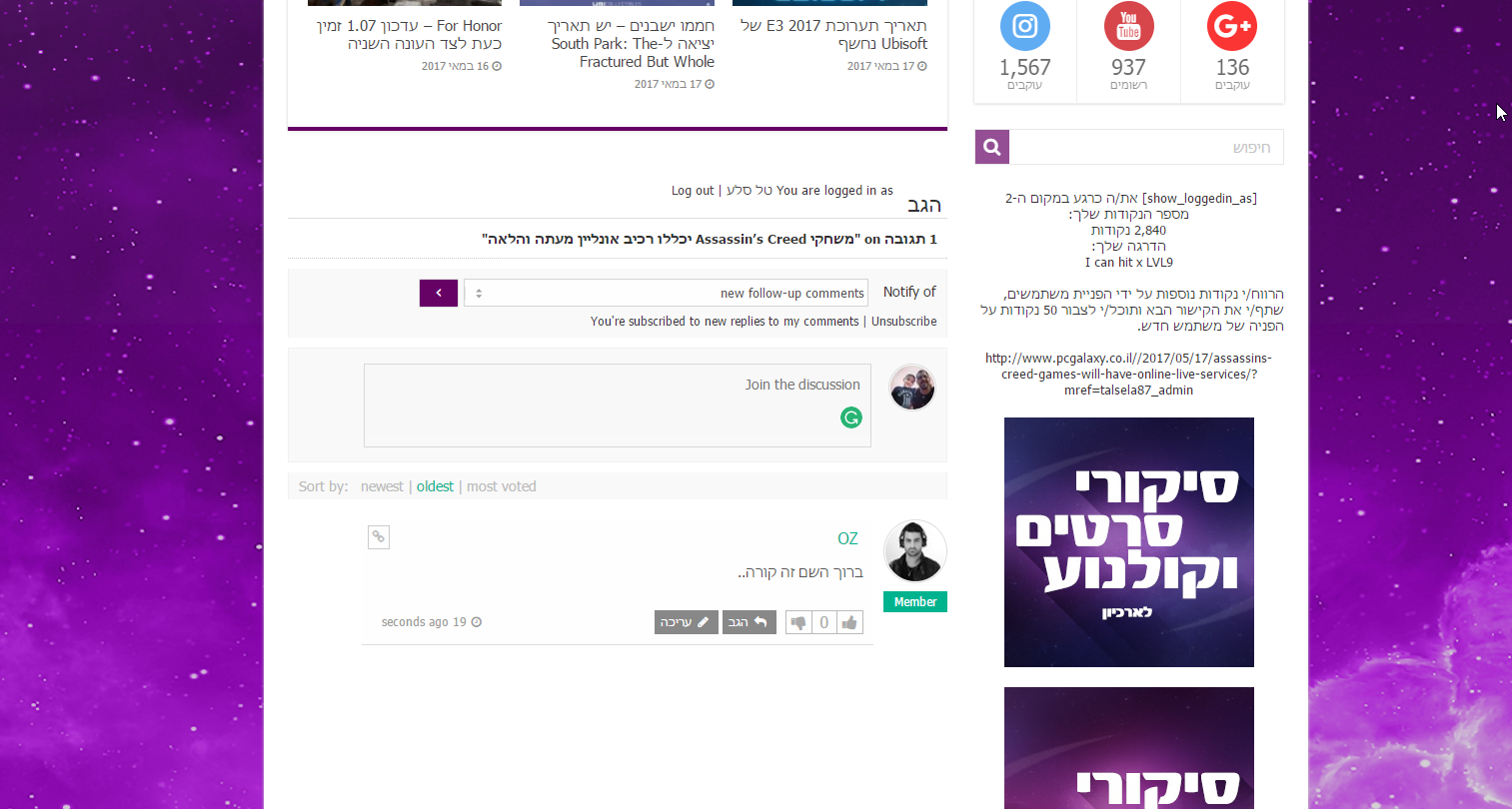
norply

Thanks!!

example attached.


Quote
 Tom
(@tomson)
Famed Member Admin
Joined: 11 years ago
Posts: 4250
Translate
English
Spanish
French
German
Italian
Portuguese
Russian
Chinese
Japanese
Korean
Arabic
Hindi
Dutch
Polish
Turkish
Vietnamese
Thai
Swedish
Danish
Finnish
Norwegian
Czech
Hungarian
Romanian
Greek
Hebrew
Indonesian
Malay
Ukrainian
Bulgarian
Croatian
Slovak
Slovenian
Serbian
Lithuanian
Latvian
Estonian
 

You need to click on textarea to open comment form with reply button.

Video: https://www.screencast.com/t/Fg64PdfZc


ReplyQuote
(@talsela87)
Active Member
Joined: 9 years ago
Posts: 11
Topic starter
Translate
English
Spanish
French
German
Italian
Portuguese
Russian
Chinese
Japanese
Korean
Arabic
Hindi
Dutch
Polish
Turkish
Vietnamese
Thai
Swedish
Danish
Finnish
Norwegian
Czech
Hungarian
Romanian
Greek
Hebrew
Indonesian
Malay
Ukrainian
Bulgarian
Croatian
Slovak
Slovenian
Serbian
Lithuanian
Latvian
Estonian
 
 
Posted by: Tom

You need to click on textarea to open comment form with reply button.

Video: https://www.screencast.com/t/Fg64PdfZc

hi, tom.

thanks for the comment.

I know that I need to click to show the button but look in my video, for registered users.

https://www.screencast.com/t/8diuTSJoW9De


ReplyQuote
 Tom
(@tomson)
Famed Member Admin
Joined: 11 years ago
Posts: 4250
Translate
English
Spanish
French
German
Italian
Portuguese
Russian
Chinese
Japanese
Korean
Arabic
Hindi
Dutch
Polish
Turkish
Vietnamese
Thai
Swedish
Danish
Finnish
Norwegian
Czech
Hungarian
Romanian
Greek
Hebrew
Indonesian
Malay
Ukrainian
Bulgarian
Croatian
Slovak
Slovenian
Serbian
Lithuanian
Latvian
Estonian
 

Please PM me some user login details.


ReplyQuote
(@talsela87)
Active Member
Joined: 9 years ago
Posts: 11
Topic starter
Translate
English
Spanish
French
German
Italian
Portuguese
Russian
Chinese
Japanese
Korean
Arabic
Hindi
Dutch
Polish
Turkish
Vietnamese
Thai
Swedish
Danish
Finnish
Norwegian
Czech
Hungarian
Romanian
Greek
Hebrew
Indonesian
Malay
Ukrainian
Bulgarian
Croatian
Slovak
Slovenian
Serbian
Lithuanian
Latvian
Estonian
 
Posted by: Tom

Please PM me some user login details.

In your inbox


ReplyQuote
 Tom
(@tomson)
Famed Member Admin
Joined: 11 years ago
Posts: 4250
Translate
English
Spanish
French
German
Italian
Portuguese
Russian
Chinese
Japanese
Korean
Arabic
Hindi
Dutch
Polish
Turkish
Vietnamese
Thai
Swedish
Danish
Finnish
Norwegian
Czech
Hungarian
Romanian
Greek
Hebrew
Indonesian
Malay
Ukrainian
Bulgarian
Croatian
Slovak
Slovenian
Serbian
Lithuanian
Latvian
Estonian
 

Ok I see the issue, please wait for 5 sec then click on the textarea, it load the white pop-up windows on top right area, and when it shows the white pop-up messages. Just wait them to go and click, it works fine.

Video: https://www.screencast.com/t/FKCbyNCu
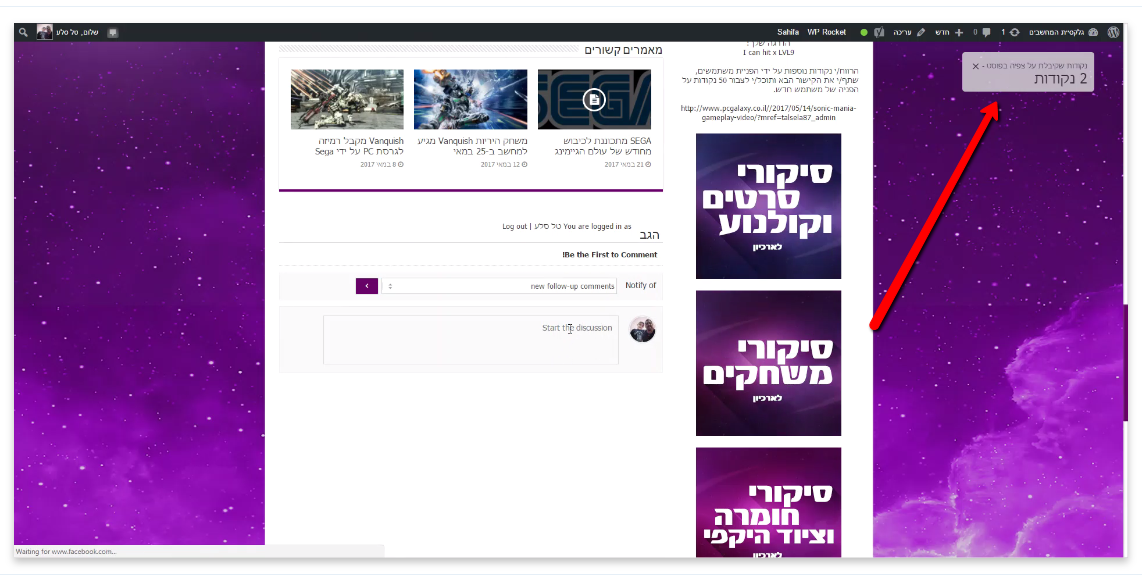
2017 05 23 1943


ReplyQuote
(@talsela87)
Active Member
Joined: 9 years ago
Posts: 11
Topic starter
Translate
English
Spanish
French
German
Italian
Portuguese
Russian
Chinese
Japanese
Korean
Arabic
Hindi
Dutch
Polish
Turkish
Vietnamese
Thai
Swedish
Danish
Finnish
Norwegian
Czech
Hungarian
Romanian
Greek
Hebrew
Indonesian
Malay
Ukrainian
Bulgarian
Croatian
Slovak
Slovenian
Serbian
Lithuanian
Latvian
Estonian
 

I just checked it and its happen for all the user loged in from sociel network.

you can check why?


thanks thanks thanks!


ReplyQuote
 Tom
(@tomson)
Famed Member Admin
Joined: 11 years ago
Posts: 4250
Translate
English
Spanish
French
German
Italian
Portuguese
Russian
Chinese
Japanese
Korean
Arabic
Hindi
Dutch
Polish
Turkish
Vietnamese
Thai
Swedish
Danish
Finnish
Norwegian
Czech
Hungarian
Romanian
Greek
Hebrew
Indonesian
Malay
Ukrainian
Bulgarian
Croatian
Slovak
Slovenian
Serbian
Lithuanian
Latvian
Estonian
 

I've already checked twice and it works fine. I explained that the issue comes from the white pop-up windows. You should wait till those disappear then click on comment form o you should remove the plugin which do this windows.


ReplyQuote
(@talsela87)
Active Member
Joined: 9 years ago
Posts: 11
Topic starter
Translate
English
Spanish
French
German
Italian
Portuguese
Russian
Chinese
Japanese
Korean
Arabic
Hindi
Dutch
Polish
Turkish
Vietnamese
Thai
Swedish
Danish
Finnish
Norwegian
Czech
Hungarian
Romanian
Greek
Hebrew
Indonesian
Malay
Ukrainian
Bulgarian
Croatian
Slovak
Slovenian
Serbian
Lithuanian
Latvian
Estonian
 
Posted by: Tom

I've already checked twice and it works fine. I explained that the issue comes from the white pop-up windows. You should wait till those disappear then click on comment form o you should remove the plugin which do this windows.

first of all thanks for the answer.

second its call Mycreed Plugin, you should know him.

I Turn it off and the problem still happens to me and to all of my website team.


thanks again.

tal


ReplyQuote
 Tom
(@tomson)
Famed Member Admin
Joined: 11 years ago
Posts: 4250
Translate
English
Spanish
French
German
Italian
Portuguese
Russian
Chinese
Japanese
Korean
Arabic
Hindi
Dutch
Polish
Turkish
Vietnamese
Thai
Swedish
Danish
Finnish
Norwegian
Czech
Hungarian
Romanian
Greek
Hebrew
Indonesian
Malay
Ukrainian
Bulgarian
Croatian
Slovak
Slovenian
Serbian
Lithuanian
Latvian
Estonian
 

This is the second time I do test. It works without any issue. And here is the second video: https://www.screencast.com/t/zXnb0MZb

I think this is your local PC issue. I have no other suggestion here. If something works then it has no issue.

Maybe I don't follow you, maybe you're trying to explain other issue, please let me know. You just need to click on white textarea and it opens the form with button.

Try with other PC, browser, inet....


ReplyQuote
Share:
Scroll to top