AI Assistant
Notifications
Clear all

RE: Badge Location

3 Posts
2 Users
0 Reactions
1,676 Views
Posts: 20
Customer
Topic starter
Translate
English
Spanish
French
German
Italian
Portuguese
Russian
Chinese
Japanese
Korean
Arabic
Hindi
Dutch
Polish
Turkish
Vietnamese
Thai
Swedish
Danish
Finnish
Norwegian
Czech
Hungarian
Romanian
Greek
Hebrew
Indonesian
Malay
Ukrainian
Bulgarian
Croatian
Slovak
Slovenian
Serbian
Lithuanian
Latvian
Estonian
(@antoney-thomas)
Member
Joined: 6 years ago
[#4853]

Greetings,

I would like to re-position the badge
between "(hello123x2x3x2x5x) and @hello123x2x3x2x5x)"

Can you please tell me how to do so.

Thank you!
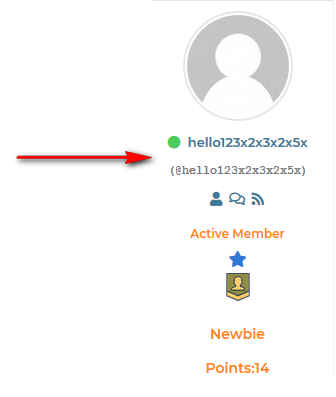
badge location 1

2 Replies
Posts: 20
Customer
Topic starter
Translate
English
Spanish
French
German
Italian
Portuguese
Russian
Chinese
Japanese
Korean
Arabic
Hindi
Dutch
Polish
Turkish
Vietnamese
Thai
Swedish
Danish
Finnish
Norwegian
Czech
Hungarian
Romanian
Greek
Hebrew
Indonesian
Malay
Ukrainian
Bulgarian
Croatian
Slovak
Slovenian
Serbian
Lithuanian
Latvian
Estonian
(@antoney-thomas)
Member
Joined: 6 years ago

Can someone help with this issue?

Thank you!


Reply
1 Reply
Elvina
(@elvina)
Joined: 7 years ago

Support
Posts: 1403
Translate
English
Spanish
French
German
Italian
Portuguese
Russian
Chinese
Japanese
Korean
Arabic
Hindi
Dutch
Polish
Turkish
Vietnamese
Thai
Swedish
Danish
Finnish
Norwegian
Czech
Hungarian
Romanian
Greek
Hebrew
Indonesian
Malay
Ukrainian
Bulgarian
Croatian
Slovak
Slovenian
Serbian
Lithuanian
Latvian
Estonian

Can someone help with this issue?

Please note this is not the issue, this is designed to work in this way.

Please put the following code in the active theme functions.php file, to change the badge position:

jQuery(document).ready(function ($) {
$.each($(".wpforo-mycred-badges-wrap"), function () {
$(this).insertBefore($(this).parents(".wpf-left").find(".wpf-author-nicename"));
});
});

Don't forget to delete all caches and press CTRL+ f5(twice) on the frontend before checking.


Reply
Share:
Scroll to top
