AI Assistant
Notifications
Clear all

Trouble Uploading Attachments

5 Posts
2 Users
0 Reactions
3,335 Views
Posts: 3
Customer
Topic starter
Translate
English
Spanish
French
German
Italian
Portuguese
Russian
Chinese
Japanese
Korean
Arabic
Hindi
Dutch
Polish
Turkish
Vietnamese
Thai
Swedish
Danish
Finnish
Norwegian
Czech
Hungarian
Romanian
Greek
Hebrew
Indonesian
Malay
Ukrainian
Bulgarian
Croatian
Slovak
Slovenian
Serbian
Lithuanian
Latvian
Estonian
(@kim4true)
Member
Joined: 9 years ago
[#1457]

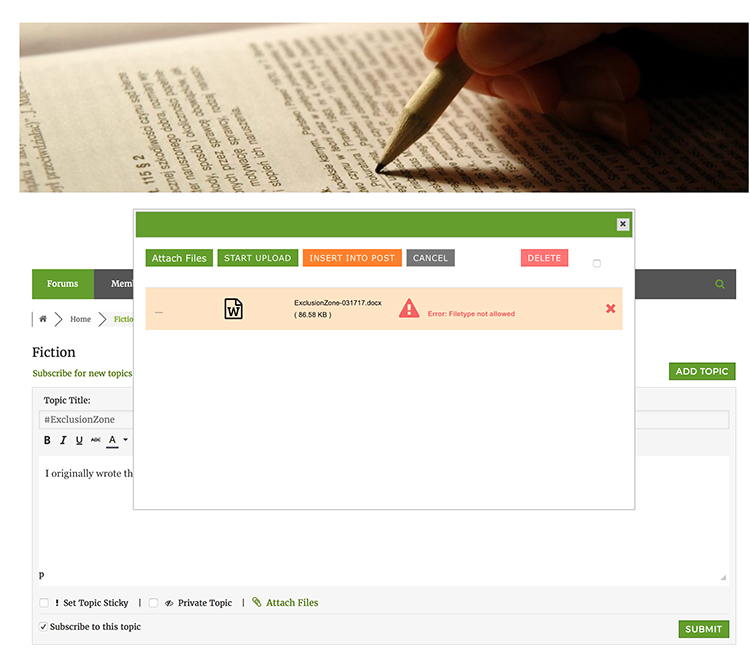
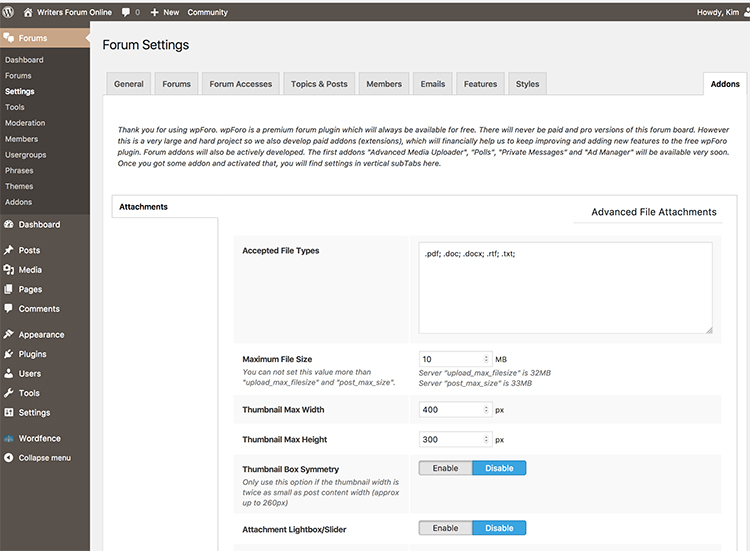
Hi, I have just installed wpForo and wpForo Advanced File Attachments, and I'm having trouble uploading files. My forum will only be using .pdf, .doc, .docx, .rtf, and .txt file type attachments. I attach two screenshots. Maybe you can tell me what I am doing wrong?

Thanks,

Kim
2 screen
1 screen

4 Replies
Posts: 3
Customer
Topic starter
Translate
English
Spanish
French
German
Italian
Portuguese
Russian
Chinese
Japanese
Korean
Arabic
Hindi
Dutch
Polish
Turkish
Vietnamese
Thai
Swedish
Danish
Finnish
Norwegian
Czech
Hungarian
Romanian
Greek
Hebrew
Indonesian
Malay
Ukrainian
Bulgarian
Croatian
Slovak
Slovenian
Serbian
Lithuanian
Latvian
Estonian
(@kim4true)
Member
Joined: 9 years ago

I should add the URL of the website: http://writersforumonline.com

I think you can register as a new user and get to the point where you attempt to upload something. I'm just in the set-up phase, so not quite sure about how the approval process works. . . that will be my next issue!

- Kim 😉


Reply
Posts: 4245
 Tom
Admin
Translate
English
Spanish
French
German
Italian
Portuguese
Russian
Chinese
Japanese
Korean
Arabic
Hindi
Dutch
Polish
Turkish
Vietnamese
Thai
Swedish
Danish
Finnish
Norwegian
Czech
Hungarian
Romanian
Greek
Hebrew
Indonesian
Malay
Ukrainian
Bulgarian
Croatian
Slovak
Slovenian
Serbian
Lithuanian
Latvian
Estonian
(@tomson)
Famed Member
Joined: 11 years ago

Please don't use ";" as separator. This is wrong. You should use "|" symbol. Here is the full extension list:

jpg|jpeg|jpe|gif|png|bmp|tiff|tif|ico|asf|asx|wmv|wmx|wm|avi|divx|flv|mov|qt|mpeg|mpg|mpe|mp4|m4v|ogv|webm|mkv|3gp|3gpp|3g2|3gp2|txt|asc|c|cc|h|srt|csv|tsv|ics|rtx|css|htm|html|vtt|dfxp|mp3|m4a|m4b|ra|ram|wav|ogg|oga|mid|midi|wma|wax|mka|rtf|js|class|tar|zip|gz|gzip|rar|7z|xcf|pot|pps|ppt|wri|xla|xls|xlt|xlw|mdb|mpp|docx|docm|dotx|dotm|xlsx|xlsm|xlsb|xltx|xltm|xlam|pptx|pptm|ppsx|ppsm|potx|potm|ppam|sldx|sldm|onetoc|onetoc2|onetmp|onepkg|oxps|xps|odt|odp|ods|odg|odc|odb|odf|wp|wpd|key|numbers|pages|ttf|woff|svg|eot

Reply
Posts: 3
Customer
Topic starter
Translate
English
Spanish
French
German
Italian
Portuguese
Russian
Chinese
Japanese
Korean
Arabic
Hindi
Dutch
Polish
Turkish
Vietnamese
Thai
Swedish
Danish
Finnish
Norwegian
Czech
Hungarian
Romanian
Greek
Hebrew
Indonesian
Malay
Ukrainian
Bulgarian
Croatian
Slovak
Slovenian
Serbian
Lithuanian
Latvian
Estonian
(@kim4true)
Member
Joined: 9 years ago

I did as you suggested, and it appears that the files are loading but then I get a message that says Unknown Error.

Do you have time to give it a try? I can elevate your permissions to admin if you'll go create an account and let me know what it is.


Reply
Posts: 4245
 Tom
Admin
Translate
English
Spanish
French
German
Italian
Portuguese
Russian
Chinese
Japanese
Korean
Arabic
Hindi
Dutch
Polish
Turkish
Vietnamese
Thai
Swedish
Danish
Finnish
Norwegian
Czech
Hungarian
Romanian
Greek
Hebrew
Indonesian
Malay
Ukrainian
Bulgarian
Croatian
Slovak
Slovenian
Serbian
Lithuanian
Latvian
Estonian
(@tomson)
Famed Member
Joined: 11 years ago

Ok, please send admin login details to support[at]gvectors.com email address.


Reply
Share:
Scroll to top