Notifications
Clear all

[Solved] Error when adding bell to main menu with custom URL %wpdiscuz-bell%

6 Posts
2 Users
0 Reactions
1,025 Views
Posts: 13
Customer
Topic starter
(@rob-mielcarski)
Member
Joined: 4 weeks ago

Purchased and installed User Notifications today.

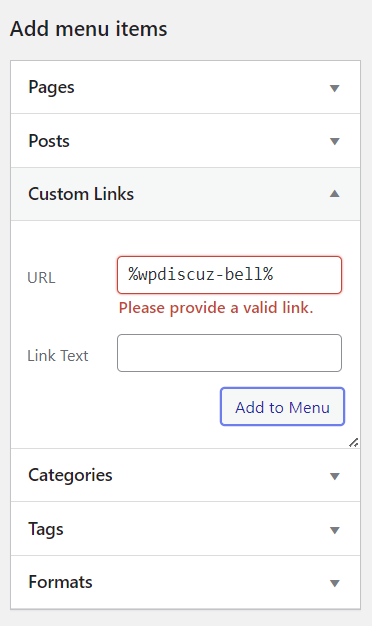
I'm following your instructions to add notification bell to main menu by adding custom link with URL %wpdiscuz-bell%.

I get error "Please provide a valid link."

Please advise how to add bell to main menu.


5 Replies
Astghik
Posts: 6641
Admin
(@astgh)
Illustrious Member
Joined: 8 years ago

Hi,

Please record a video or provide a screenshot showing how you added the custom link so we can better understand the issue.


Posts: 13
Customer
Topic starter
(@rob-mielcarski)
Member
Joined: 4 weeks ago

Your documentation states:

You can put the notification bell in the main menu using %wpdiscuz-bell% shortocde as a Custom Link URL and any phrase as the Link Text. This menu item will be replaced to a notification bell on the website front-end menu:

This is what I see:

image

Posts: 13
Customer
Topic starter
(@rob-mielcarski)
Member
Joined: 4 weeks ago

Hello, anyone there? I provided the information you requested.


1 Reply
Astghik
Admin
(@astgh)
Joined: 8 years ago

Illustrious Member
Posts: 6641

@rob-mielcarski

WordPress has made some changes, so this option can no longer be used: %wpdiscuz-bell%.

You should use this URL instead when inserting a custom link:
https://%wpdiscuz-bell%

We will update the documentation soon.


Posts: 13
Customer
Topic starter
(@rob-mielcarski)
Member
Joined: 4 weeks ago

Thank you.

It is working now.


Share:
Scroll to top