
Search
Close
AI Search
Classic Search
 Search Phrase:
 Search Type:
Advanced search options
 Search in Forums:
 Search in date period:

 Sort Search Results by:

AI Assistant
Notifications
Clear all

[Solved] Can’t Mark Comments As Private

3 Posts
2 Users
0 Reactions
2,301 Views
Posts: 2
Customer
Topic starter
Translate
English
Spanish
French
German
Italian
Portuguese
Russian
Chinese
Japanese
Korean
Arabic
Hindi
Dutch
Polish
Turkish
Vietnamese
Thai
Swedish
Danish
Finnish
Norwegian
Czech
Hungarian
Romanian
Greek
Hebrew
Indonesian
Malay
Ukrainian
Bulgarian
Croatian
Slovak
Slovenian
Serbian
Lithuanian
Latvian
Estonian
(@revwildfire)
Member
Joined: 7 years ago
[#3904]

I bought this plugin with the expectation that I will be able to mark some comments as private. However, after installation, I did not see any way to do that. So, here is my question, after a subscriber posts a comment, how do I mark that comment as private?


2 Replies
Astghik
Posts: 6645
Admin
Translate
English
Spanish
French
German
Italian
Portuguese
Russian
Chinese
Japanese
Korean
Arabic
Hindi
Dutch
Polish
Turkish
Vietnamese
Thai
Swedish
Danish
Finnish
Norwegian
Czech
Hungarian
Romanian
Greek
Hebrew
Indonesian
Malay
Ukrainian
Bulgarian
Croatian
Slovak
Slovenian
Serbian
Lithuanian
Latvian
Estonian
(@astgh)
Illustrious Member
Joined: 8 years ago

Hi @revwildfire,

Thank you for your purchase. 

Once you install the add-on it adds a small button under comment textarea to set it private, also it adds [Private] button to parent comments to make it private after a comment is submitted.  See the screenshot. 
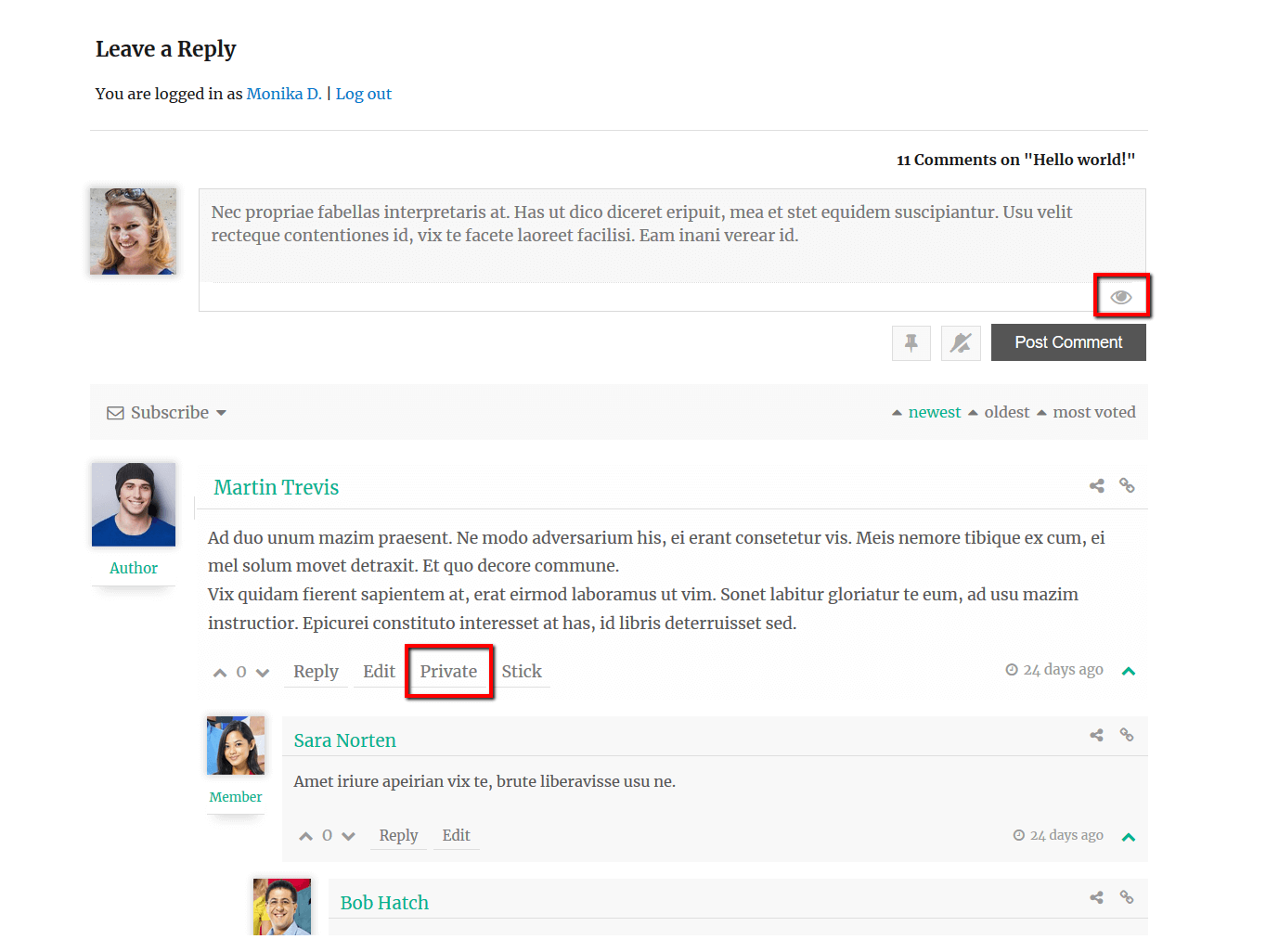
If you don't see the button please try to delete all caches and check again. In case the button will not be visible please leave some example URL to allow us to check it probably, it's just a CSS conflict. 


1 Reply
Customer
(@revwildfire)
Joined: 7 years ago

Member
Posts: 2
Translate
English
Spanish
French
German
Italian
Portuguese
Russian
Chinese
Japanese
Korean
Arabic
Hindi
Dutch
Polish
Turkish
Vietnamese
Thai
Swedish
Danish
Finnish
Norwegian
Czech
Hungarian
Romanian
Greek
Hebrew
Indonesian
Malay
Ukrainian
Bulgarian
Croatian
Slovak
Slovenian
Serbian
Lithuanian
Latvian
Estonian

Thank you for your quick response. 

After clearing all my cache, everything is showing and working as you described. Thank you.


Share:
Scroll to top
