
AI Assistant
Notifications
Clear all

[Solved] Problem with Installation of the Advance attachments addon

6 Posts
3 Users
0 Reactions
2,145 Views
Posts: 3
Customer
Topic starter
Translate
English
Spanish
French
German
Italian
Portuguese
Russian
Chinese
Japanese
Korean
Arabic
Hindi
Dutch
Polish
Turkish
Vietnamese
Thai
Swedish
Danish
Finnish
Norwegian
Czech
Hungarian
Romanian
Greek
Hebrew
Indonesian
Malay
Ukrainian
Bulgarian
Croatian
Slovak
Slovenian
Serbian
Lithuanian
Latvian
Estonian
(@jeanne-dornellas)
Member
Joined: 1 year ago
[#13823]

Hello,

I am trying to add the advance attachment addon plugin zip on my wordpress site but getting a 403 forbidden error while uploading it. My site is in cloudways server and they are saying the plugin upload is working properly with any other plugin zip but not only working with the advance attachment zip.

Could you please share the resolution of the issue? I know I can upload the plugin via SFTP but I need to know why normal plugin upload process is not working.

Regards
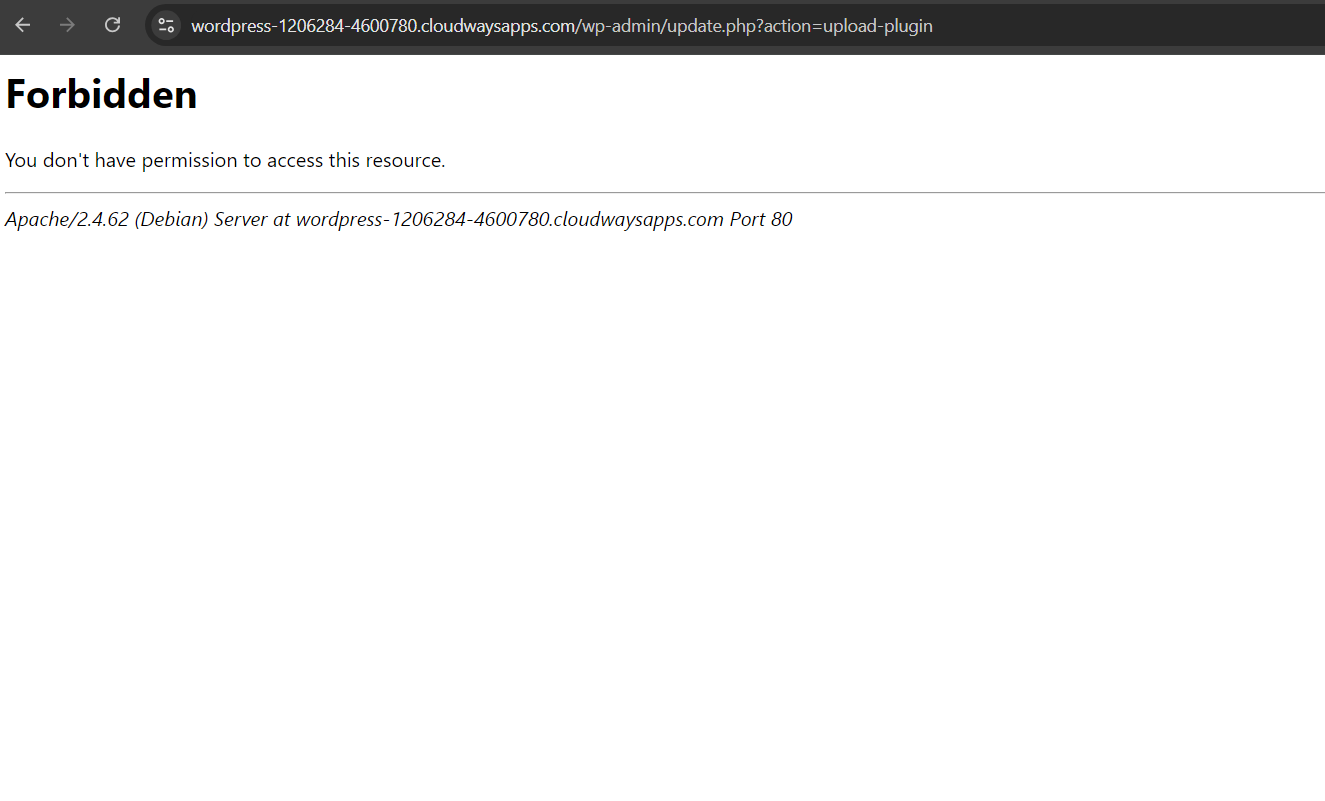
Screenshot 2024 10 18 121115


5 Replies
Astghik
Posts: 6645
Admin
Translate
English
Spanish
French
German
Italian
Portuguese
Russian
Chinese
Japanese
Korean
Arabic
Hindi
Dutch
Polish
Turkish
Vietnamese
Thai
Swedish
Danish
Finnish
Norwegian
Czech
Hungarian
Romanian
Greek
Hebrew
Indonesian
Malay
Ukrainian
Bulgarian
Croatian
Slovak
Slovenian
Serbian
Lithuanian
Latvian
Estonian
(@astgh)
Illustrious Member
Joined: 8 years ago

Hi,

I'll ask the developers and get back to you soon. 


Reply
1 Reply
Astghik
Admin
(@astgh)
Joined: 8 years ago

Illustrious Member
Posts: 6645
Translate
English
Spanish
French
German
Italian
Portuguese
Russian
Chinese
Japanese
Korean
Arabic
Hindi
Dutch
Polish
Turkish
Vietnamese
Thai
Swedish
Danish
Finnish
Norwegian
Czech
Hungarian
Romanian
Greek
Hebrew
Indonesian
Malay
Ukrainian
Bulgarian
Croatian
Slovak
Slovenian
Serbian
Lithuanian
Latvian
Estonian

Hi,

Please unzip the plugin zip file and zip using your zipping software and upload the new zip file in Dashboard > Plugins admin page.


Reply
Posts: 2
Customer
Translate
English
Spanish
French
German
Italian
Portuguese
Russian
Chinese
Japanese
Korean
Arabic
Hindi
Dutch
Polish
Turkish
Vietnamese
Thai
Swedish
Danish
Finnish
Norwegian
Czech
Hungarian
Romanian
Greek
Hebrew
Indonesian
Malay
Ukrainian
Bulgarian
Croatian
Slovak
Slovenian
Serbian
Lithuanian
Latvian
Estonian
(@roelof-worst)
Member
Joined: 5 years ago

Hi, Allow me to pick up this thread. I have a similar problem. The downloaded zipfile from gVector is rejected when uploading via the recommended Dashboard - Plugins - Add plugins - Upload plugin. Result: 403 error. I want to follow your advice. Unzip and zip with software from my own laptop, but where do I find: Dashboard > Plugins admin page.

Many thanks for your help.

Roelof


Reply
2 Replies
Astghik
Admin
(@astgh)
Joined: 8 years ago

Illustrious Member
Posts: 6645
Translate
English
Spanish
French
German
Italian
Portuguese
Russian
Chinese
Japanese
Korean
Arabic
Hindi
Dutch
Polish
Turkish
Vietnamese
Thai
Swedish
Danish
Finnish
Norwegian
Czech
Hungarian
Romanian
Greek
Hebrew
Indonesian
Malay
Ukrainian
Bulgarian
Croatian
Slovak
Slovenian
Serbian
Lithuanian
Latvian
Estonian

@roelof-worst 

Please find the information in this article: https://www.elegantthemes.com/blog/wordpress/how-to-install-a-wordpress-plugin#2-how-to-install-a-wordpress-plugin-using-the-wordpress-plugin-upload


Reply
Customer
(@roelof-worst)
Joined: 5 years ago

Member
Posts: 2
Translate
English
Spanish
French
German
Italian
Portuguese
Russian
Chinese
Japanese
Korean
Arabic
Hindi
Dutch
Polish
Turkish
Vietnamese
Thai
Swedish
Danish
Finnish
Norwegian
Czech
Hungarian
Romanian
Greek
Hebrew
Indonesian
Malay
Ukrainian
Bulgarian
Croatian
Slovak
Slovenian
Serbian
Lithuanian
Latvian
Estonian

@astgh 

Thanks for the article with the extensive instruction. I will study it.

However, it remains a mystery to me, why the recommended and preferred gvectors method leads to a 403 error. I used this addon until a year ago and the upload was no problem at all then.

Again thanks and my kind regards, Roelof


Reply
Share:
Scroll to top
