
AI Assistant
Notifications
Clear all

Remove "share" option and other modif.

5 Posts
2 Users
0 Reactions
5,503 Views
 kaou
(@kaou)
New Member
Joined: 10 years ago
Posts: 3
Topic starter
Translate
English
Spanish
French
German
Italian
Portuguese
Russian
Chinese
Japanese
Korean
Arabic
Hindi
Dutch
Polish
Turkish
Vietnamese
Thai
Swedish
Danish
Finnish
Norwegian
Czech
Hungarian
Romanian
Greek
Hebrew
Indonesian
Malay
Ukrainian
Bulgarian
Croatian
Slovak
Slovenian
Serbian
Lithuanian
Latvian
Estonian
  [#499]

Hello.

First, let me tell you that your comment form is the best for what I want. It is really nice !
But there is a few things I wanna change, so I hope you could help me a bit.
Here is what I wanna do :
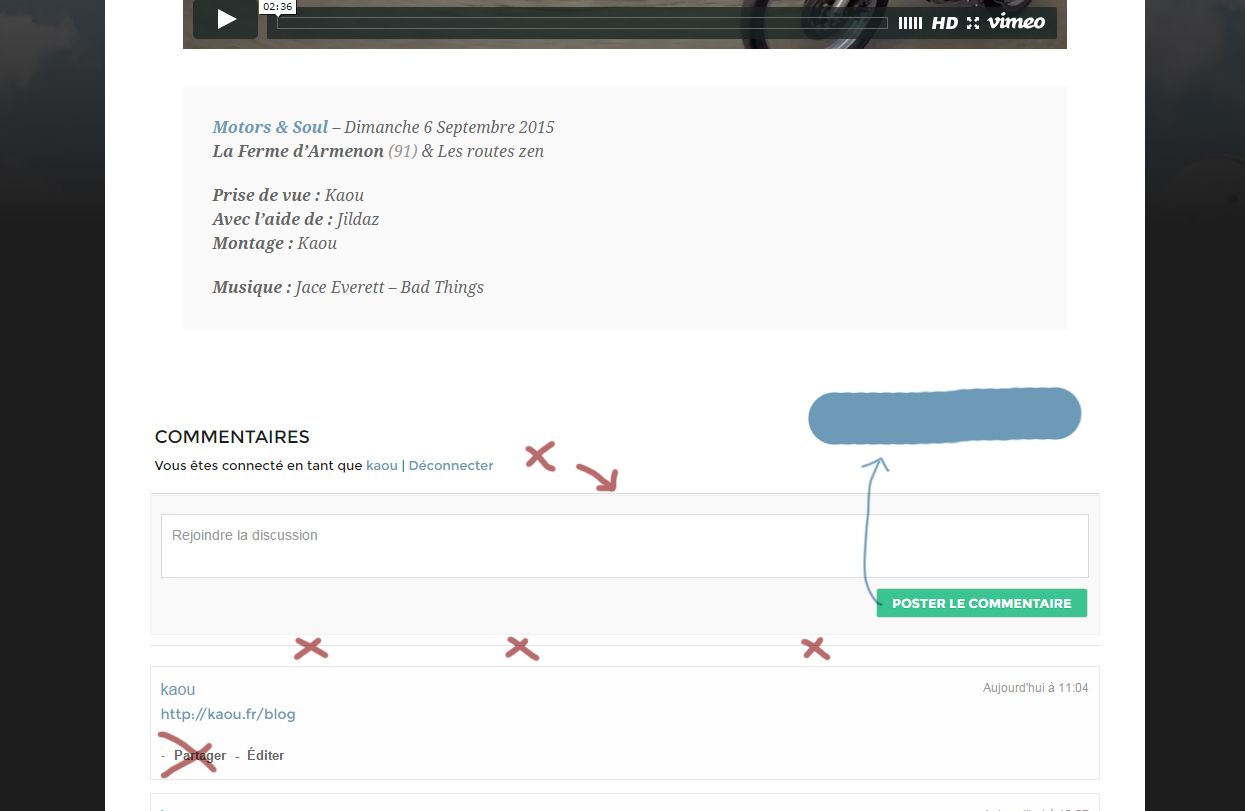
wpdiscuzcustom
  1. turn the "post comment" button to blue instead of green
  2. make the "share" ("partager" for me in french) option dissapear
  3. make the 2 lines above and under the comment form dissapear

I hope I'm clear enough (pardon my french) and you could help me.
Thanks a lot.

Kaou


Quote
 kaou
(@kaou)
New Member
Joined: 10 years ago
Posts: 3
Topic starter
Translate
English
Spanish
French
German
Italian
Portuguese
Russian
Chinese
Japanese
Korean
Arabic
Hindi
Dutch
Polish
Turkish
Vietnamese
Thai
Swedish
Danish
Finnish
Norwegian
Czech
Hungarian
Romanian
Greek
Hebrew
Indonesian
Malay
Ukrainian
Bulgarian
Croatian
Slovak
Slovenian
Serbian
Lithuanian
Latvian
Estonian
 

Hello.

I manage to make the submit button turn to blue

(.wc_comm_submit.button.alt{background-color: #6c9ab7;}

and remove the "share" (and "edit" but this is no problem) zone :

.wc-comment-footer{ display:none; }

There is one last thing I don't know how to do : to remove the grey thin bars ( <hr>). So I hope you will be able to help me.

Thanks in advance.
Kaou


ReplyQuote
 Tom
(@tomson)
Famed Member Admin
Joined: 11 years ago
Posts: 4248
Translate
English
Spanish
French
German
Italian
Portuguese
Russian
Chinese
Japanese
Korean
Arabic
Hindi
Dutch
Polish
Turkish
Vietnamese
Thai
Swedish
Danish
Finnish
Norwegian
Czech
Hungarian
Romanian
Greek
Hebrew
Indonesian
Malay
Ukrainian
Bulgarian
Croatian
Slovak
Slovenian
Serbian
Lithuanian
Latvian
Estonian
 

Hi kaou,

You could disable share button using wpDiscuz Share Settings, making all options grey/inactive like it shown on this screenshot:
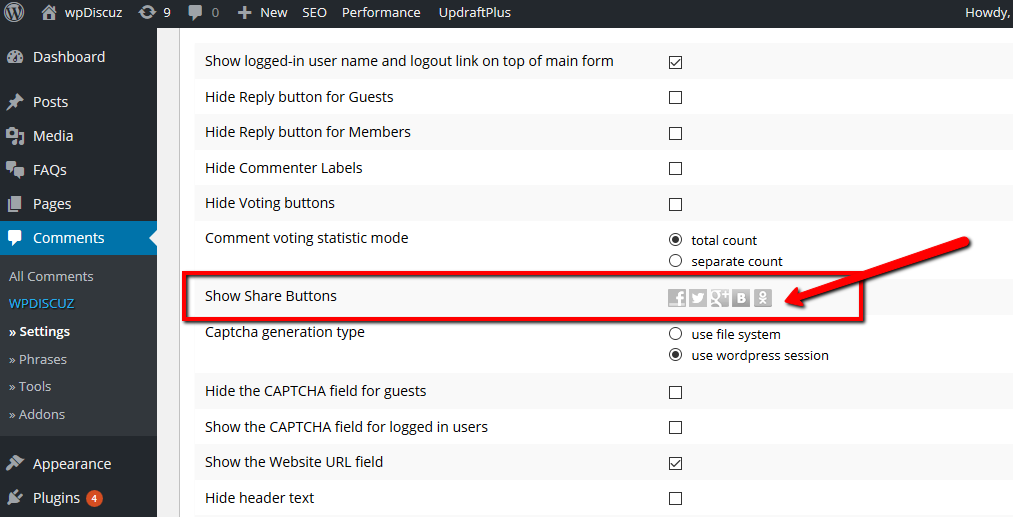
disable share button

To remove the grey line, navigate to wpDiscuz Settings > Styling Tab and put this css code in Custom CSS Code textarea:

#wpcomm hr{ background:transparent; padding:1px; margin:1px;}


ReplyQuote
 kaou
(@kaou)
New Member
Joined: 10 years ago
Posts: 3
Topic starter
Translate
English
Spanish
French
German
Italian
Portuguese
Russian
Chinese
Japanese
Korean
Arabic
Hindi
Dutch
Polish
Turkish
Vietnamese
Thai
Swedish
Danish
Finnish
Norwegian
Czech
Hungarian
Romanian
Greek
Hebrew
Indonesian
Malay
Ukrainian
Bulgarian
Croatian
Slovak
Slovenian
Serbian
Lithuanian
Latvian
Estonian
 

Thanks a lot for the trick, it's almost perfect to me. The last thing I wanna do is to remove a last grey line wich annoys me :
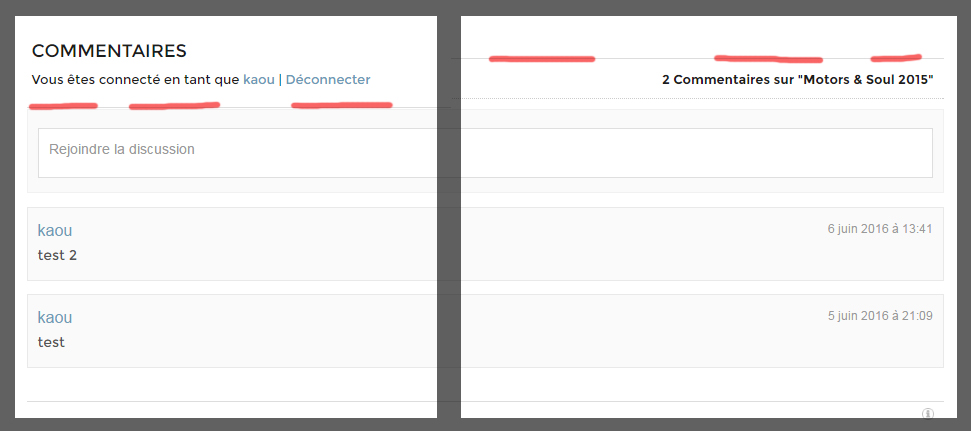
wpdiscuzcustom2

I hope you could help me 🙂
Kaou


ReplyQuote
 Tom
(@tomson)
Famed Member Admin
Joined: 11 years ago
Posts: 4248
Translate
English
Spanish
French
German
Italian
Portuguese
Russian
Chinese
Japanese
Korean
Arabic
Hindi
Dutch
Polish
Turkish
Vietnamese
Thai
Swedish
Danish
Finnish
Norwegian
Czech
Hungarian
Romanian
Greek
Hebrew
Indonesian
Malay
Ukrainian
Bulgarian
Croatian
Slovak
Slovenian
Serbian
Lithuanian
Latvian
Estonian
 

Hope this is the correct one:

#wpcomm {border-top: none!important;}


ReplyQuote
Share:
Scroll to top