
AI Assistant
Notifications
Clear all

[Solved] How to hide the comments link icon?

5 Posts
2 Users
0 Reactions
4,292 Views
(@skenecat)
New Member
Joined: 9 years ago
Posts: 3
Topic starter
Translate
English
Spanish
French
German
Italian
Portuguese
Russian
Chinese
Japanese
Korean
Arabic
Hindi
Dutch
Polish
Turkish
Vietnamese
Thai
Swedish
Danish
Finnish
Norwegian
Czech
Hungarian
Romanian
Greek
Hebrew
Indonesian
Malay
Ukrainian
Bulgarian
Croatian
Slovak
Slovenian
Serbian
Lithuanian
Latvian
Estonian
  [#740]

I have wpDiscuz set up on a members only website, so I don't want to show the url link icon next to comments. Is there a way to hide or disable this?

I tried to find the plugin css, to hide it that way, but didn't see a css file. Can someone point me to where that is?


Quote
 Tom
(@tomson)
Famed Member Admin
Joined: 11 years ago
Posts: 4248
Translate
English
Spanish
French
German
Italian
Portuguese
Russian
Chinese
Japanese
Korean
Arabic
Hindi
Dutch
Polish
Turkish
Vietnamese
Thai
Swedish
Danish
Finnish
Norwegian
Czech
Hungarian
Romanian
Greek
Hebrew
Indonesian
Malay
Ukrainian
Bulgarian
Croatian
Slovak
Slovenian
Serbian
Lithuanian
Latvian
Estonian
 

wpDiscuz 4 comes with comment form manager. Please navigate to Dashboard > Comments > Forms admin page, then edit the Default Form and disable Website field:
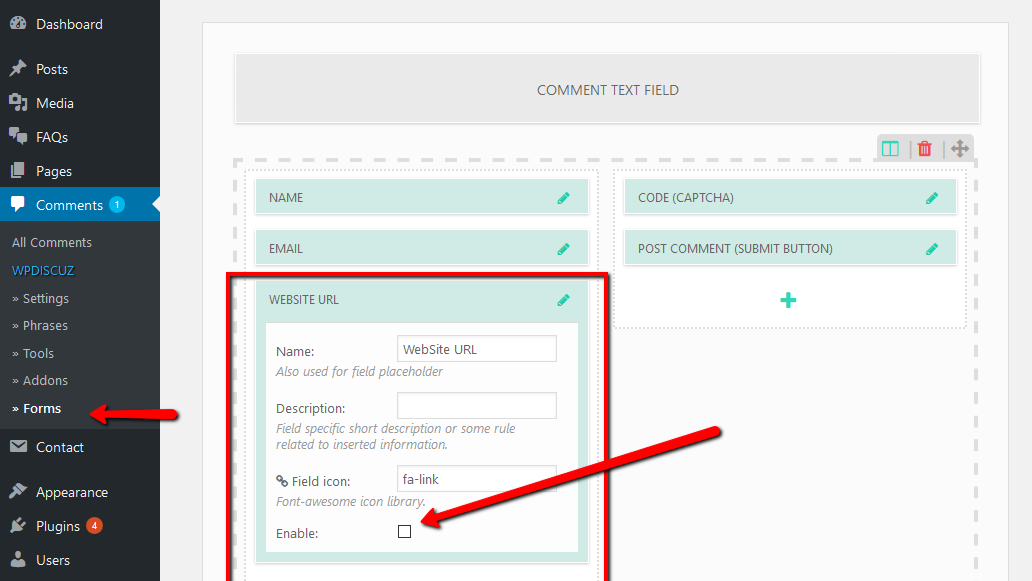
wpDiscuz 4 remove website field from comment form


ReplyQuote
(@skenecat)
New Member
Joined: 9 years ago
Posts: 3
Topic starter
Translate
English
Spanish
French
German
Italian
Portuguese
Russian
Chinese
Japanese
Korean
Arabic
Hindi
Dutch
Polish
Turkish
Vietnamese
Thai
Swedish
Danish
Finnish
Norwegian
Czech
Hungarian
Romanian
Greek
Hebrew
Indonesian
Malay
Ukrainian
Bulgarian
Croatian
Slovak
Slovenian
Serbian
Lithuanian
Latvian
Estonian
 

Hi Tom, 

Thanks for the quick response. I disabled the website, and also removed the Field icon, but I still see the link icon above each comment, with the comment's url.

Could you tell me how to get to the css? Then I could at least change the icon color so it won't be visible. 


ReplyQuote
 Tom
(@tomson)
Famed Member Admin
Joined: 11 years ago
Posts: 4248
Translate
English
Spanish
French
German
Italian
Portuguese
Russian
Chinese
Japanese
Korean
Arabic
Hindi
Dutch
Polish
Turkish
Vietnamese
Thai
Swedish
Danish
Finnish
Norwegian
Czech
Hungarian
Romanian
Greek
Hebrew
Indonesian
Malay
Ukrainian
Bulgarian
Croatian
Slovak
Slovenian
Serbian
Lithuanian
Latvian
Estonian
 

The instruction above was for removing Website/Link field from comment form, that's not for removing comment link. It seems I followed you incorrect.

Navigate to Comments > Settings > Show/Hide Tab and use "Hide Comment Link" option:
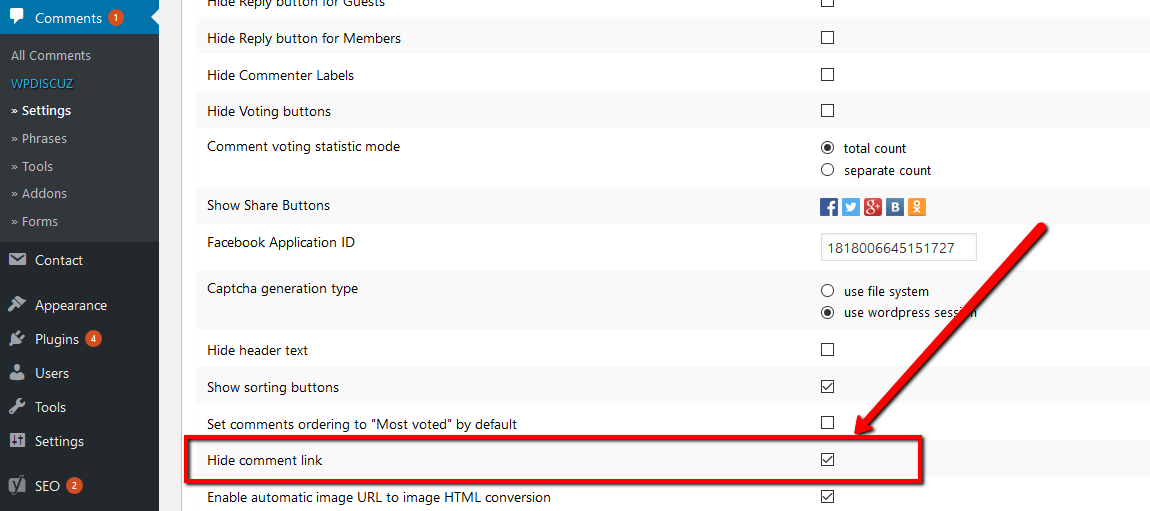
wpDiscuz hind comment link


ReplyQuote
(@skenecat)
New Member
Joined: 9 years ago
Posts: 3
Topic starter
Translate
English
Spanish
French
German
Italian
Portuguese
Russian
Chinese
Japanese
Korean
Arabic
Hindi
Dutch
Polish
Turkish
Vietnamese
Thai
Swedish
Danish
Finnish
Norwegian
Czech
Hungarian
Romanian
Greek
Hebrew
Indonesian
Malay
Ukrainian
Bulgarian
Croatian
Slovak
Slovenian
Serbian
Lithuanian
Latvian
Estonian
 

Thanks, Tom. That's exactly what I needed!


ReplyQuote
Share:
Scroll to top