
AI Assistant
Notifications
Clear all

Comments do not show up until page is refreshed

6 Posts
2 Users
0 Reactions
2,595 Views
(@oldseaminer)
Member Customer
Joined: 10 years ago
Posts: 10
Topic starter
Translate
English
Spanish
French
German
Italian
Portuguese
Russian
Chinese
Japanese
Korean
Arabic
Hindi
Dutch
Polish
Turkish
Vietnamese
Thai
Swedish
Danish
Finnish
Norwegian
Czech
Hungarian
Romanian
Greek
Hebrew
Indonesian
Malay
Ukrainian
Bulgarian
Croatian
Slovak
Slovenian
Serbian
Lithuanian
Latvian
Estonian

  [#3639]

I am running the latest version of wpdiscusz and wpdiscusz media uploader. When users post comments, they do not show up on the page unless the page is manually reloaded. The comment status animation simply goes on forever.

I have elimated all caching by changing hosts (bluehost). I have disabled all plugins to test. I have tried with "Use WordPress native AJAX functions " on and off.

I have tried all three settings under live update. When I set "

This seems to have been happening for about six weeks now. I was on a very old version of the plugin and updated to the latest and still have same issues. On newest version of wordpress.


Quote
Astghik
(@astgh)
Illustrious Member Admin
Joined: 8 years ago
Posts: 6645
Translate
English
Spanish
French
German
Italian
Portuguese
Russian
Chinese
Japanese
Korean
Arabic
Hindi
Dutch
Polish
Turkish
Vietnamese
Thai
Swedish
Danish
Finnish
Norwegian
Czech
Hungarian
Romanian
Greek
Hebrew
Indonesian
Malay
Ukrainian
Bulgarian
Croatian
Slovak
Slovenian
Serbian
Lithuanian
Latvian
Estonian
 

Hi @oldseaminer,

Please leave some example URL to allow us to check it. 


ReplyQuote
(@oldseaminer)
Member Customer
Joined: 10 years ago
Posts: 10
Topic starter
Translate
English
Spanish
French
German
Italian
Portuguese
Russian
Chinese
Japanese
Korean
Arabic
Hindi
Dutch
Polish
Turkish
Vietnamese
Thai
Swedish
Danish
Finnish
Norwegian
Czech
Hungarian
Romanian
Greek
Hebrew
Indonesian
Malay
Ukrainian
Bulgarian
Croatian
Slovak
Slovenian
Serbian
Lithuanian
Latvian
Estonian
 
 http://cavstheblog.com/?p=55449 


ReplyQuote
Astghik
(@astgh)
Illustrious Member Admin
Joined: 8 years ago
Posts: 6645
Translate
English
Spanish
French
German
Italian
Portuguese
Russian
Chinese
Japanese
Korean
Arabic
Hindi
Dutch
Polish
Turkish
Vietnamese
Thai
Swedish
Danish
Finnish
Norwegian
Czech
Hungarian
Romanian
Greek
Hebrew
Indonesian
Malay
Ukrainian
Bulgarian
Croatian
Slovak
Slovenian
Serbian
Lithuanian
Latvian
Estonian
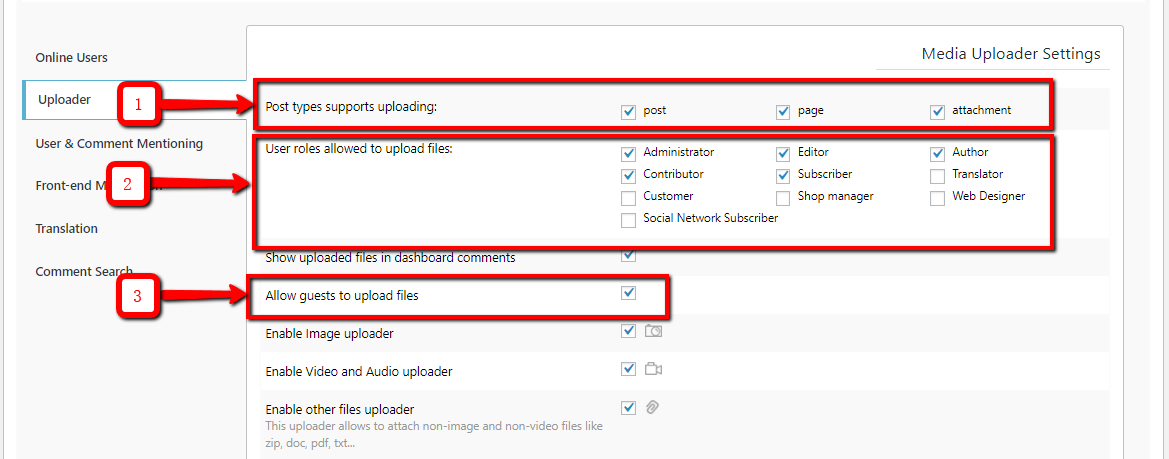
 

Hi @oldseaminer,

Please check the following options:

1. Navigate to Dashboard > Comments > Settings > Addons admin page and check if  the post types support uploading

2. On the same page make sure user roles allowed to upload files.

3. Allow guests to upload files option also should be enabled. 

upload


ReplyQuote
(@oldseaminer)
Member Customer
Joined: 10 years ago
Posts: 10
Topic starter
Translate
English
Spanish
French
German
Italian
Portuguese
Russian
Chinese
Japanese
Korean
Arabic
Hindi
Dutch
Polish
Turkish
Vietnamese
Thai
Swedish
Danish
Finnish
Norwegian
Czech
Hungarian
Romanian
Greek
Hebrew
Indonesian
Malay
Ukrainian
Bulgarian
Croatian
Slovak
Slovenian
Serbian
Lithuanian
Latvian
Estonian
 
Capture

I have attached a picture of my uploader settings, but this behavior persists even with the plugin turned off.


ReplyQuote
Astghik
(@astgh)
Illustrious Member Admin
Joined: 8 years ago
Posts: 6645
Translate
English
Spanish
French
German
Italian
Portuguese
Russian
Chinese
Japanese
Korean
Arabic
Hindi
Dutch
Polish
Turkish
Vietnamese
Thai
Swedish
Danish
Finnish
Norwegian
Czech
Hungarian
Romanian
Greek
Hebrew
Indonesian
Malay
Ukrainian
Bulgarian
Croatian
Slovak
Slovenian
Serbian
Lithuanian
Latvian
Estonian
 

Hi @oldseaminer),

We've checked your website and it seems the issue is solved. Probably it was some cache issue. Please press CTRL+F5 twice on frontend before checking. 

http://cavstheblog.com/?p=55449#comment-310431


ReplyQuote
Share:
Scroll to top