
AI Assistant
Notifications
Clear all

[Solved] Change text of Post Comment button

2 Posts
2 Users
1 Reactions
7,732 Views
(@webtoolsframeworks)
Member Customer
Joined: 9 years ago
Posts: 14
Topic starter
Translate
English
Spanish
French
German
Italian
Portuguese
Russian
Chinese
Japanese
Korean
Arabic
Hindi
Dutch
Polish
Turkish
Vietnamese
Thai
Swedish
Danish
Finnish
Norwegian
Czech
Hungarian
Romanian
Greek
Hebrew
Indonesian
Malay
Ukrainian
Bulgarian
Croatian
Slovak
Slovenian
Serbian
Lithuanian
Latvian
Estonian
  [#755]

Wondering if anyone knows how to change the text of the "Post Comment" button. I've looked through all the phrases and other settings included but cannot find this information anywhere.

Thank you!


Quote
 Tom
(@tomson)
Famed Member Admin
Joined: 11 years ago
Posts: 4248
Translate
English
Spanish
French
German
Italian
Portuguese
Russian
Chinese
Japanese
Korean
Arabic
Hindi
Dutch
Polish
Turkish
Vietnamese
Thai
Swedish
Danish
Finnish
Norwegian
Czech
Hungarian
Romanian
Greek
Hebrew
Indonesian
Malay
Ukrainian
Bulgarian
Croatian
Slovak
Slovenian
Serbian
Lithuanian
Latvian
Estonian
 

wpDiscuz 4 comes with custom comment form and field creation api. Please navigate to Dashboard > Comments > Forms admin page, edit the Default Form and change whatever you want.

Screenshot:
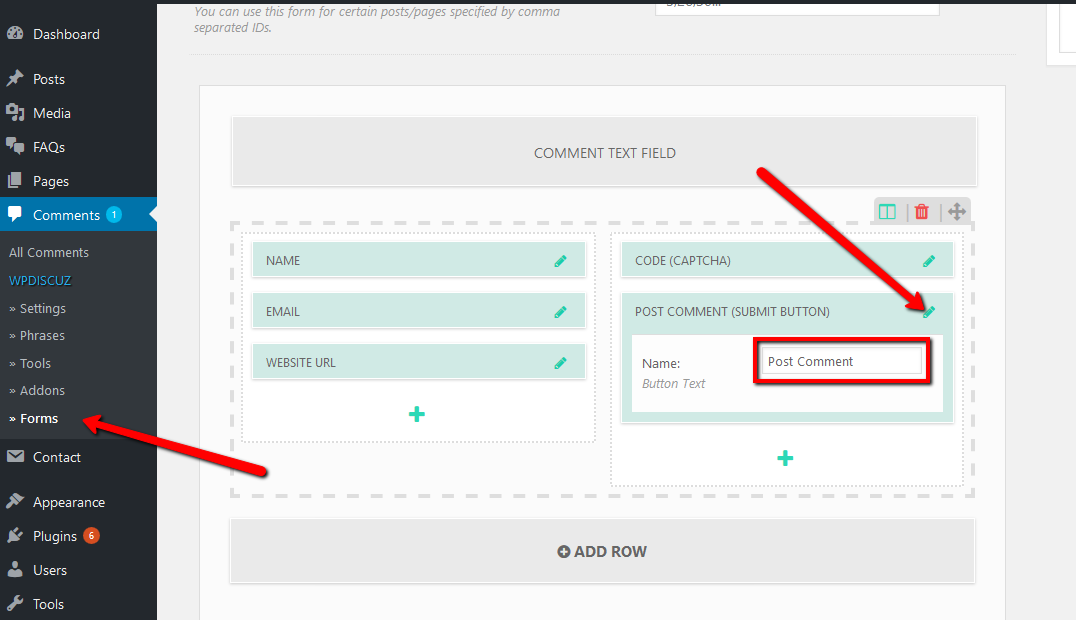
wpDiscuz change post comment button text


Brian reacted
ReplyQuote
Share:
Scroll to top