AI Assistant
Notifications
Clear all

[Solved] Cross posting and links

5 Posts
2 Users
1 Reactions
3,396 Views
Posts: 3
Customer
Topic starter
Translate
English
Spanish
French
German
Italian
Portuguese
Russian
Chinese
Japanese
Korean
Arabic
Hindi
Dutch
Polish
Turkish
Vietnamese
Thai
Swedish
Danish
Finnish
Norwegian
Czech
Hungarian
Romanian
Greek
Hebrew
Indonesian
Malay
Ukrainian
Bulgarian
Croatian
Slovak
Slovenian
Serbian
Lithuanian
Latvian
Estonian
(@hoorspelen)
Member
Joined: 9 years ago
[#1407]

I am not sure if this has been asked or is already a feature that I just can't find.

I use cross posting for my blog and a post is automatically posted or updated in selected forum as topic with the same title and content.

It works almost perfectly. But a link in a blog entry appears as a text in the forum. Am I doing something wrong?

4 Replies
Posts: 4248
 Tom
Admin
Translate
English
Spanish
French
German
Italian
Portuguese
Russian
Chinese
Japanese
Korean
Arabic
Hindi
Dutch
Polish
Turkish
Vietnamese
Thai
Swedish
Danish
Finnish
Norwegian
Czech
Hungarian
Romanian
Greek
Hebrew
Indonesian
Malay
Ukrainian
Bulgarian
Croatian
Slovak
Slovenian
Serbian
Lithuanian
Latvian
Estonian
(@tomson)
Famed Member
Joined: 11 years ago

Hi John van Houten,

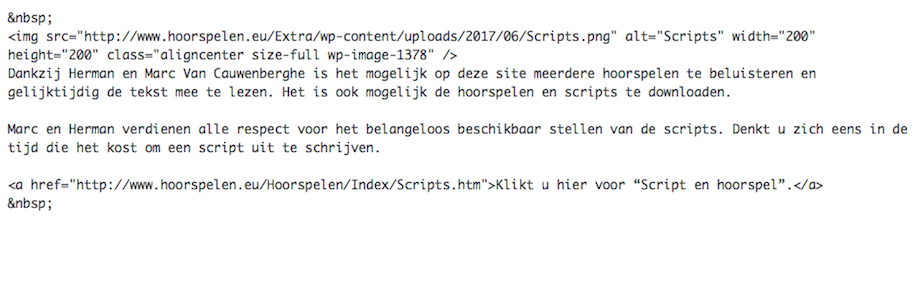
Could you please leave some screenshot of the post content in Dashboard Editor. I need to see what kind of link you mean. Is that a simple URL or HTML link?


Reply
Posts: 3
Customer
Topic starter
Translate
English
Spanish
French
German
Italian
Portuguese
Russian
Chinese
Japanese
Korean
Arabic
Hindi
Dutch
Polish
Turkish
Vietnamese
Thai
Swedish
Danish
Finnish
Norwegian
Czech
Hungarian
Romanian
Greek
Hebrew
Indonesian
Malay
Ukrainian
Bulgarian
Croatian
Slovak
Slovenian
Serbian
Lithuanian
Latvian
Estonian
(@hoorspelen)
Member
Joined: 9 years ago

Thank you for your response.

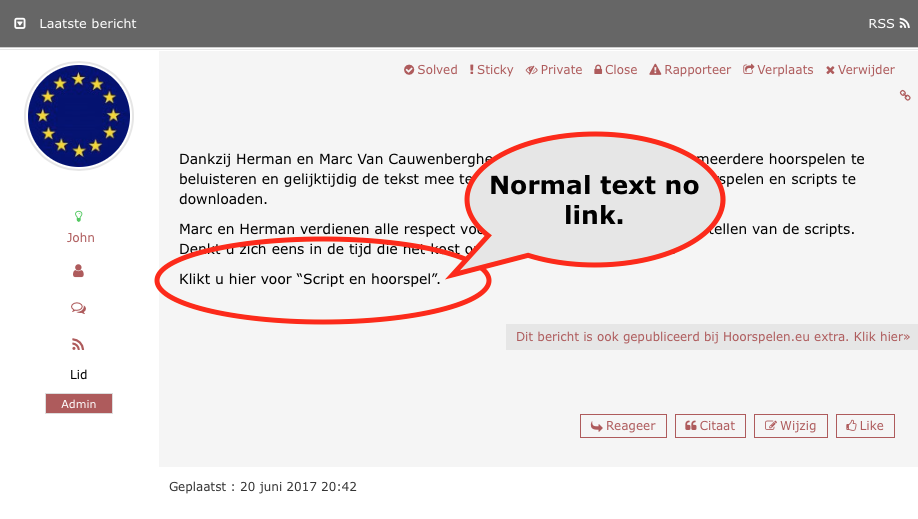
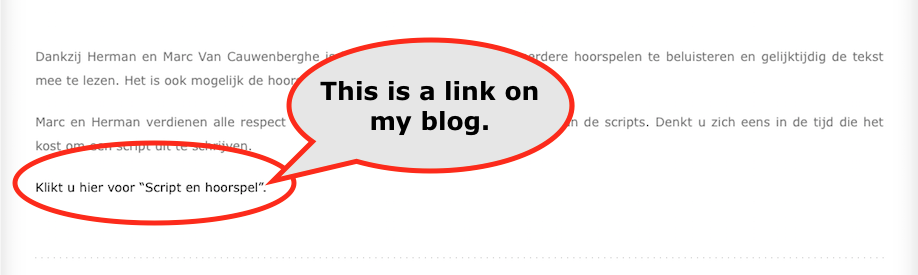
Here are three screenshots and additional information.

This is the source of the link on my blog.

<a href="http://www.hoorspelen.eu/Hoorspelen/Index/Scripts.htm">Klikt u hier voor “Script en hoorspel”.</a>

I also use the wpForo Addons:

Advanced Attachments

Embeds

Blog 1
Blog 2
Forum

Reply
Posts: 4248
 Tom
Admin
Translate
English
Spanish
French
German
Italian
Portuguese
Russian
Chinese
Japanese
Korean
Arabic
Hindi
Dutch
Polish
Turkish
Vietnamese
Thai
Swedish
Danish
Finnish
Norwegian
Czech
Hungarian
Romanian
Greek
Hebrew
Indonesian
Malay
Ukrainian
Bulgarian
Croatian
Slovak
Slovenian
Serbian
Lithuanian
Latvian
Estonian
(@tomson)
Famed Member
Joined: 11 years ago

Thank you for detailed explanation. We just made some changes and released v1.0.1. Please navigate to Dashboard > Plugins admin page and update the addon.


Reply
1 Reply
Customer
(@hoorspelen)
Joined: 9 years ago

Member
Posts: 3
Translate
English
Spanish
French
German
Italian
Portuguese
Russian
Chinese
Japanese
Korean
Arabic
Hindi
Dutch
Polish
Turkish
Vietnamese
Thai
Swedish
Danish
Finnish
Norwegian
Czech
Hungarian
Romanian
Greek
Hebrew
Indonesian
Malay
Ukrainian
Bulgarian
Croatian
Slovak
Slovenian
Serbian
Lithuanian
Latvian
Estonian

Your efforts exceed my expectations.

Cross posting works perfectly now.

Thanks.


Reply
Share:
Scroll to top