Search
Close
AI Search
Classic Search
 Search Phrase:
 Search Type:
Advanced search options
 Search in Forums:
 Search in date period:

 Sort Search Results by:

AI Assistant
Notifications
Clear all

[Solved] Old attachments disappearing

3 Posts
2 Users
0 Reactions
1,789 Views
Posts: 15
Topic starter
Translate
English
Spanish
French
German
Italian
Portuguese
Russian
Chinese
Japanese
Korean
Arabic
Hindi
Dutch
Polish
Turkish
Vietnamese
Thai
Swedish
Danish
Finnish
Norwegian
Czech
Hungarian
Romanian
Greek
Hebrew
Indonesian
Malay
Ukrainian
Bulgarian
Croatian
Slovak
Slovenian
Serbian
Lithuanian
Latvian
Estonian
(@zeeshan333)
Active Member
Joined: 7 years ago
[#5166]

When I go to old threads that I attached images to, they don't display. But when I edit the post to see what the html is, the [attach ] #number [/ attach] is still there.

Is this a common problem? 


2 Replies
Posts: 15
Topic starter
Translate
English
Spanish
French
German
Italian
Portuguese
Russian
Chinese
Japanese
Korean
Arabic
Hindi
Dutch
Polish
Turkish
Vietnamese
Thai
Swedish
Danish
Finnish
Norwegian
Czech
Hungarian
Romanian
Greek
Hebrew
Indonesian
Malay
Ukrainian
Bulgarian
Croatian
Slovak
Slovenian
Serbian
Lithuanian
Latvian
Estonian
(@zeeshan333)
Active Member
Joined: 7 years ago
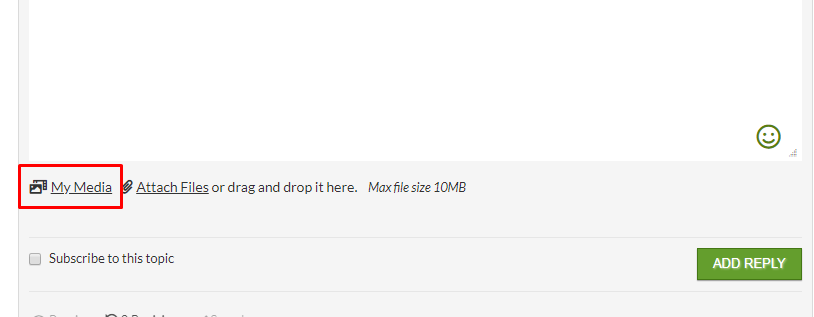
image

Also how do I get this button in the red box on my website?

Only the "attach files" appears.


Reply
1 Reply
Elvina
(@elvina)
Joined: 7 years ago

Support
Posts: 1403
Translate
English
Spanish
French
German
Italian
Portuguese
Russian
Chinese
Japanese
Korean
Arabic
Hindi
Dutch
Polish
Turkish
Vietnamese
Thai
Swedish
Danish
Finnish
Norwegian
Czech
Hungarian
Romanian
Greek
Hebrew
Indonesian
Malay
Ukrainian
Bulgarian
Croatian
Slovak
Slovenian
Serbian
Lithuanian
Latvian
Estonian

@zeeshan333,

We see you've marked the topic as solved. Please let us know is it solved or not. If the
issue isn't solved please follow the steps below:

1. Please make sure you're using wpForo 1.7.0 version

2. Then please make sure you've updated wpForo Advanced Attachment to latest 2.0.1 version

3. Once you update please go to Dashboard > Forums > Dashboard admin page and click on the [Delete All Caches] button.


Reply
Share:
Scroll to top