
Search
Close
AI Search
Classic Search
 Search Phrase:
 Search Type:
Advanced search options
 Search in Forums:
 Search in date period:

 Sort Search Results by:

AI Assistant
Notifications
Clear all

How can I enable "Rich Text" toolbar?

11 Posts
3 Users
1 Reactions
5,457 Views
(@michael_aa)
Member Customer
Joined: 8 years ago
Posts: 3
Topic starter
Translate
English
Spanish
French
German
Italian
Portuguese
Russian
Chinese
Japanese
Korean
Arabic
Hindi
Dutch
Polish
Turkish
Vietnamese
Thai
Swedish
Danish
Finnish
Norwegian
Czech
Hungarian
Romanian
Greek
Hebrew
Indonesian
Malay
Ukrainian
Bulgarian
Croatian
Slovak
Slovenian
Serbian
Lithuanian
Latvian
Estonian
  [#1745]

Hello,

How can I enable the "Rich Text" toolbar in the Comment form?

Thanks!


Quote
(@rowhoe)
Active Member
Joined: 8 years ago
Posts: 7
Translate
English
Spanish
French
German
Italian
Portuguese
Russian
Chinese
Japanese
Korean
Arabic
Hindi
Dutch
Polish
Turkish
Vietnamese
Thai
Swedish
Danish
Finnish
Norwegian
Czech
Hungarian
Romanian
Greek
Hebrew
Indonesian
Malay
Ukrainian
Bulgarian
Croatian
Slovak
Slovenian
Serbian
Lithuanian
Latvian
Estonian
 

I would also like to know this. Mines showing the default text toolbar but it doesn't perform any function when I try to use it. Link, Underline, nothing works.


ReplyQuote
 Tom
(@tomson)
Famed Member Admin
Joined: 11 years ago
Posts: 4245
Translate
English
Spanish
French
German
Italian
Portuguese
Russian
Chinese
Japanese
Korean
Arabic
Hindi
Dutch
Polish
Turkish
Vietnamese
Thai
Swedish
Danish
Finnish
Norwegian
Czech
Hungarian
Romanian
Greek
Hebrew
Indonesian
Malay
Ukrainian
Bulgarian
Croatian
Slovak
Slovenian
Serbian
Lithuanian
Latvian
Estonian
 
Posted by: michael_aa

Hello,

How can I enable the "Rich Text" toolbar in the Comment form?

Thanks!

You can enable Quicktags in Dashboard > Comments > Settings admin page (option: Enable Quicktags).


ReplyQuote
 Tom
(@tomson)
Famed Member Admin
Joined: 11 years ago
Posts: 4245
Translate
English
Spanish
French
German
Italian
Portuguese
Russian
Chinese
Japanese
Korean
Arabic
Hindi
Dutch
Polish
Turkish
Vietnamese
Thai
Swedish
Danish
Finnish
Norwegian
Czech
Hungarian
Romanian
Greek
Hebrew
Indonesian
Malay
Ukrainian
Bulgarian
Croatian
Slovak
Slovenian
Serbian
Lithuanian
Latvian
Estonian

 
Posted by: Rowhoe

I would also like to know this. Mines showing the default text toolbar but it doesn't perform any function when I try to use it. Link, Underline, nothing works.

It seems you have JS errors on your website, they affect wpDiscuz comment form. Please leave website URL to allow us check it.


ReplyQuote
(@rowhoe)
Active Member
Joined: 8 years ago
Posts: 7
Translate
English
Spanish
French
German
Italian
Portuguese
Russian
Chinese
Japanese
Korean
Arabic
Hindi
Dutch
Polish
Turkish
Vietnamese
Thai
Swedish
Danish
Finnish
Norwegian
Czech
Hungarian
Romanian
Greek
Hebrew
Indonesian
Malay
Ukrainian
Bulgarian
Croatian
Slovak
Slovenian
Serbian
Lithuanian
Latvian
Estonian
 

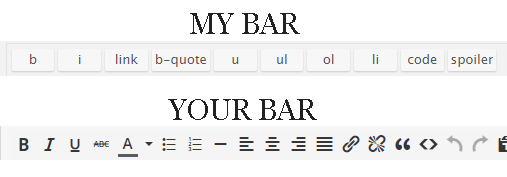
I fixed it. I noticed at random times I would see the 'Leave a Reply' message, twice. I inspected it and found the facebook comments associated with the Super Socializer plugin. Go to Super Socializer /Social Commenting and uncheck it to turn it off. The text editor now works.

The text edit bar is still the plain one, I installed TinyMCE Advanced plugin, it doesn't change the template however.

mybar yourbar
text editor null


ReplyQuote
 Tom
(@tomson)
Famed Member Admin
Joined: 11 years ago
Posts: 4245
Translate
English
Spanish
French
German
Italian
Portuguese
Russian
Chinese
Japanese
Korean
Arabic
Hindi
Dutch
Polish
Turkish
Vietnamese
Thai
Swedish
Danish
Finnish
Norwegian
Czech
Hungarian
Romanian
Greek
Hebrew
Indonesian
Malay
Ukrainian
Bulgarian
Croatian
Slovak
Slovenian
Serbian
Lithuanian
Latvian
Estonian
 

Rowhoe,

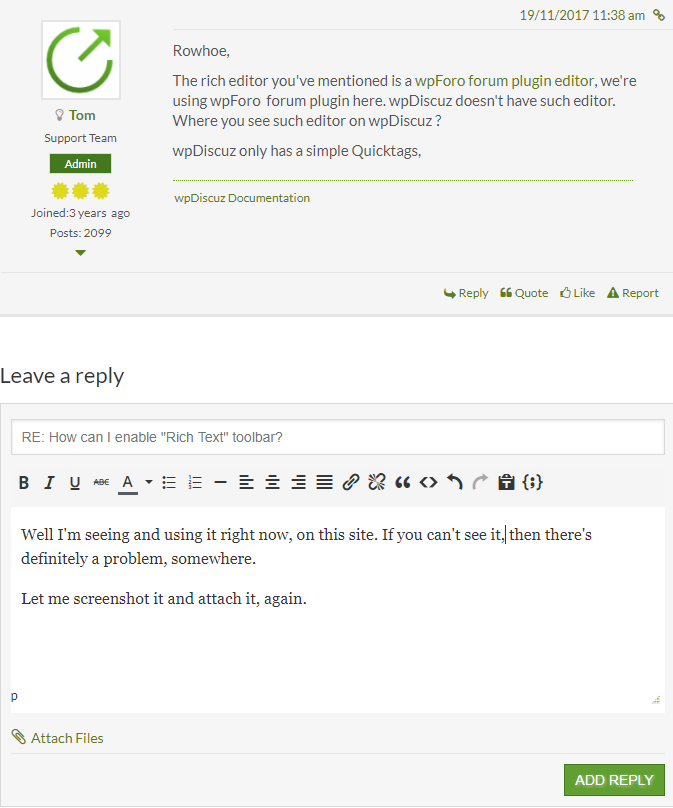
The rich editor you've mentioned is a wpForo forum plugin editor, we're using wpForo  forum plugin here. wpDiscuz doesn't have such editor. Where you see such editor on wpDiscuz ?

wpDiscuz only has a simple Quicktags,


ReplyQuote
(@rowhoe)
Active Member
Joined: 8 years ago
Posts: 7
Translate
English
Spanish
French
German
Italian
Portuguese
Russian
Chinese
Japanese
Korean
Arabic
Hindi
Dutch
Polish
Turkish
Vietnamese
Thai
Swedish
Danish
Finnish
Norwegian
Czech
Hungarian
Romanian
Greek
Hebrew
Indonesian
Malay
Ukrainian
Bulgarian
Croatian
Slovak
Slovenian
Serbian
Lithuanian
Latvian
Estonian
 

Well I'm seeing and using it right now, on this site. If you can't see it,then there's definitely a problem, somewhere.

Let me screenshot it and attach it, again.

wpDiscuz texteditor


ReplyQuote
 Tom
(@tomson)
Famed Member Admin
Joined: 11 years ago
Posts: 4245
Translate
English
Spanish
French
German
Italian
Portuguese
Russian
Chinese
Japanese
Korean
Arabic
Hindi
Dutch
Polish
Turkish
Vietnamese
Thai
Swedish
Danish
Finnish
Norwegian
Czech
Hungarian
Romanian
Greek
Hebrew
Indonesian
Malay
Ukrainian
Bulgarian
Croatian
Slovak
Slovenian
Serbian
Lithuanian
Latvian
Estonian
 

This is a forum editor. This is the wpForo Forum plugin editor this is not wpDiscuz comment form. How can forum editor be on comment form? I can't understand why you think this editor should be on your comment form? This is topic and post creator editor this is not comment editor.


ReplyQuote
 Tom
(@tomson)
Famed Member Admin
Joined: 11 years ago
Posts: 4245
Translate
English
Spanish
French
German
Italian
Portuguese
Russian
Chinese
Japanese
Korean
Arabic
Hindi
Dutch
Polish
Turkish
Vietnamese
Thai
Swedish
Danish
Finnish
Norwegian
Czech
Hungarian
Romanian
Greek
Hebrew
Indonesian
Malay
Ukrainian
Bulgarian
Croatian
Slovak
Slovenian
Serbian
Lithuanian
Latvian
Estonian
 

Do you see the difference between wpDiscuz Comment plugin and wpForo Forum plugin?

wpDiscuz Comment Plugin: https://wordpress.org/plugins/wpdiscuz/

wpForo Forum Plugin: https://wordpress.org/plugins/wpforo/


ReplyQuote
(@rowhoe)
Active Member
Joined: 8 years ago
Posts: 7
Translate
English
Spanish
French
German
Italian
Portuguese
Russian
Chinese
Japanese
Korean
Arabic
Hindi
Dutch
Polish
Turkish
Vietnamese
Thai
Swedish
Danish
Finnish
Norwegian
Czech
Hungarian
Romanian
Greek
Hebrew
Indonesian
Malay
Ukrainian
Bulgarian
Croatian
Slovak
Slovenian
Serbian
Lithuanian
Latvian
Estonian
 

Yep, I understand perfectly. I have a few forums installed.  Do you see that this topic is under wpDiscuz Support and not under wpForo Forum  Support? Do you see the confusion there?

I just assumed that since wpDiscuz already has quicktags, that there was a way to make them look a little nicer, and add them to the comment box. What's so difficult about understanding that??


ReplyQuote
 Tom
(@tomson)
Famed Member Admin
Joined: 11 years ago
Posts: 4245
Translate
English
Spanish
French
German
Italian
Portuguese
Russian
Chinese
Japanese
Korean
Arabic
Hindi
Dutch
Polish
Turkish
Vietnamese
Thai
Swedish
Danish
Finnish
Norwegian
Czech
Hungarian
Romanian
Greek
Hebrew
Indonesian
Malay
Ukrainian
Bulgarian
Croatian
Slovak
Slovenian
Serbian
Lithuanian
Latvian
Estonian
 

I think this misunderstanding comes from your posts. After my reply:

wpDiscuz doesn't have such editor. Where you see such editor on wpDiscuz ?

You've replied:

Well I'm seeing and using it right now, on this site. If you can't see it,then there's definitely a problem, somewhere.

wpDiscuz texteditor

Most people will think that you see wpDiscuz editor on forum or something like that. As you can see your post confused us.


I just assumed that since wpDiscuz already has quicktags, that there was a way to make them look a little nicer.

Quicktag doesn't have any relation to rich editor. Quick tag is a light JS function with simple textarea comment field, but the rich editor is a tremendous JS lib with iframe editor. As you know comment area has many forms (main comment form and reply forms) so it may affect your page load speed. 

However this is in our to do list. We may add it in future release, but i'm sorry I don't have ETA yet.


UsernameMi reacted
ReplyQuote
Share:
Scroll to top