
AI Assistant
Notifications
Clear all

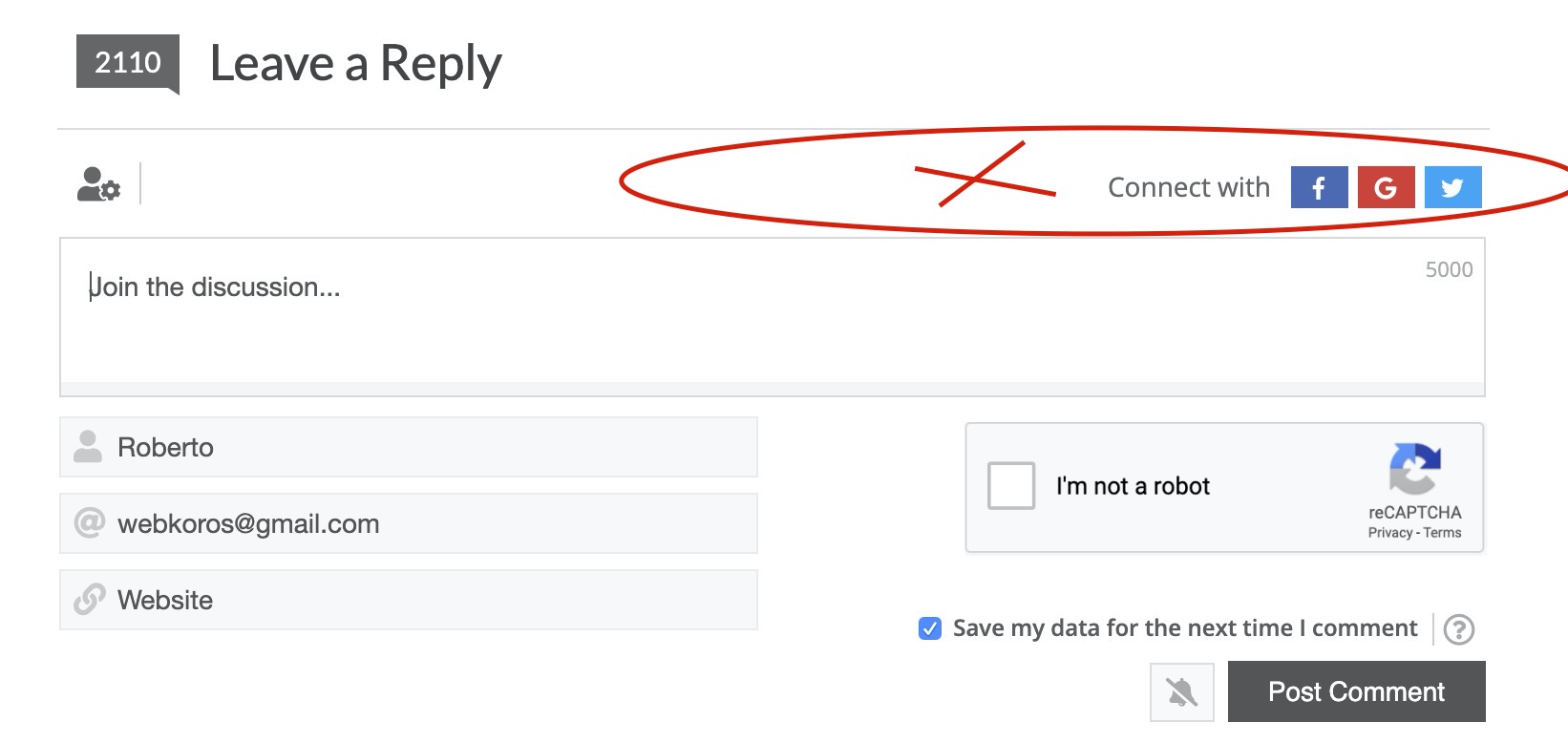
Suggestion: Add "Register / login" links along with "Connect with" buttons

4 Posts
2 Users
0 Reactions
1,764 Views
 Benj
(@benj)
Member Customer
Joined: 6 years ago
Posts: 43
Topic starter
Translate
English
Spanish
French
German
Italian
Portuguese
Russian
Chinese
Japanese
Korean
Arabic
Hindi
Dutch
Polish
Turkish
Vietnamese
Thai
Swedish
Danish
Finnish
Norwegian
Czech
Hungarian
Romanian
Greek
Hebrew
Indonesian
Malay
Ukrainian
Bulgarian
Croatian
Slovak
Slovenian
Serbian
Lithuanian
Latvian
Estonian
  [#5824]

Hi,

I was surprised that wpdiscuz comment area only allows to "connect with" social media and not from wordpress itself!! 

It would be logical to allow user to login or register from local install and not just social media.
In particular for those of use that use wpforo as login system, there is no reason to only allow connection from social media and not local system from the comment area.

Capture d’écran 2020 04 27 à 01.37.21


Quote
Elvina
(@elvina)
Support
Joined: 7 years ago
Posts: 1403
Translate
English
Spanish
French
German
Italian
Portuguese
Russian
Chinese
Japanese
Korean
Arabic
Hindi
Dutch
Polish
Turkish
Vietnamese
Thai
Swedish
Danish
Finnish
Norwegian
Czech
Hungarian
Romanian
Greek
Hebrew
Indonesian
Malay
Ukrainian
Bulgarian
Croatian
Slovak
Slovenian
Serbian
Lithuanian
Latvian
Estonian

 

Hi @benj,

Please navigate to the Dashboard > Comments > Settings > Comment Form admin page and make sure the "Hide "Please login to comment" text" is disabled. See the screenshot below: 

https://www.screencast.com/t/lUZ5MpWyepeI

More info here: https://wpdiscuz.com/docs/wpdiscuz-documentation/settings/comment-form/#components


ReplyQuote
 Benj
(@benj)
Member Customer
Joined: 6 years ago
Posts: 43
Topic starter
Translate
English
Spanish
French
German
Italian
Portuguese
Russian
Chinese
Japanese
Korean
Arabic
Hindi
Dutch
Polish
Turkish
Vietnamese
Thai
Swedish
Danish
Finnish
Norwegian
Czech
Hungarian
Romanian
Greek
Hebrew
Indonesian
Malay
Ukrainian
Bulgarian
Croatian
Slovak
Slovenian
Serbian
Lithuanian
Latvian
Estonian
 

@elvina thanks. Indeed it helps but several problems:

- I can't change the phrase. It's not in the phrase list. Phrase is misleading: it seems user must login to comment. My guests can comment so phrase should just be "Login or Register" with 2 links. That would make more sense.

- Style of "login" is not different from rest of phrase, so we are not sure "login" is clickable.

I suggest you apply these little fixes for next release.


ReplyQuote
Elvina
(@elvina)
Support
Joined: 7 years ago
Posts: 1403
Translate
English
Spanish
French
German
Italian
Portuguese
Russian
Chinese
Japanese
Korean
Arabic
Hindi
Dutch
Polish
Turkish
Vietnamese
Thai
Swedish
Danish
Finnish
Norwegian
Czech
Hungarian
Romanian
Greek
Hebrew
Indonesian
Malay
Ukrainian
Bulgarian
Croatian
Slovak
Slovenian
Serbian
Lithuanian
Latvian
Estonian
 

- I can't change the phrase.

Please navigate to the Dashboard > Comments > Phrases > Notification admin page and change the Login phrase as you want, save delete all caches, and check again.

Posted by: @benj

Style of "login" is not different from rest of phrase, so we are not sure "login" is clickable

Please leave the example URL to allow us to check it.


ReplyQuote
Share:
Scroll to top