AI Assistant
Notifications
Clear all

[Solved] How can members block other members?

7 Posts
2 Users
1 Reactions
1,573 Views
Posts: 10
Customer
Topic starter
Translate
English
Spanish
French
German
Italian
Portuguese
Russian
Chinese
Japanese
Korean
Arabic
Hindi
Dutch
Polish
Turkish
Vietnamese
Thai
Swedish
Danish
Finnish
Norwegian
Czech
Hungarian
Romanian
Greek
Hebrew
Indonesian
Malay
Ukrainian
Bulgarian
Croatian
Slovak
Slovenian
Serbian
Lithuanian
Latvian
Estonian
(@zubin-mathai)
Member
Joined: 3 years ago
[#12206]

From the product description, it sounded like members can block other members. Is this possible?

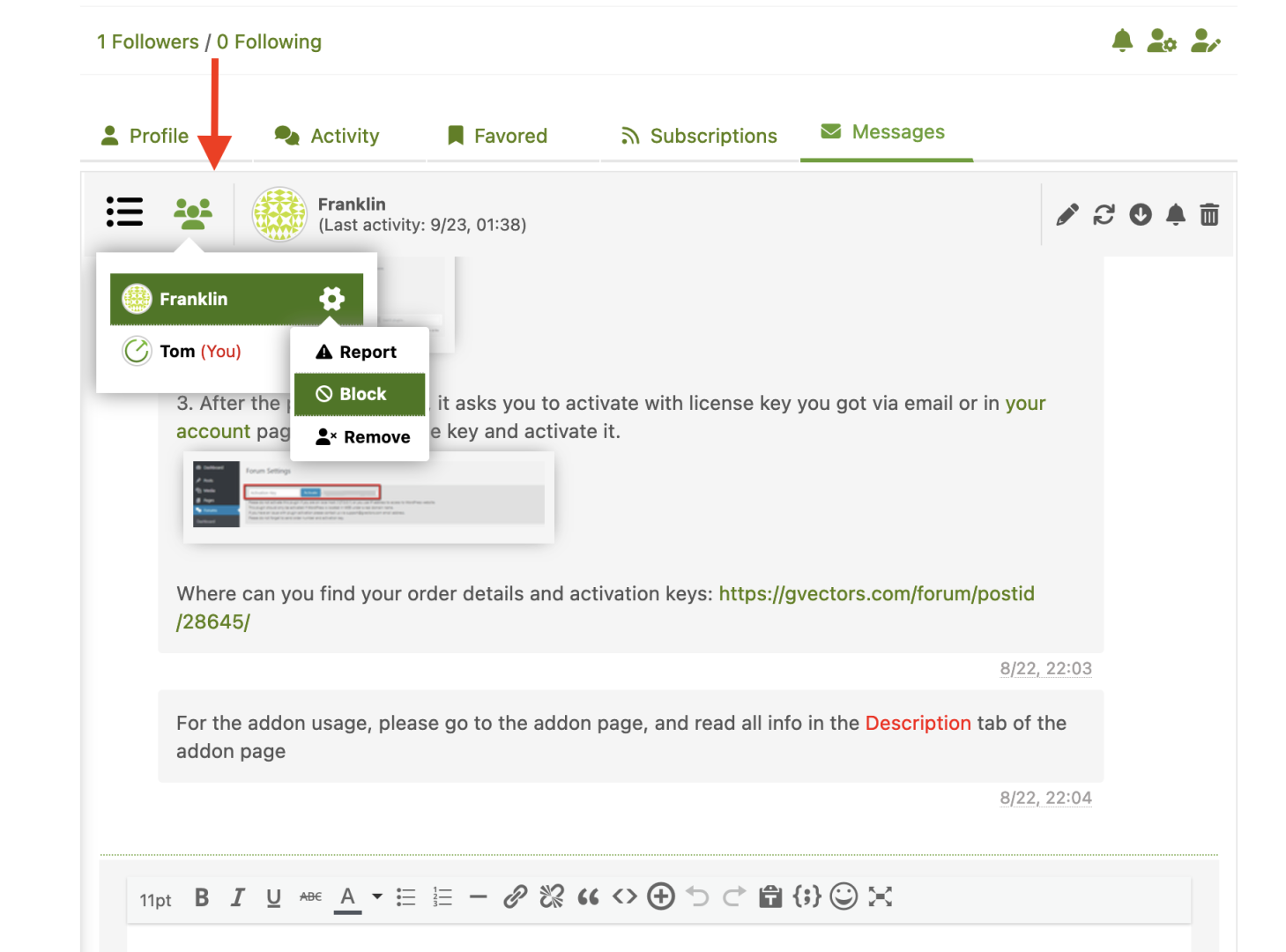
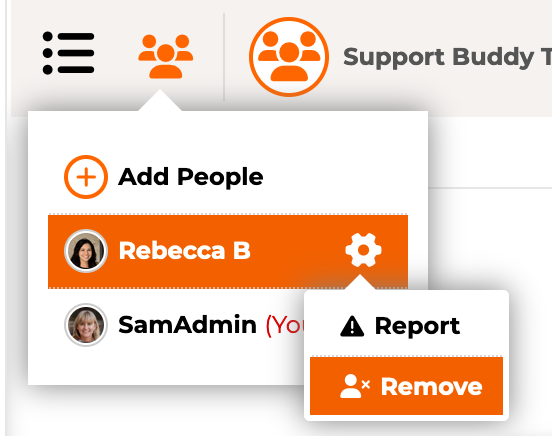
I can't find that option anywhere. If someone sends another person a message, I see there are options to "remove" and "report". Neither of them stop the other person from starting a new chat with them.

How do members block someone from sending them messages?


6 Replies
Posts: 4245
 Tom
Admin
Translate
English
Spanish
French
German
Italian
Portuguese
Russian
Chinese
Japanese
Korean
Arabic
Hindi
Dutch
Polish
Turkish
Vietnamese
Thai
Swedish
Danish
Finnish
Norwegian
Czech
Hungarian
Romanian
Greek
Hebrew
Indonesian
Malay
Ukrainian
Bulgarian
Croatian
Slovak
Slovenian
Serbian
Lithuanian
Latvian
Estonian
(@tomson)
Famed Member
Joined: 11 years ago

Hi @zubin-mathai,

Please see the attached screenshot:

Screenshot 2023 09 14 at 00.31.07

Reply
1 Reply
Customer
(@zubin-mathai)
Joined: 3 years ago

Member
Posts: 10
Translate
English
Spanish
French
German
Italian
Portuguese
Russian
Chinese
Japanese
Korean
Arabic
Hindi
Dutch
Polish
Turkish
Vietnamese
Thai
Swedish
Danish
Finnish
Norwegian
Czech
Hungarian
Romanian
Greek
Hebrew
Indonesian
Malay
Ukrainian
Bulgarian
Croatian
Slovak
Slovenian
Serbian
Lithuanian
Latvian
Estonian

@tomson Please see my other reply and screenshot. Any idea why I'm not seeing the "block" option on my site? I couldn't find any setting that might be affecting it.


Reply
Posts: 10
Customer
Topic starter
Translate
English
Spanish
French
German
Italian
Portuguese
Russian
Chinese
Japanese
Korean
Arabic
Hindi
Dutch
Polish
Turkish
Vietnamese
Thai
Swedish
Danish
Finnish
Norwegian
Czech
Hungarian
Romanian
Greek
Hebrew
Indonesian
Malay
Ukrainian
Bulgarian
Croatian
Slovak
Slovenian
Serbian
Lithuanian
Latvian
Estonian
(@zubin-mathai)
Member
Joined: 3 years ago

Thanks for the reply. But I'm not seeing that. What could be causing it not showing?

Screenshot 2023 09 12 at 7.05.35 PM

?


Reply
2 Replies
 Tom
Admin
(@tomson)
Joined: 11 years ago

Famed Member
Posts: 4245
Translate
English
Spanish
French
German
Italian
Portuguese
Russian
Chinese
Japanese
Korean
Arabic
Hindi
Dutch
Polish
Turkish
Vietnamese
Thai
Swedish
Danish
Finnish
Norwegian
Czech
Hungarian
Romanian
Greek
Hebrew
Indonesian
Malay
Ukrainian
Bulgarian
Croatian
Slovak
Slovenian
Serbian
Lithuanian
Latvian
Estonian

@zubin-mathai,

Ok, I passed this to the addon developers, it seems the block button depends how the conversation is created. If you've manually selected a person to massage with him/her you cannot block him/her, you can only block if somebody contacted you by clicking the [envelop] button of your profile.


Reply
Customer
(@zubin-mathai)
Joined: 3 years ago

Member
Posts: 10
Translate
English
Spanish
French
German
Italian
Portuguese
Russian
Chinese
Japanese
Korean
Arabic
Hindi
Dutch
Polish
Turkish
Vietnamese
Thai
Swedish
Danish
Finnish
Norwegian
Czech
Hungarian
Romanian
Greek
Hebrew
Indonesian
Malay
Ukrainian
Bulgarian
Croatian
Slovak
Slovenian
Serbian
Lithuanian
Latvian
Estonian

@tomson 

Thanks for the response. That clarifies it! Interesting choice on the developers' part, since someone can just add someone into a conversation they want to harass and the other person can't block them.

I see that the blocks are stored in the blocker's user_meta under wpforopm_blocked_userids. I can add my own button to profiles to allow someone to block anyone. Can you ask the developers if there is a public function in the add-on I can call to block a user?

I'd rather use an official function than write directly to the db.


Reply
Posts: 10
Customer
Topic starter
Translate
English
Spanish
French
German
Italian
Portuguese
Russian
Chinese
Japanese
Korean
Arabic
Hindi
Dutch
Polish
Turkish
Vietnamese
Thai
Swedish
Danish
Finnish
Norwegian
Czech
Hungarian
Romanian
Greek
Hebrew
Indonesian
Malay
Ukrainian
Bulgarian
Croatian
Slovak
Slovenian
Serbian
Lithuanian
Latvian
Estonian
(@zubin-mathai)
Member
Joined: 3 years ago

@tomson

You can disregard my other question. Just adding the html to the page works, and wpforo's javascript properly handles the blocking of a user

If anyone else is looking for this solution:

// add block user choice if not there
if ( jQuery('.wpfpm-uli-cog-report').length && !jQuery('.wpfpm-uli-cog-block').length) {
    jQuery('.wpfpm-uli-cog-report').after('<li class="wpfpm-uli-cog-block" title="Block User"><i class="fas fa-ban"></i>Block</li>');
}

Reply
Share:
Scroll to top