AI Assistant
Notifications
Clear all

Images do not insert into post

4 Posts
2 Users
0 Reactions
2,736 Views
Posts: 2
Customer
Topic starter
Translate
English
Spanish
French
German
Italian
Portuguese
Russian
Chinese
Japanese
Korean
Arabic
Hindi
Dutch
Polish
Turkish
Vietnamese
Thai
Swedish
Danish
Finnish
Norwegian
Czech
Hungarian
Romanian
Greek
Hebrew
Indonesian
Malay
Ukrainian
Bulgarian
Croatian
Slovak
Slovenian
Serbian
Lithuanian
Latvian
Estonian
(@andreymorozov11)
Member
Joined: 8 years ago
[#1672]

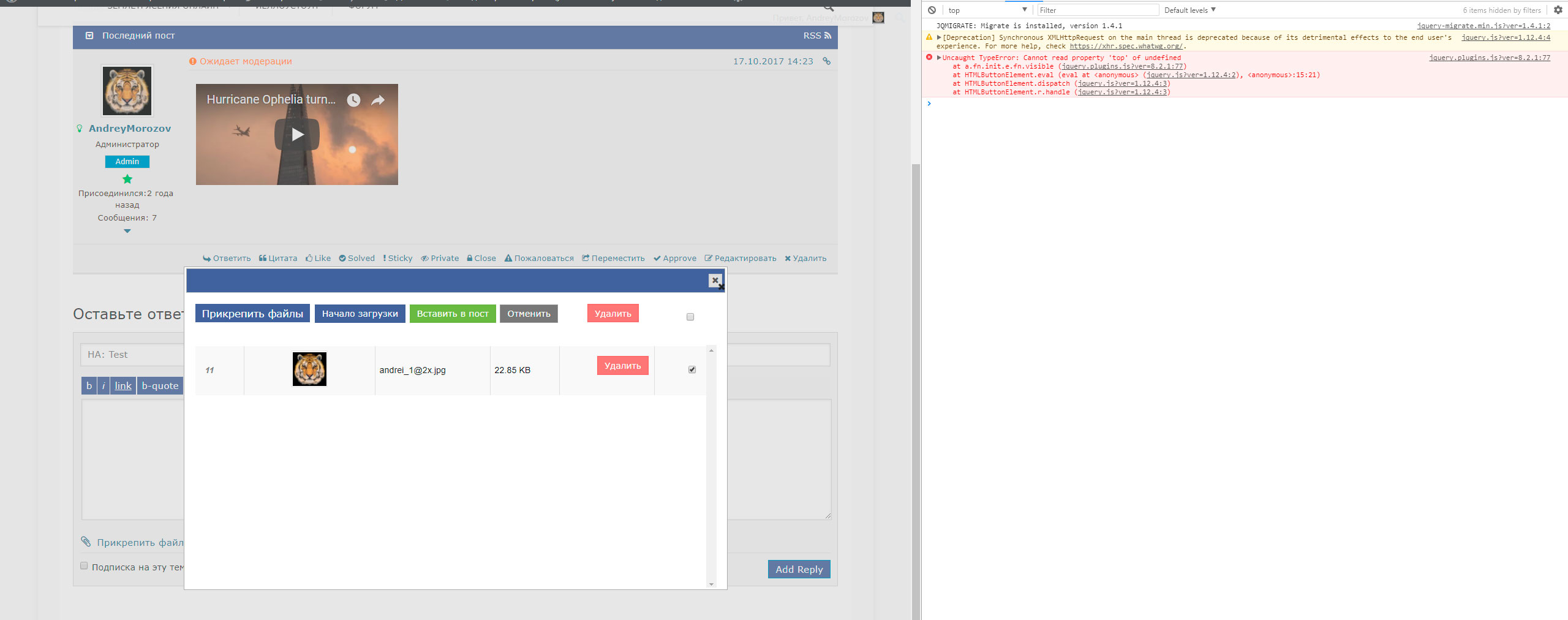
hi,  I have a problem with this plugin. Images do not insert into post. When i Click "Insert" nothing happens. At this point, an error appears in the console:

Uncaught TypeError: Cannot read property 'top' of undefined jquery.plugins.js?ver=8.2.1:77 Uncaught TypeError: Cannot read property 'top' of undefined
at a.fn.init.e.fn.visible (jquery.plugins.js?ver=8.2.1:77)
at HTMLButtonElement.eval (eval at <anonymous> (jquery.js?ver=1.12.4:2), <anonymous>:15:21)
at HTMLButtonElement.dispatch (jquery.js?ver=1.12.4:3)
at HTMLButtonElement.r.handle (jquery.js?ver=1.12.4:3)

picserror

at a.fn.init.e.fn.visible (jquery.plugins.js?ver=8.2.1:77)
at HTMLButtonElement.eval (eval at <anonymous> (jquery.js?ver=1.12.4:2), <anonymous>:15:21)
at HTMLButtonElement.dispatch (jquery.js?ver=1.12.4:3)
at HTMLButtonElement.r.handle (jquery.js?ver=1.12.4:3)

picserror

3 Replies
Posts: 4245
 Tom
Admin
Translate
English
Spanish
French
German
Italian
Portuguese
Russian
Chinese
Japanese
Korean
Arabic
Hindi
Dutch
Polish
Turkish
Vietnamese
Thai
Swedish
Danish
Finnish
Norwegian
Czech
Hungarian
Romanian
Greek
Hebrew
Indonesian
Malay
Ukrainian
Bulgarian
Croatian
Slovak
Slovenian
Serbian
Lithuanian
Latvian
Estonian
(@tomson)
Famed Member
Joined: 11 years ago

Please not this error comes from your website and affects wpForo Attachment JS functions. This is not addon error, I think this come from other plugins or the theme. please deactivate other plugis, delete all cache and do Ctrl+F5 on forum front, then test it. Then activate plugins one by one and find the error generator plugin.

Also please leave website URL to allow us debug the theme JS functions.


Reply
Posts: 2
Customer
Topic starter
Translate
English
Spanish
French
German
Italian
Portuguese
Russian
Chinese
Japanese
Korean
Arabic
Hindi
Dutch
Polish
Turkish
Vietnamese
Thai
Swedish
Danish
Finnish
Norwegian
Czech
Hungarian
Romanian
Greek
Hebrew
Indonesian
Malay
Ukrainian
Bulgarian
Croatian
Slovak
Slovenian
Serbian
Lithuanian
Latvian
Estonian
(@andreymorozov11)
Member
Joined: 8 years ago

I disabled all plug-ins, except forum. Did not help. My URL is

http://zeml.info/forum/


Reply
Posts: 4245
 Tom
Admin
Translate
English
Spanish
French
German
Italian
Portuguese
Russian
Chinese
Japanese
Korean
Arabic
Hindi
Dutch
Polish
Turkish
Vietnamese
Thai
Swedish
Danish
Finnish
Norwegian
Czech
Hungarian
Romanian
Greek
Hebrew
Indonesian
Malay
Ukrainian
Bulgarian
Croatian
Slovak
Slovenian
Serbian
Lithuanian
Latvian
Estonian
(@tomson)
Famed Member
Joined: 11 years ago

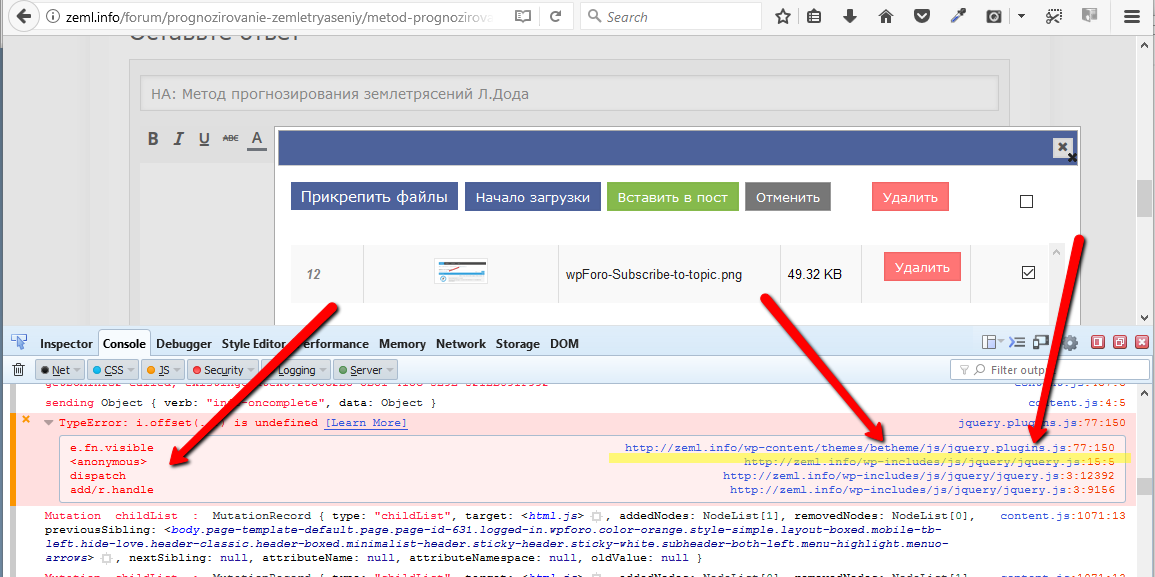
That because this is a Theme error. Your theme has a jquery.plugins.js file which generates JS Error. I recommend forward this screenshot to the theme developer to allow them support and fix it. This JS error will affect all plugins which have front-end actions.

2017 10 18 1233

Reply
Share:
Scroll to top