AI Assistant
Notifications
Clear all

Where do I enter all the keys?

4 Posts
2 Users
0 Reactions
1,818 Views
Posts: 5
Customer
Topic starter
Translate
English
Spanish
French
German
Italian
Portuguese
Russian
Chinese
Japanese
Korean
Arabic
Hindi
Dutch
Polish
Turkish
Vietnamese
Thai
Swedish
Danish
Finnish
Norwegian
Czech
Hungarian
Romanian
Greek
Hebrew
Indonesian
Malay
Ukrainian
Bulgarian
Croatian
Slovak
Slovenian
Serbian
Lithuanian
Latvian
Estonian
(@johannes-mertens)
Member
Joined: 5 years ago
[#12010]

Hello,

there doesn't seem to be any option to renew an existing license so I bought my addon packages again.

Now I have about 20 "keys".

Where do I enter them.

I looked through the menu options in the Wordpress backend, I also searched the documentation.

It's not clear to me what I have to do with all the keys.

Thank you.


3 Replies
Astghik
Posts: 6645
Admin
Translate
English
Spanish
French
German
Italian
Portuguese
Russian
Chinese
Japanese
Korean
Arabic
Hindi
Dutch
Polish
Turkish
Vietnamese
Thai
Swedish
Danish
Finnish
Norwegian
Czech
Hungarian
Romanian
Greek
Hebrew
Indonesian
Malay
Ukrainian
Bulgarian
Croatian
Slovak
Slovenian
Serbian
Lithuanian
Latvian
Estonian
(@astgh)
Illustrious Member
Joined: 8 years ago

Your old keys are still valid for 27 days. After the 27 days expired you'll see the section for inserting the keys.


Reply
Posts: 5
Customer
Topic starter
Translate
English
Spanish
French
German
Italian
Portuguese
Russian
Chinese
Japanese
Korean
Arabic
Hindi
Dutch
Polish
Turkish
Vietnamese
Thai
Swedish
Danish
Finnish
Norwegian
Czech
Hungarian
Romanian
Greek
Hebrew
Indonesian
Malay
Ukrainian
Bulgarian
Croatian
Slovak
Slovenian
Serbian
Lithuanian
Latvian
Estonian
(@johannes-mertens)
Member
Joined: 5 years ago

So I understand correctly: Ihave to wait for my keys to expire before I can enter the new ones?

Where exactly will I have to look for the section to enter the keys? Where will it appear?

And is there any documentation on this than I can bookmark for next time?


Reply
1 Reply
Astghik
Admin
(@astgh)
Joined: 8 years ago

Illustrious Member
Posts: 6645
Translate
English
Spanish
French
German
Italian
Portuguese
Russian
Chinese
Japanese
Korean
Arabic
Hindi
Dutch
Polish
Turkish
Vietnamese
Thai
Swedish
Danish
Finnish
Norwegian
Czech
Hungarian
Romanian
Greek
Hebrew
Indonesian
Malay
Ukrainian
Bulgarian
Croatian
Slovak
Slovenian
Serbian
Lithuanian
Latvian
Estonian

@johannes-mertens,

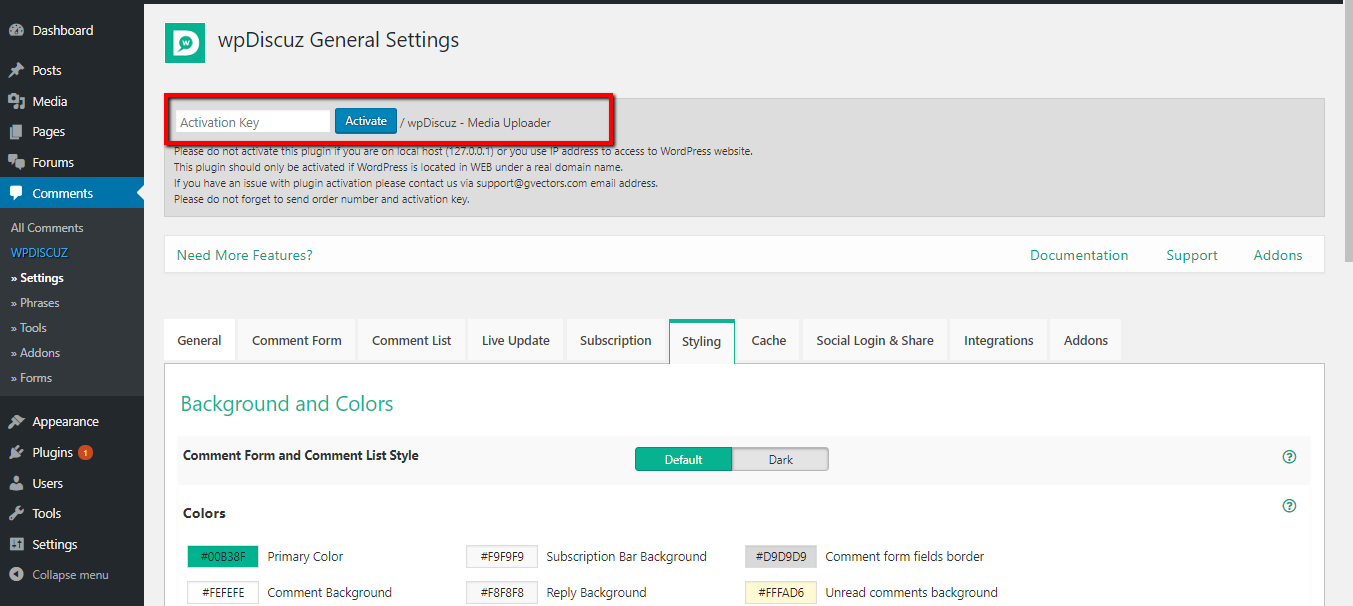
You'll find it in the section in the Dashboard > wpDiscuz > Settings admin page. Just use your activation key to activate it.

activation key


Reply
Share:
Scroll to top