Hello,
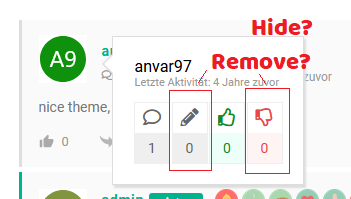
how can i hide or remove the received Dislike and posts info on Display comment author full and short information ?

Professional WordPress Plugins and Services. wpDiscuz, WooDiscuz, Advanced Post Pagination

Hello,
how can i hide or remove the received Dislike and posts info on Display comment author full and short information ?

Hi @murat-pulice,
Please use the following CSS code:
.wcai-profile-stat-box:nth-child(2), .wcai-profile-stat-box:nth-child(4){
   display: none;
}

.wcai-wrapper .wcai-profile-stat {
   display: flex;
   justify-content: center;
}
The code should be added in the Top Admin Bar > Customize > Additional CSS > "Additional CSS" textarea, save it, delete all caches, and check again.