Search
Close
AI Search
Classic Search
 Search Phrase:
 Search Type:
Advanced search options
 Search in Forums:
 Search in date period:

 Sort Search Results by:

AI Assistant
Notifications
Clear all

How to add google ASdsense script into comment list?

2 Posts
2 Users
1 Reactions
6,429 Views
Posts: 1
Customer
Topic starter
Translate
English
Spanish
French
German
Italian
Portuguese
Russian
Chinese
Japanese
Korean
Arabic
Hindi
Dutch
Polish
Turkish
Vietnamese
Thai
Swedish
Danish
Finnish
Norwegian
Czech
Hungarian
Romanian
Greek
Hebrew
Indonesian
Malay
Ukrainian
Bulgarian
Croatian
Slovak
Slovenian
Serbian
Lithuanian
Latvian
Estonian
(@quan-phan)
Member
Joined: 6 years ago
[#8668]

Hello

I bought the plugin and now it takes the whole day, but I can not find the way to add gooogle adsense secript into comment list.

What is different between Ad manager and Ad banners? Are they linked in ways?

Very difficult to use your addon without specific instruction.

Thanks


1 Reply
Astghik
Posts: 6645
Admin
Translate
English
Spanish
French
German
Italian
Portuguese
Russian
Chinese
Japanese
Korean
Arabic
Hindi
Dutch
Polish
Turkish
Vietnamese
Thai
Swedish
Danish
Finnish
Norwegian
Czech
Hungarian
Romanian
Greek
Hebrew
Indonesian
Malay
Ukrainian
Bulgarian
Croatian
Slovak
Slovenian
Serbian
Lithuanian
Latvian
Estonian
(@astgh)
Illustrious Member
Joined: 8 years ago

Hi @quan-phan,

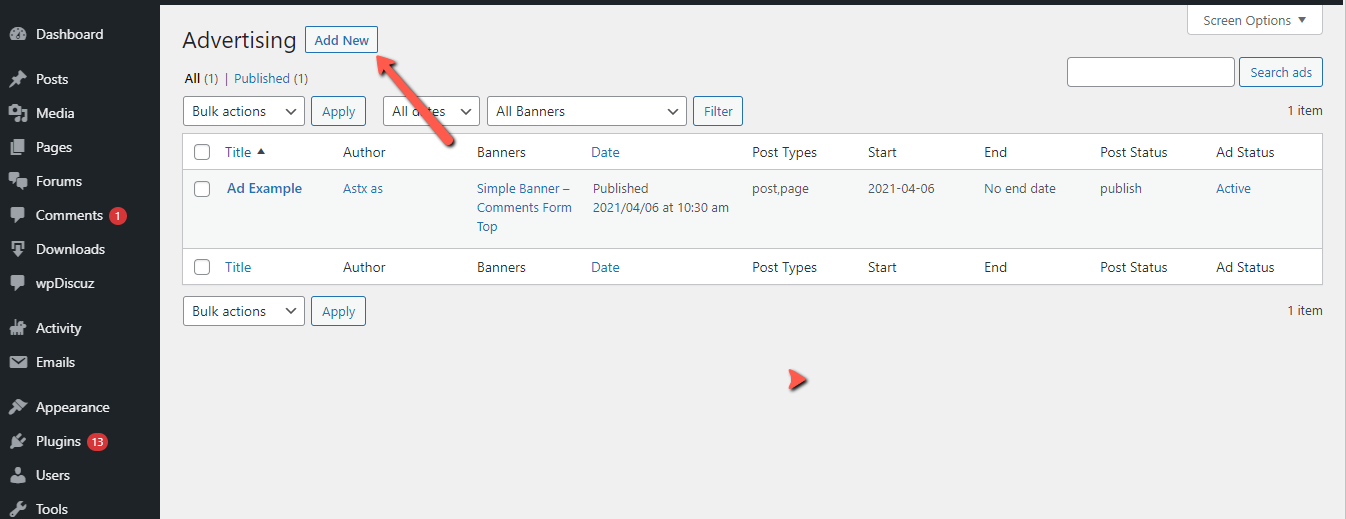
The script from Google AdSense you should put in the "Ad Manager" section.

Just create some new Ad using the according the "Add new" button: 

image

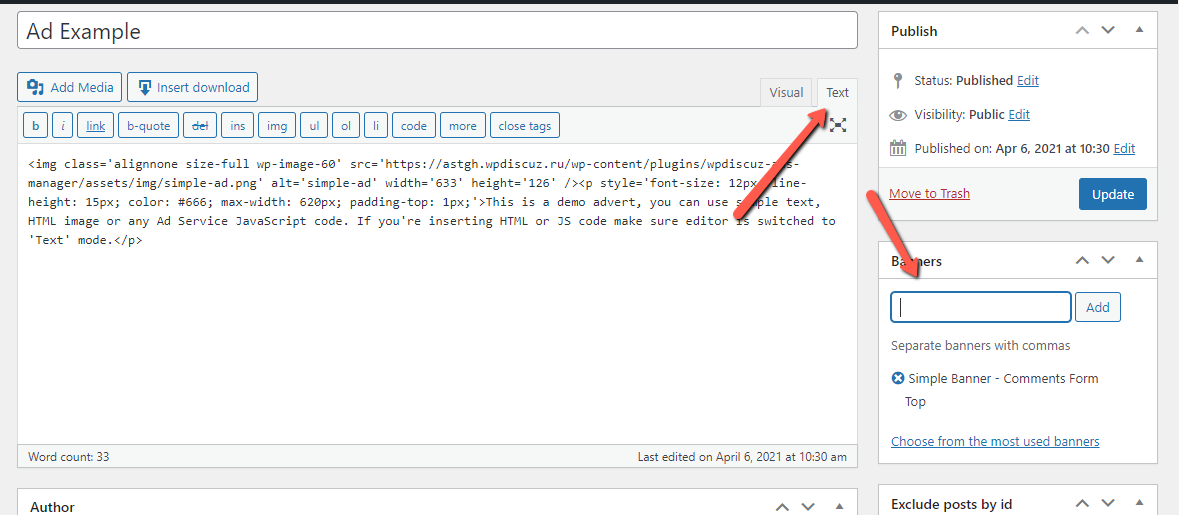
On the Ad Add/Edit screen put the script from Google AdSense in Text mode and choose the banner/banners. 

image

The rest of the options like Ad start/end days, Exclude posts by ID, etc. you should configure as you need. 

Regarding the "Ad Banners" section. Here you can create the Banners and choose the banner location.

In other words, you'd need to create the Banner with its name and location, then put your custom Ad text in the "Ad Manager" section and link it with the Banner/Banners you've created. 


Reply
Share:
Scroll to top