
Notifications
Clear all
How-To and Troubleshooting
5
Posts
3
Users
1
Reactions
3,014
Views

Topic starter
25/03/2020 12:30 pm
I'm not sure if these tabs should even be on this form, but when I took this screenshot I had all plugins except wpDiscuz disabled and I was running the twentyseventeen theme.
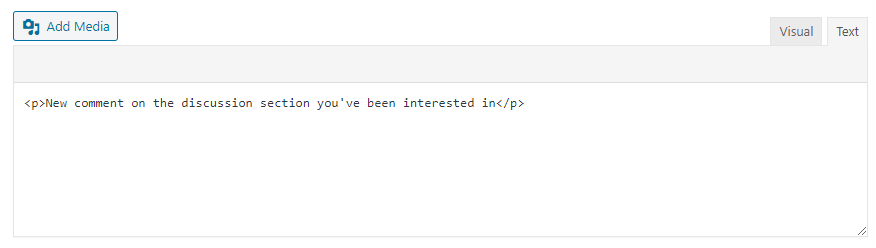
We have wpDiscuz installed on six sites. Four of those sites the visual tab is selected and the text tab cannot be selected. On the other two, the text tab is selected and the visual tab cannot be selected. The funny thing is that each of these sites we also have a copy for testing on another server, and in some cases, the test site is opposite from the real site as to which tab is selected and which cannot be selected.



25/03/2020 12:34 pm
Hi @csmwp,
You have a JS error on that pages. Please press F12 and check the error. In most cases, this is a plugin conflict.
Topic starter
25/03/2020 11:11 pm
Thanks @astghik
As indicated in my OP, there are no plugins enabled except wpDiscuz, and the site is running the TwentySeventeen theme.
There is a javascript related error in the console.
GET  https://stage.safesmartliving.com/wp-content/plugins/wpdiscuz/assets/third-party/wpdcookiejs/customcookie.js?ver=5.3.5  net::ERR_ABORTED 404

edit-comments.php?page=wpdiscuz_phrases_page:1273 Uncaught ReferenceError: Cookies is not defined
    at HTMLDocument.<anonymous> (edit-comments.php?page=wpdiscuz_phrases_page:1273)
    at i (load-scripts.php?c=0&load[chunk_0]=jquery-core,jquery-migrate,utils&ver=5.3.2:2)
    at Object.fireWith [as resolveWith] (load-scripts.php?c=0&load[chunk_0]=jquery-core,jquery-migrate,utils&ver=5.3.2:2)
    at Function.ready (load-scripts.php?c=0&load[chunk_0]=jquery-core,jquery-migrate,utils&ver=5.3.2:2)
    at HTMLDocument.J (load-scripts.php?c=0&load[chunk_0]=jquery-core,jquery-migrate,utils&ver=5.3.2:2)
I'm running 5.3.5 and I downloaded a fresh copy to see if I was missing a file somehow, but the file is not present in the new download either. There is no wpdiscuz/assets/third-party/wpdcookiejs/ directory and no customcookie.js anywhere.
but there is a reference to that file in the page.
<script src="https://stage.safesmartliving.com/wp-content/plugins/wpdiscuz/assets/third-party/wpdcookiejs/customcookie.js?ver=5.3.5"></script>
And wpDiscuz attempts to load the file in class.WpdiscuzCore.php line 1068
wp_register_script('wpdiscuz-jquery-cookie', plugins_url(WPDISCUZ_DIR_NAME . '/assets/third-party/wpdcookiejs/customcookie.js'), array('jquery'), $this->version, true);

26/03/2020 12:42 am
This will be fixed in the next version update.
In case if you want to fix it as soon as possible please follows the support topic below to get it resolved: https://gvectors.com/forum/emoticons/cant-add-or-disable-emoticons-in-admin-area/