
AI Assistant
Notifications
Clear all

[Solved] Changing hyperlink color

10 Posts
4 Users
0 Reactions
3,295 Views
(@ofirbeigel)
Member Customer
Joined: 9 years ago
Posts: 3
Topic starter
Translate
English
Spanish
French
German
Italian
Portuguese
Russian
Chinese
Japanese
Korean
Arabic
Hindi
Dutch
Polish
Turkish
Vietnamese
Thai
Swedish
Danish
Finnish
Norwegian
Czech
Hungarian
Romanian
Greek
Hebrew
Indonesian
Malay
Ukrainian
Bulgarian
Croatian
Slovak
Slovenian
Serbian
Lithuanian
Latvian
Estonian
  [#1586]

What do I need to add in the custom css in order to change the color of the hyperlink inside a comment to blue? Currently it's showing as green.


Quote
 Tom
(@tomson)
Famed Member Admin
Joined: 11 years ago
Posts: 4245
Translate
English
Spanish
French
German
Italian
Portuguese
Russian
Chinese
Japanese
Korean
Arabic
Hindi
Dutch
Polish
Turkish
Vietnamese
Thai
Swedish
Danish
Finnish
Norwegian
Czech
Hungarian
Romanian
Greek
Hebrew
Indonesian
Malay
Ukrainian
Bulgarian
Croatian
Slovak
Slovenian
Serbian
Lithuanian
Latvian
Estonian
 

Put this CSS code in Dashboard > Comments > Settings > Styling > Custom CSS Code Textarea. Save it, delete all caches and do Ctrl+F5 on front-end:

#wpcomm a:visited {
    color: #0073aa;
}
#wpcomm a {
  color: #00a0d2;
}
#wpcomm .wc-comment-text > p > a {
   color: #00a0d2;
}


ReplyQuote
(@henrimatthijssen)
Member Customer
Joined: 9 years ago
Posts: 27
Translate
English
Spanish
French
German
Italian
Portuguese
Russian
Chinese
Japanese
Korean
Arabic
Hindi
Dutch
Polish
Turkish
Vietnamese
Thai
Swedish
Danish
Finnish
Norwegian
Czech
Hungarian
Romanian
Greek
Hebrew
Indonesian
Malay
Ukrainian
Bulgarian
Croatian
Slovak
Slovenian
Serbian
Lithuanian
Latvian
Estonian
 

This is not working for me in the latest wpDiscuz 5.0.2. I thus have the same question again (preferable with using the 'wpdiscuz.css' file in the Themes directory):

How can I change the color of a hyperlinks in the comments? In my case they have the same color as the other comment-text thus you cannot see it.

See also below where word 'forum' is a hyperlink:

hyperlink


ReplyQuote
 Tom
(@tomson)
Famed Member Admin
Joined: 11 years ago
Posts: 4245
Translate
English
Spanish
French
German
Italian
Portuguese
Russian
Chinese
Japanese
Korean
Arabic
Hindi
Dutch
Polish
Turkish
Vietnamese
Thai
Swedish
Danish
Finnish
Norwegian
Czech
Hungarian
Romanian
Greek
Hebrew
Indonesian
Malay
Ukrainian
Bulgarian
Croatian
Slovak
Slovenian
Serbian
Lithuanian
Latvian
Estonian
 

Please leave website URL.

Also please don't set label background white. It should be transparent.


ReplyQuote
(@henrimatthijssen)
Member Customer
Joined: 9 years ago
Posts: 27
Translate
English
Spanish
French
German
Italian
Portuguese
Russian
Chinese
Japanese
Korean
Arabic
Hindi
Dutch
Polish
Turkish
Vietnamese
Thai
Swedish
Danish
Finnish
Norwegian
Czech
Hungarian
Romanian
Greek
Hebrew
Indonesian
Malay
Ukrainian
Bulgarian
Croatian
Slovak
Slovenian
Serbian
Lithuanian
Latvian
Estonian
 
Posted by: Tom

Please leave website URL.

Also please don't set label background white. It should be transparent.

The URL of the screenshot is: https://eye-vision.homeip.net/plex-en-hdhomerun-met-ziggo-smartcard/#comment-68123

How can I set label background to transparent with custom css (wpdiscuz.css in Themes directory)


ReplyQuote
 Tom
(@tomson)
Famed Member Admin
Joined: 11 years ago
Posts: 4245
Translate
English
Spanish
French
German
Italian
Portuguese
Russian
Chinese
Japanese
Korean
Arabic
Hindi
Dutch
Polish
Turkish
Vietnamese
Thai
Swedish
Danish
Finnish
Norwegian
Czech
Hungarian
Romanian
Greek
Hebrew
Indonesian
Malay
Ukrainian
Bulgarian
Croatian
Slovak
Slovenian
Serbian
Lithuanian
Latvian
Estonian
 

Do you use the wpDiscuz Dark Style? If you don't please navigate to Dashboard > Comments > Settings > Styling admin page and change the Style to Dark.
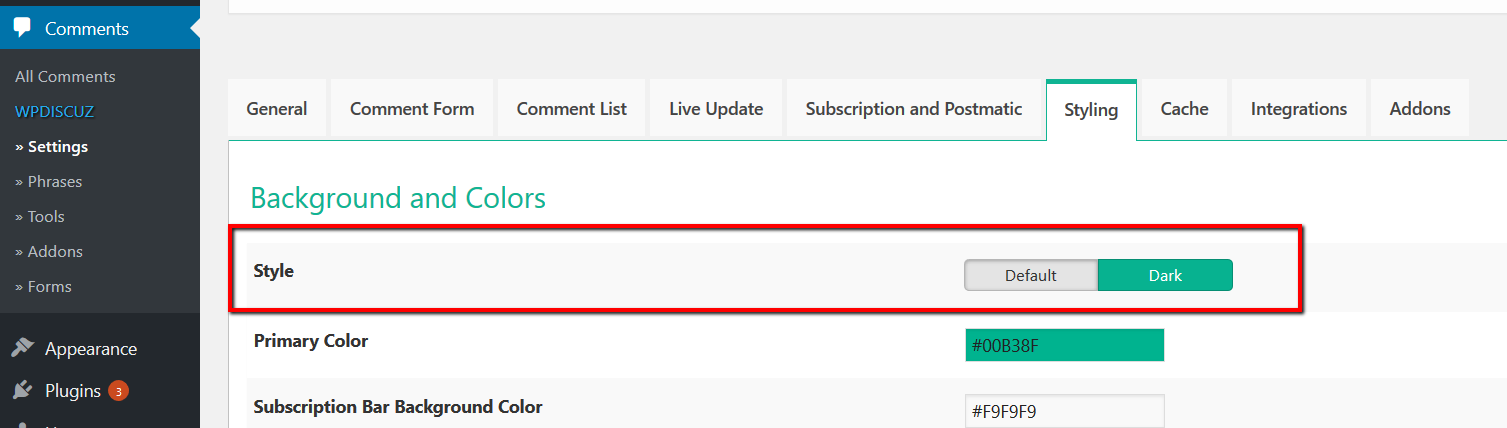
wpDiscuz dark style
screenshot 2


ReplyQuote
(@henrimatthijssen)
Member Customer
Joined: 9 years ago
Posts: 27
Translate
English
Spanish
French
German
Italian
Portuguese
Russian
Chinese
Japanese
Korean
Arabic
Hindi
Dutch
Polish
Turkish
Vietnamese
Thai
Swedish
Danish
Finnish
Norwegian
Czech
Hungarian
Romanian
Greek
Hebrew
Indonesian
Malay
Ukrainian
Bulgarian
Croatian
Slovak
Slovenian
Serbian
Lithuanian
Latvian
Estonian
 

This does not solve the problem. Still the hyperlink is shown in the same color.

Further I actually do not want to change the wpDiscuz Style to Dark as I made some changes in the copy of the wpdiscuz.css file in Themes directory for the default style.

This means I still have the same question: "Which setting to change/adapt in the wpdiscuz.css file so the hyperlink is shown in a different color." (for the default style).

Thank you very much in advance for your assistance.



ReplyQuote
Astghik
(@astgh)
Illustrious Member Admin
Joined: 8 years ago
Posts: 6645
Translate
English
Spanish
French
German
Italian
Portuguese
Russian
Chinese
Japanese
Korean
Arabic
Hindi
Dutch
Polish
Turkish
Vietnamese
Thai
Swedish
Danish
Finnish
Norwegian
Czech
Hungarian
Romanian
Greek
Hebrew
Indonesian
Malay
Ukrainian
Bulgarian
Croatian
Slovak
Slovenian
Serbian
Lithuanian
Latvian
Estonian
 

Please try to use following CSS code:

#wpcomm .wc-comment-text > p > a {
color: #00f;
}


ReplyQuote
(@henrimatthijssen)
Member Customer
Joined: 9 years ago
Posts: 27
Translate
English
Spanish
French
German
Italian
Portuguese
Russian
Chinese
Japanese
Korean
Arabic
Hindi
Dutch
Polish
Turkish
Vietnamese
Thai
Swedish
Danish
Finnish
Norwegian
Czech
Hungarian
Romanian
Greek
Hebrew
Indonesian
Malay
Ukrainian
Bulgarian
Croatian
Slovak
Slovenian
Serbian
Lithuanian
Latvian
Estonian
 

I tried this but it does not solve the issue (I made sure that all caches were deleted and explicitly refreshed the page with CTRL-F5).


ReplyQuote
(@henrimatthijssen)
Member Customer
Joined: 9 years ago
Posts: 27
Translate
English
Spanish
French
German
Italian
Portuguese
Russian
Chinese
Japanese
Korean
Arabic
Hindi
Dutch
Polish
Turkish
Vietnamese
Thai
Swedish
Danish
Finnish
Norwegian
Czech
Hungarian
Romanian
Greek
Hebrew
Indonesian
Malay
Ukrainian
Bulgarian
Croatian
Slovak
Slovenian
Serbian
Lithuanian
Latvian
Estonian
 

Found the solution! You need to add '!important' behind it:

#wpcomm .wc-comment-text > p > a {
color: #00f!important;
}


ReplyQuote
Share:
Scroll to top