
AI Assistant
Notifications
Clear all

[Solved] Problem with wpfo-members shortcode

5 Posts
2 Users
2 Reactions
1,286 Views
Marco Rosini
Posts: 24
Customer
Topic starter
Translate
English
Spanish
French
German
Italian
Portuguese
Russian
Chinese
Japanese
Korean
Arabic
Hindi
Dutch
Polish
Turkish
Vietnamese
Thai
Swedish
Danish
Finnish
Norwegian
Czech
Hungarian
Romanian
Greek
Hebrew
Indonesian
Malay
Ukrainian
Bulgarian
Croatian
Slovak
Slovenian
Serbian
Lithuanian
Latvian
Estonian
(@marco-rosini)
Member
Joined: 4 years ago
[#12389]

Hi everyone, I'm trying to use the wpforo-members shortcode to be able to count the users who have written multiple posts and display them in a widget block. Unfortunately, however, nothing appears, only the writing of the shortcode.
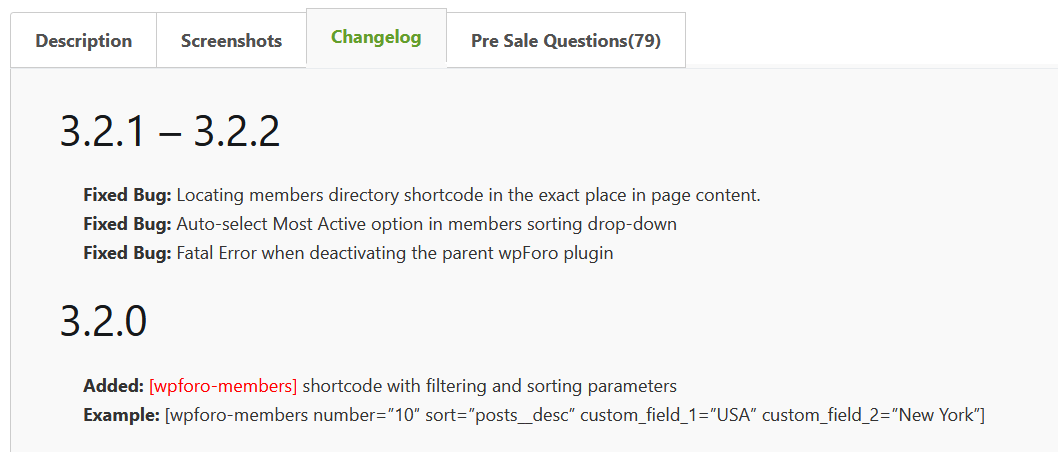
I'm interested in showing the list of the most active users (with the most posts), regardless of their origin. So I used the following shortcode:

[WPforo-Member-Nummer = "10" Sort = "posts__desc"]

I can't understand where the problem is.


4 Replies
Marco Rosini
Posts: 24
Customer
Topic starter
Translate
English
Spanish
French
German
Italian
Portuguese
Russian
Chinese
Japanese
Korean
Arabic
Hindi
Dutch
Polish
Turkish
Vietnamese
Thai
Swedish
Danish
Finnish
Norwegian
Czech
Hungarian
Romanian
Greek
Hebrew
Indonesian
Malay
Ukrainian
Bulgarian
Croatian
Slovak
Slovenian
Serbian
Lithuanian
Latvian
Estonian
(@marco-rosini)
Member
Joined: 4 years ago

Thanks to the advice of the legendary and always extremely helpful  @Tutrix I solved part of the problem, namely the appearance of the shortcode instead of a "graphic element". The problem lay in the spaces generated by copy and paste. Now, however, the problem remains that the users with the highest number of posts are not displayed but rather a list of all users in alphabetical order. Where am I wrong?


Posts: 4245
 Tom
Admin
Translate
English
Spanish
French
German
Italian
Portuguese
Russian
Chinese
Japanese
Korean
Arabic
Hindi
Dutch
Polish
Turkish
Vietnamese
Thai
Swedish
Danish
Finnish
Norwegian
Czech
Hungarian
Romanian
Greek
Hebrew
Indonesian
Malay
Ukrainian
Bulgarian
Croatian
Slovak
Slovenian
Serbian
Lithuanian
Latvian
Estonian
(@tomson)
Famed Member
Joined: 11 years ago

Hi @marco-rosini,

You should make sure the quotes are correct symbols and there is no spaces after and before "=" and "[" "]" (inside). Here is a correct shordcode: 

[wpforo-members number="20" sort="posts__desc"]

also, there is no "-" between wpforo-members and number words. They are spearate parameters in the shortcode.


Marco Rosini
Posts: 24
Customer
Topic starter
Translate
English
Spanish
French
German
Italian
Portuguese
Russian
Chinese
Japanese
Korean
Arabic
Hindi
Dutch
Polish
Turkish
Vietnamese
Thai
Swedish
Danish
Finnish
Norwegian
Czech
Hungarian
Romanian
Greek
Hebrew
Indonesian
Malay
Ukrainian
Bulgarian
Croatian
Slovak
Slovenian
Serbian
Lithuanian
Latvian
Estonian
(@marco-rosini)
Member
Joined: 4 years ago

Hi @Tom, thanks for the kind and patient response, it works now, but I see that the administrators don't appear among the users.. is there a way to make them appear in the count too?  


Marco Rosini
Posts: 24
Customer
Topic starter
Translate
English
Spanish
French
German
Italian
Portuguese
Russian
Chinese
Japanese
Korean
Arabic
Hindi
Dutch
Polish
Turkish
Vietnamese
Thai
Swedish
Danish
Finnish
Norwegian
Czech
Hungarian
Romanian
Greek
Hebrew
Indonesian
Malay
Ukrainian
Bulgarian
Croatian
Slovak
Slovenian
Serbian
Lithuanian
Latvian
Estonian
(@marco-rosini)
Member
Joined: 4 years ago

Ok @Tom I understand why they don't appear.

I had excluded administrators from viewing the member. 

Have a nice weekend.


Share:
Scroll to top