AI Assistant
Notifications
Clear all

Naming custom fields

3 Posts
2 Users
0 Reactions
988 Views
Posts: 9
Customer
Topic starter
Translate
English
Spanish
French
German
Italian
Portuguese
Russian
Chinese
Japanese
Korean
Arabic
Hindi
Dutch
Polish
Turkish
Vietnamese
Thai
Swedish
Danish
Finnish
Norwegian
Czech
Hungarian
Romanian
Greek
Hebrew
Indonesian
Malay
Ukrainian
Bulgarian
Croatian
Slovak
Slovenian
Serbian
Lithuanian
Latvian
Estonian
(@elena-tapper)
Member
Joined: 1 year ago
[#13967]

Hi, is there a way to name html and other custom fields, so I can easily know what they are. It's frustrating to have to click on each one to know what it is. Thank you.
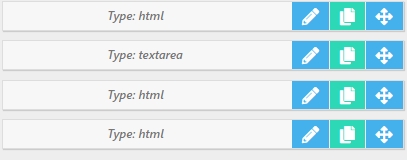

screenshot


2 Replies
Astghik
Posts: 6645
Admin
Translate
English
Spanish
French
German
Italian
Portuguese
Russian
Chinese
Japanese
Korean
Arabic
Hindi
Dutch
Polish
Turkish
Vietnamese
Thai
Swedish
Danish
Finnish
Norwegian
Czech
Hungarian
Romanian
Greek
Hebrew
Indonesian
Malay
Ukrainian
Bulgarian
Croatian
Slovak
Slovenian
Serbian
Lithuanian
Latvian
Estonian
(@astgh)
Illustrious Member
Joined: 8 years ago

Hi,

Each field has a description. Once you fill it in, you'll see an icon that allows you to easily view the field's description.

Member Fields ‹ wpForo — WordPress — Mozilla Firefox

Reply
Posts: 9
Customer
Topic starter
Translate
English
Spanish
French
German
Italian
Portuguese
Russian
Chinese
Japanese
Korean
Arabic
Hindi
Dutch
Polish
Turkish
Vietnamese
Thai
Swedish
Danish
Finnish
Norwegian
Czech
Hungarian
Romanian
Greek
Hebrew
Indonesian
Malay
Ukrainian
Bulgarian
Croatian
Slovak
Slovenian
Serbian
Lithuanian
Latvian
Estonian
(@elena-tapper)
Member
Joined: 1 year ago

Okay, got it! It would be great if you could see the question mark under User Fields Manager, and not just the Register Form. Thank you.


Reply
Share:
Scroll to top
