
AI Assistant
Notifications
Clear all

Adding custom user registration info under account post in post.php or topic.php

5 Posts
3 Users
0 Reactions
1,783 Views
Posts: 9
Customer
Topic starter
Translate
English
Spanish
French
German
Italian
Portuguese
Russian
Chinese
Japanese
Korean
Arabic
Hindi
Dutch
Polish
Turkish
Vietnamese
Thai
Swedish
Danish
Finnish
Norwegian
Czech
Hungarian
Romanian
Greek
Hebrew
Indonesian
Malay
Ukrainian
Bulgarian
Croatian
Slovak
Slovenian
Serbian
Lithuanian
Latvian
Estonian
(@joshua-hidalgo)
Member
Joined: 6 years ago
[#5891]

Hi there,

I've been having trouble implementing a feature where you can add custom field info from registration under the account where users post

Screen Shot 2020 05 02 at 12.19.07 PM

I saw that someone else figured it out on a much older version in this thread: https://gvectors.com/forum/wpforo-user-custom-fields/how-to-display-the-custom-fields-in-the-post-php-topic-php/#post-7505

I just wanted to make this post since I'm relatively new and was having trouble following the instructions on this post. I'm also not sure if this thread is outdated (1.4.7 it says) I have 1.7.4.

I want to achieve what the customer had achieved in this post:
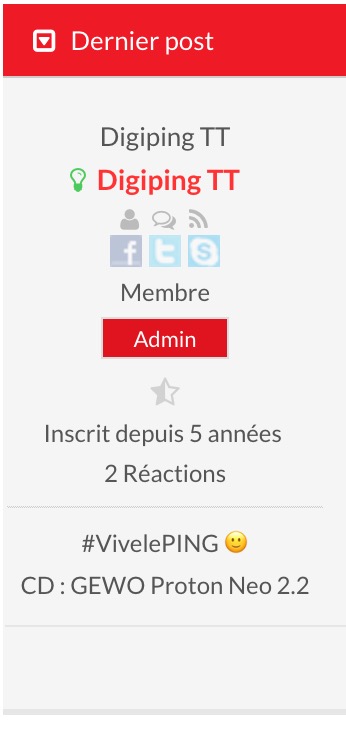
1843 Capture decran 2018 02 23 a 221704

Could I please get detailed instructions on how to insert the proper php function to make this work?


Thank you!


4 Replies
Astghik
Posts: 6645
Admin
Translate
English
Spanish
French
German
Italian
Portuguese
Russian
Chinese
Japanese
Korean
Arabic
Hindi
Dutch
Polish
Turkish
Vietnamese
Thai
Swedish
Danish
Finnish
Norwegian
Czech
Hungarian
Romanian
Greek
Hebrew
Indonesian
Malay
Ukrainian
Bulgarian
Croatian
Slovak
Slovenian
Serbian
Lithuanian
Latvian
Estonian
(@astgh)
Illustrious Member
Joined: 8 years ago

Hi @joshua-hidalgo,

you can use those changes for the 1.7.4 version as well.

Here is another example of this kind of customization: 

https://gvectors.com/forum/wpforo-user-custom-fields/using-custom-fields-can-i-show-city-name-below-the-gravatar-pic-inside-the-forum/#post-22095


Reply
Posts: 9
Customer
Topic starter
Translate
English
Spanish
French
German
Italian
Portuguese
Russian
Chinese
Japanese
Korean
Arabic
Hindi
Dutch
Polish
Turkish
Vietnamese
Thai
Swedish
Danish
Finnish
Norwegian
Czech
Hungarian
Romanian
Greek
Hebrew
Indonesian
Malay
Ukrainian
Bulgarian
Croatian
Slovak
Slovenian
Serbian
Lithuanian
Latvian
Estonian
(@joshua-hidalgo)
Member
Joined: 6 years ago

Hi there!

Thanks for your reply 🙂

The link you sent me lead to a 404 error.

I think i ran into another problem...

the changes I'm making in the post-thread.php file don't seem to be showing up on the front end. I've tried taking away some code and refreshing, but they don't disappear.


Any reason for this?


Thanks!


Reply
Posts: 9
Customer
Topic starter
Translate
English
Spanish
French
German
Italian
Portuguese
Russian
Chinese
Japanese
Korean
Arabic
Hindi
Dutch
Polish
Turkish
Vietnamese
Thai
Swedish
Danish
Finnish
Norwegian
Czech
Hungarian
Romanian
Greek
Hebrew
Indonesian
Malay
Ukrainian
Bulgarian
Croatian
Slovak
Slovenian
Serbian
Lithuanian
Latvian
Estonian
(@joshua-hidalgo)
Member
Joined: 6 years ago
image

Here is what I inserted so far (div custom-user-field). I tried the original one from the post but nothing changed either. Is this the right spot? The echo "text" doesn't show up in the inspector either. Meaning for reason the info isn't being transferred.


Reply
1 Reply
Elvina
(@elvina)
Joined: 7 years ago

Support
Posts: 1403
Translate
English
Spanish
French
German
Italian
Portuguese
Russian
Chinese
Japanese
Korean
Arabic
Hindi
Dutch
Polish
Turkish
Vietnamese
Thai
Swedish
Danish
Finnish
Norwegian
Czech
Hungarian
Romanian
Greek
Hebrew
Indonesian
Malay
Ukrainian
Bulgarian
Croatian
Slovak
Slovenian
Serbian
Lithuanian
Latvian
Estonian

@joshua-hidalgo,

I apologize for the late response.

Please check the link provided above one more time. It should open fine.


Reply
Share:
Scroll to top

