
AI Assistant
Notifications
Clear all

[Solved] I can't update

7 Posts
3 Users
0 Reactions
1,429 Views
(@lfernando)
Posts: 10
Active Member
Topic starter
Translate
English
Spanish
French
German
Italian
Portuguese
Russian
Chinese
Japanese
Korean
Arabic
Hindi
Dutch
Polish
Turkish
Vietnamese
Thai
Swedish
Danish
Finnish
Norwegian
Czech
Hungarian
Romanian
Greek
Hebrew
Indonesian
Malay
Ukrainian
Bulgarian
Croatian
Slovak
Slovenian
Serbian
Lithuanian
Latvian
Estonian

 
[#5132]

Since the last update of this and other addons, I was asked again for the activation key, but when entering the code nothing happens, just reload the page, my purchase order is # 32105


Posted : 10/02/2020 11:22 pm
Astghik
(@astgh)
Posts: 6645
Illustrious Member Admin
Translate
English
Spanish
French
German
Italian
Portuguese
Russian
Chinese
Japanese
Korean
Arabic
Hindi
Dutch
Polish
Turkish
Vietnamese
Thai
Swedish
Danish
Finnish
Norwegian
Czech
Hungarian
Romanian
Greek
Hebrew
Indonesian
Malay
Ukrainian
Bulgarian
Croatian
Slovak
Slovenian
Serbian
Lithuanian
Latvian
Estonian
 

Hi @lfernando

Please try to insert the activation keys one more time then:

  • Navigate to Dashboard > Updates  admin page
  • Click on the "Check Again" button
  • Try to update the add-ons
Check update

 
Posted : 11/02/2020 11:09 am
(@lfernando)
Posts: 10
Active Member
Topic starter
Translate
English
Spanish
French
German
Italian
Portuguese
Russian
Chinese
Japanese
Korean
Arabic
Hindi
Dutch
Polish
Turkish
Vietnamese
Thai
Swedish
Danish
Finnish
Norwegian
Czech
Hungarian
Romanian
Greek
Hebrew
Indonesian
Malay
Ukrainian
Bulgarian
Croatian
Slovak
Slovenian
Serbian
Lithuanian
Latvian
Estonian
 

@astghik

Correct, now if it could be activated, and updated, before it showed a message like "The code has already been used", then nothing happened, and now it is already activated thank you very much!


Posted : 11/02/2020 10:21 pm
(@lfernando)
Posts: 10
Active Member
Topic starter
Translate
English
Spanish
French
German
Italian
Portuguese
Russian
Chinese
Japanese
Korean
Arabic
Hindi
Dutch
Polish
Turkish
Vietnamese
Thai
Swedish
Danish
Finnish
Norwegian
Czech
Hungarian
Romanian
Greek
Hebrew
Indonesian
Malay
Ukrainian
Bulgarian
Croatian
Slovak
Slovenian
Serbian
Lithuanian
Latvian
Estonian

 

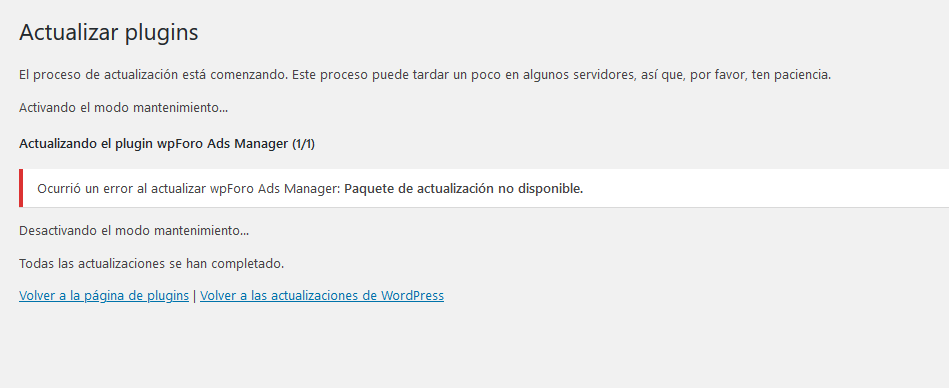
Although now when trying to update from the Wordpress updater the following error appeared, and if I try to update from the plugins, the option to update does not appear, only the legend of "Automatic update is not available for this plugin" is displayed.

2020 02 11 123130

 
Posted : 11/02/2020 10:34 pm
Elvina
(@elvina)
Posts: 1403
Support
Translate
English
Spanish
French
German
Italian
Portuguese
Russian
Chinese
Japanese
Korean
Arabic
Hindi
Dutch
Polish
Turkish
Vietnamese
Thai
Swedish
Danish
Finnish
Norwegian
Czech
Hungarian
Romanian
Greek
Hebrew
Indonesian
Malay
Ukrainian
Bulgarian
Croatian
Slovak
Slovenian
Serbian
Lithuanian
Latvian
Estonian
 

@lfernando,

Please send the admin login details to info[at]gvectors.com email address to allow us to check it.


Posted : 12/02/2020 12:37 pm
(@lfernando)
Posts: 10
Active Member
Topic starter
Translate
English
Spanish
French
German
Italian
Portuguese
Russian
Chinese
Japanese
Korean
Arabic
Hindi
Dutch
Polish
Turkish
Vietnamese
Thai
Swedish
Danish
Finnish
Norwegian
Czech
Hungarian
Romanian
Greek
Hebrew
Indonesian
Malay
Ukrainian
Bulgarian
Croatian
Slovak
Slovenian
Serbian
Lithuanian
Latvian
Estonian
 

@elvina

I just went to check and now the link to update each of the addons appears, I don't know if any action was taken but apparently the problem was already solved


Posted : 13/02/2020 11:07 pm
Elvina
(@elvina)
Posts: 1403
Support
Translate
English
Spanish
French
German
Italian
Portuguese
Russian
Chinese
Japanese
Korean
Arabic
Hindi
Dutch
Polish
Turkish
Vietnamese
Thai
Swedish
Danish
Finnish
Norwegian
Czech
Hungarian
Romanian
Greek
Hebrew
Indonesian
Malay
Ukrainian
Bulgarian
Croatian
Slovak
Slovenian
Serbian
Lithuanian
Latvian
Estonian
 

@lfernando,

Glad to hear the issue is solved.


Posted : 14/02/2020 11:31 am
Share:
Scroll to top