
Search
Close
AI Search
Classic Search
 Search Phrase:
 Search Type:
Advanced search options
 Search in Forums:
 Search in date period:

 Sort Search Results by:

AI Assistant
Notifications
Clear all

Shortcode

3 Posts
2 Users
0 Reactions
2,918 Views
(@tanjas)
Active Member
Joined: 8 years ago
Posts: 7
Topic starter
Translate
English
Spanish
French
German
Italian
Portuguese
Russian
Chinese
Japanese
Korean
Arabic
Hindi
Dutch
Polish
Turkish
Vietnamese
Thai
Swedish
Danish
Finnish
Norwegian
Czech
Hungarian
Romanian
Greek
Hebrew
Indonesian
Malay
Ukrainian
Bulgarian
Croatian
Slovak
Slovenian
Serbian
Lithuanian
Latvian
Estonian
  [#1705]

Hello a presales question,

can i add wpDiscuz as a shortcode on a empty page?

I need to show only commens at the home page.

Thank you


Quote
 Tom
(@tomson)
Famed Member Admin
Joined: 11 years ago
Posts: 4245
Translate
English
Spanish
French
German
Italian
Portuguese
Russian
Chinese
Japanese
Korean
Arabic
Hindi
Dutch
Polish
Turkish
Vietnamese
Thai
Swedish
Danish
Finnish
Norwegian
Czech
Hungarian
Romanian
Greek
Hebrew
Indonesian
Malay
Ukrainian
Bulgarian
Croatian
Slovak
Slovenian
Serbian
Lithuanian
Latvian
Estonian
 

Hi TanjaS,

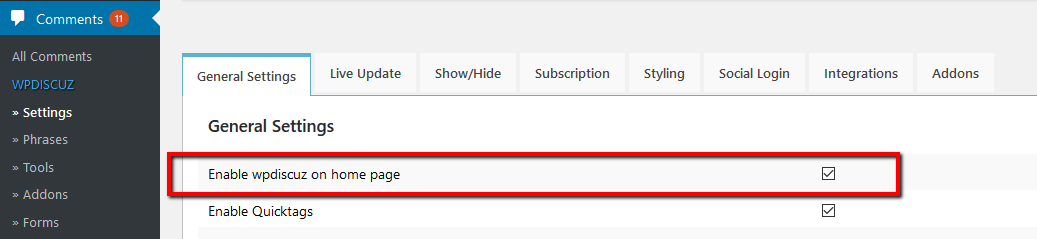
wpDiscuz is a free comment plugin for WordPress. Please download an test it. You should be able to ad it on home page. Also please make sure this option is enabled:

wpDiscuz enable on home page


ReplyQuote
 Tom
(@tomson)
Famed Member Admin
Joined: 11 years ago
Posts: 4245
Translate
English
Spanish
French
German
Italian
Portuguese
Russian
Chinese
Japanese
Korean
Arabic
Hindi
Dutch
Polish
Turkish
Vietnamese
Thai
Swedish
Danish
Finnish
Norwegian
Czech
Hungarian
Romanian
Greek
Hebrew
Indonesian
Malay
Ukrainian
Bulgarian
Croatian
Slovak
Slovenian
Serbian
Lithuanian
Latvian
Estonian
 
Posted by: TanjaS

Hello a presales question,

can i add wpDiscuz as a shortcode on a empty page?

I need to show only commens at the home page.

Thank you

No, wpDiscuz is designed as a native WordPress comment system, it's not possible to add in page content, it's loaded under page content. If your page comment area is enabled then it'll work fine. Please navigate to Dashboard > Comments > Forms admin page, edit the Default Form and make sure it's enabled for Page content type.

Also edit the home page, open the Screen Options bar (above), enable the "Comments" option, then scroll down and make sure comments are enabled for this page.

More info here: https://gvectors.com/forum/how-to-and-troubleshooting/resolved-wpdiscuz-comment-form-is-missing/#post-349


ReplyQuote
Share:
Scroll to top