Limited Support
Our support team is currently on holiday from December 25, 2025 to January 7, 2026, and replies may be delayed during this period.
We appreciate your patience and understanding while our team is away. Thank you for being part of the gVectors community!
Merry Christmas and Happy Holidays! 🎄
Good afternoon.
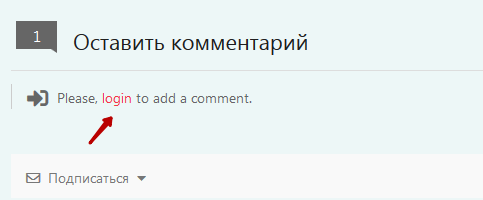
On my website I use a custom login and registration form. The form wpdiscuz contains text with reference to standard authorization
How do I replace my link?
<p class="wc-must-login">
For commenting please <a class="js-authentication" role="button" data-toggle=".bb-header-user-box .menu" href="#sign-in">
Login</a>
</p>
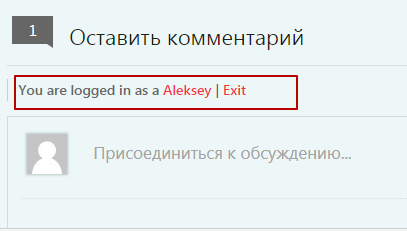
And another question. How to hide the text You are logged in as a username. Exit.
Hi IGjijklgf4,
How do I replace login link?
Please find the solution here:
https://wordpress.org/support/topic/change-link-for-login-link-text/#post-5774909
And another question. How to hide the text You are logged in as a username. Exit.
I'm sorry but there is no way to do this.
Hi IGjijklgf4,
How do I replace login link?
Please find the solution here:
https://wordpress.org/support/topic/change-link-for-login-link-text/#post-5774909
And another question. How to hide the text You are logged in as a username. Exit.
I'm sorry but there is no way to do this.
This decision changes unfortunately all links on the site. I need to change the link only in the text wpdiscuz
I guess you only have one login/register page for whole website so it's correct to change all login links. If it's not like this, then I have no other solution here. There is no way to change WordPress login link in a specific place.
Okay!
For users who want to replace the link in the text with a custom, I share the solution. For example, you need to send the user to their authorization form, not the standard Wordpress
Find the file - /plugins/wpdiscuz/templates/comment/comment-form.php
Find this code
<div id="wc_show_hide_loggedin_username">
<?php
if ($wpdiscuz->optionsSerialized->showHideLoggedInUsername) {
if ($currentUser && $currentUser->ID) {
$user_url = get_author_posts_url($currentUser->ID);
$user_url = apply_filters('wpdiscuz_profile_url', $user_url, $currentUser);
$logout = wp_loginout(get_permalink(), false);
$logout = preg_replace('!>([^<]+)!is', '>' . $wpdiscuz->optionsSerialized->phrases['wc_log_out'], $logout);
echo $wpdiscuz->optionsSerialized->phrases['wc_logged_in_as'] . ' <a href="' . $user_url . '">' . $wpdiscuz->helper->getCurrentUserDisplayName($currentUser) . '</a> | ' . $logout;
} else {
if (!$form->isUserCanComment($currentUser, $post->ID) || !$wpdiscuz->optionsSerialized->hideLoginLinkForGuests) {
$login = wp_loginout(get_permalink(), false);
$login = preg_replace('!>([^<]+)!is', '>' . $wpdiscuz->optionsSerialized->phrases['wc_log_in'], $login);
$login = sprintf($wpdiscuz->optionsSerialized->phrases['wc_login_please'], $login);
echo '<i class="fas fa-sign-in-alt"></i> <span>' . $login . '</span>';
}
}
}
?>
</div>
Remove this code and paste custom
Example
<?php if ( is_user_logged_in() ) {
echo '';
}
else {
echo 'For comment please <a class="my-login js-authentication" role="button" data-toggle=".bb-header-user-box .menu" href="#sign-in">Login</a>';
}
?>
The first part echo ' '; shows the text or html for registered users
The two part echo ' ' shows the text or html for non-registered users.
Of course, the changes will disappear after the plugin is developed, but it's better than nothing