
Notifications
Clear all

Limited Support

Our support team is currently on holiday from December 25, 2025 to January 7, 2026, and replies may be delayed during this period.

We appreciate your patience and understanding while our team is away. Thank you for being part of the gVectors community!

Merry Christmas and Happy Holidays! 🎄

[Solved] Change text of Post Comment button

2 Posts
2 Users
1 Reactions
7,559 Views
(@webtoolsframeworks)
Member Customer
Joined: 9 years ago
Posts: 14
Topic starter  

Wondering if anyone knows how to change the text of the "Post Comment" button. I've looked through all the phrases and other settings included but cannot find this information anywhere.

Thank you!


Quote
 Tom
(@tomson)
Famed Member Admin
Joined: 11 years ago
Posts: 4234
 

wpDiscuz 4 comes with custom comment form and field creation api. Please navigate to Dashboard > Comments > Forms admin page, edit the Default Form and change whatever you want.

Screenshot:
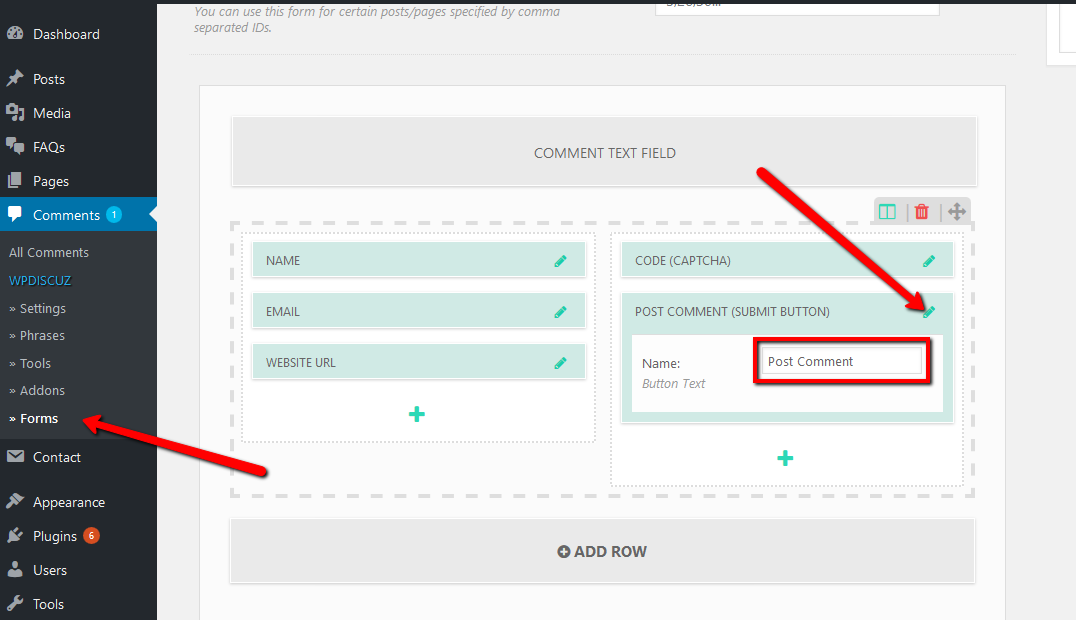
wpDiscuz change post comment button text


Brian reacted
ReplyQuote
Share:
Scroll to top