Search
Close
AI Search
Classic Search
 Search Phrase:
 Search Type:
Advanced search options
 Search in Forums:
 Search in date period:

 Sort Search Results by:

AI Assistant
Emojis missing in d...
 
Notifications
Clear all

[Solved] Emojis missing in drop down menue

7 Posts
2 Users
0 Reactions
1,720 Views
 thd
(@thd)
Posts: 17
Member Customer
Topic starter
Translate
English
Spanish
French
German
Italian
Portuguese
Russian
Chinese
Japanese
Korean
Arabic
Hindi
Dutch
Polish
Turkish
Vietnamese
Thai
Swedish
Danish
Finnish
Norwegian
Czech
Hungarian
Romanian
Greek
Hebrew
Indonesian
Malay
Ukrainian
Bulgarian
Croatian
Slovak
Slovenian
Serbian
Lithuanian
Latvian
Estonian
 
[#6055]
emojibug

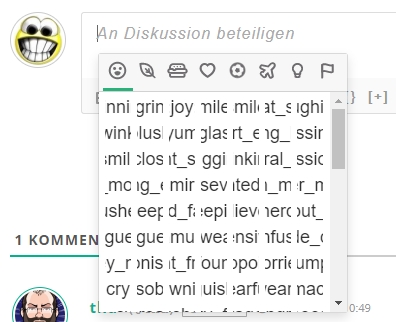
As shown in the graphic, the emojis of the emoticons add on are not shown in the drop down menue. However when I click on them, they are correctly insertet in the comments text. How can I fix this?


Posted : 25/05/2020 8:41 pm
(@taron)
Posts: 10
Active Member
Translate
English
Spanish
French
German
Italian
Portuguese
Russian
Chinese
Japanese
Korean
Arabic
Hindi
Dutch
Polish
Turkish
Vietnamese
Thai
Swedish
Danish
Finnish
Norwegian
Czech
Hungarian
Romanian
Greek
Hebrew
Indonesian
Malay
Ukrainian
Bulgarian
Croatian
Slovak
Slovenian
Serbian
Lithuanian
Latvian
Estonian
 

Hi @thd.

Please update to wpDiscuz Emoticons v7.0.1. The issue should be fixed.


Posted : 25/05/2020 11:23 pm
 thd
(@thd)
Posts: 17
Member Customer
Topic starter
Translate
English
Spanish
French
German
Italian
Portuguese
Russian
Chinese
Japanese
Korean
Arabic
Hindi
Dutch
Polish
Turkish
Vietnamese
Thai
Swedish
Danish
Finnish
Norwegian
Czech
Hungarian
Romanian
Greek
Hebrew
Indonesian
Malay
Ukrainian
Bulgarian
Croatian
Slovak
Slovenian
Serbian
Lithuanian
Latvian
Estonian
 

@taron That solved the problem. Thank you.

How do I know if a new plugin is available? Do I have to check that manually? 


Posted : 26/05/2020 12:21 am
(@taron)
Posts: 10
Active Member
Translate
English
Spanish
French
German
Italian
Portuguese
Russian
Chinese
Japanese
Korean
Arabic
Hindi
Dutch
Polish
Turkish
Vietnamese
Thai
Swedish
Danish
Finnish
Norwegian
Czech
Hungarian
Romanian
Greek
Hebrew
Indonesian
Malay
Ukrainian
Bulgarian
Croatian
Slovak
Slovenian
Serbian
Lithuanian
Latvian
Estonian
 

@thd

Did you mean that the new add-on has been published? Or does the existing addon/plugin have a new update?


Posted : 26/05/2020 12:36 am
 thd
(@thd)
Posts: 17
Member Customer
Topic starter
Translate
English
Spanish
French
German
Italian
Portuguese
Russian
Chinese
Japanese
Korean
Arabic
Hindi
Dutch
Polish
Turkish
Vietnamese
Thai
Swedish
Danish
Finnish
Norwegian
Czech
Hungarian
Romanian
Greek
Hebrew
Indonesian
Malay
Ukrainian
Bulgarian
Croatian
Slovak
Slovenian
Serbian
Lithuanian
Latvian
Estonian
 

@taron new updates on an existing addon


Posted : 26/05/2020 1:17 am
(@taron)
Posts: 10
Active Member
Translate
English
Spanish
French
German
Italian
Portuguese
Russian
Chinese
Japanese
Korean
Arabic
Hindi
Dutch
Polish
Turkish
Vietnamese
Thai
Swedish
Danish
Finnish
Norwegian
Czech
Hungarian
Romanian
Greek
Hebrew
Indonesian
Malay
Ukrainian
Bulgarian
Croatian
Slovak
Slovenian
Serbian
Lithuanian
Latvian
Estonian
 

@thd

Basically WordPress checks for new updates every 8-12 hours. But you can do it manually from Dashboard > Updates page, but only do it when you have some problem with the plugin and need to check for updates.


Posted : 26/05/2020 11:28 am
 thd
(@thd)
Posts: 17
Member Customer
Topic starter
Translate
English
Spanish
French
German
Italian
Portuguese
Russian
Chinese
Japanese
Korean
Arabic
Hindi
Dutch
Polish
Turkish
Vietnamese
Thai
Swedish
Danish
Finnish
Norwegian
Czech
Hungarian
Romanian
Greek
Hebrew
Indonesian
Malay
Ukrainian
Bulgarian
Croatian
Slovak
Slovenian
Serbian
Lithuanian
Latvian
Estonian
 

Ah ok. If the updates are shown up through the normal wordpress update procedure, that will be enough. I wondered wether this would happend or not. Thank you for the info and for your help.


Posted : 26/05/2020 12:33 pm
Share:
Scroll to top