
AI Assistant
Notifications
Clear all

[Solved] Cannot add poll (v1.0.6, wpForo v1.8.2)

3 Posts
2 Users
1 Reactions
1,695 Views
Posts: 2
Customer
Topic starter
Translate
English
Spanish
French
German
Italian
Portuguese
Russian
Chinese
Japanese
Korean
Arabic
Hindi
Dutch
Polish
Turkish
Vietnamese
Thai
Swedish
Danish
Finnish
Norwegian
Czech
Hungarian
Romanian
Greek
Hebrew
Indonesian
Malay
Ukrainian
Bulgarian
Croatian
Slovak
Slovenian
Serbian
Lithuanian
Latvian
Estonian
(@jen-haldaman)
Member
Joined: 6 years ago
[#6434]

Hello,

I upgraded to wpForo v1.8.2 today (from v1.7.7). I also updated from Polls v1.0.5 to v1.0.6. However, now I cannot add polls. I'm seeing the same screen as shown in a previous post, but I am seeing it in both FireFox and Edge.
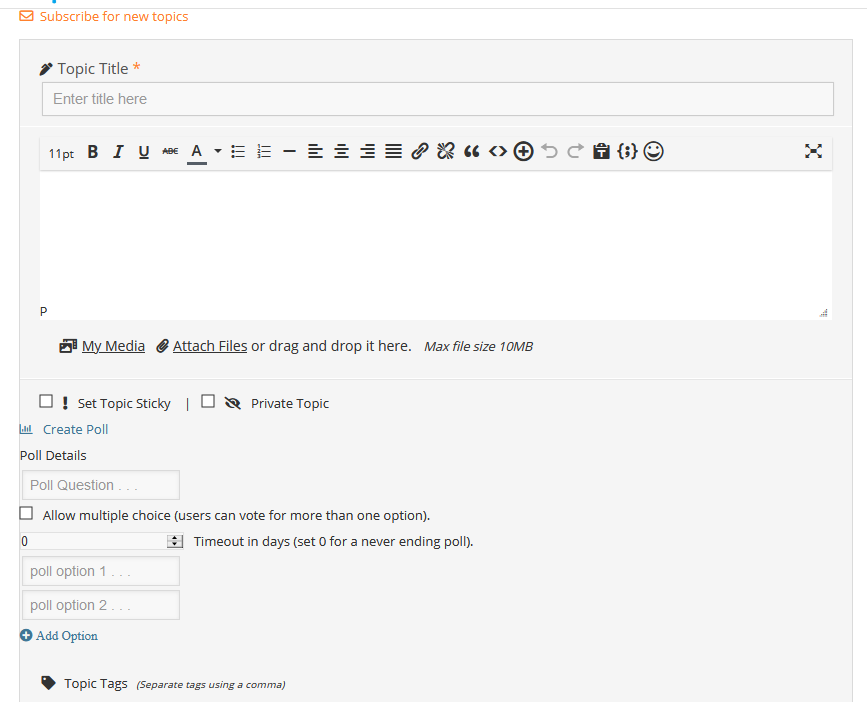
polls plugin display

I have tried deactivating/reactivating the Polls plugin, deleting all of the wpForo caches, clearing the website cache, uninstalling/deleting/reinstalling the Polls v1.0.6 plugin, and refreshing the main forum page (to account for any CSS updates). I've tried all of those steps in different orders. Nothing has worked.

Any suggestions?


2 Replies
Posts: 4245
 Tom
Admin
Translate
English
Spanish
French
German
Italian
Portuguese
Russian
Chinese
Japanese
Korean
Arabic
Hindi
Dutch
Polish
Turkish
Vietnamese
Thai
Swedish
Danish
Finnish
Norwegian
Czech
Hungarian
Romanian
Greek
Hebrew
Indonesian
Malay
Ukrainian
Bulgarian
Croatian
Slovak
Slovenian
Serbian
Lithuanian
Latvian
Estonian
(@tomson)
Famed Member
Joined: 11 years ago

Hi @jen-haldaman,

This is a cache issue. Please delete all caches, if you have a CDN purge it. Then reset all optimizer/minifyer plugins cache and go to forum front-end and press [Ctrl] + [F5] to reset browser cache. If you use Mac/Safari just press [CMD] + [ALT] + [E] to reset safari browser cache.


Posts: 2
Customer
Topic starter
Translate
English
Spanish
French
German
Italian
Portuguese
Russian
Chinese
Japanese
Korean
Arabic
Hindi
Dutch
Polish
Turkish
Vietnamese
Thai
Swedish
Danish
Finnish
Norwegian
Czech
Hungarian
Romanian
Greek
Hebrew
Indonesian
Malay
Ukrainian
Bulgarian
Croatian
Slovak
Slovenian
Serbian
Lithuanian
Latvian
Estonian
(@jen-haldaman)
Member
Joined: 6 years ago

Finally got it! Thank you!

On GoDaddy, I had to disable the CDN, flush all of the caches, and then re-enable the CDN.


Share:
Scroll to top