
Notifications
Clear all

Topic starter
06/09/2019 3:01 pm
hi
wpdiscuz not showing in Easy digital download plugin
i use shortcode will not work because JS and CSS files are not loaded. i use manul code
function my_wpdiscuz_shortcode() {
   if (file_exists(ABSPATH . 'wp-content/plugins/wpdiscuz/templates/comment/comment-form.php')) {
       ob_start();
       include_once ABSPATH . 'wp-content/plugins/wpdiscuz/templates/comment/comment-form.php';
       return ob_get_clean();
   }
}
add_shortcode('wpdiscuz_comments', 'my_wpdiscuz_shortcode');

The edd option in post type does not showing

https://wordpress.org/support/topic/not-working-with-edd/#post-11905761



06/09/2019 5:02 pm
Hi @eg-h9,
Thank you for using wpDiscuz and for contacting us.
Please follow the steps to get it resolved
1. Put the following code in your active theme functions.php file:
function myprefix_edd_download_supports( $supports ) {
   $supports[] = 'comments';
   return $supports;
}
add_filter('edd_download_supports', 'myprefix_edd_download_supports');
2. Once you add that code and visit the “edit download” page in the WP admin, you will see the “Discussion” options where you should enable comments:
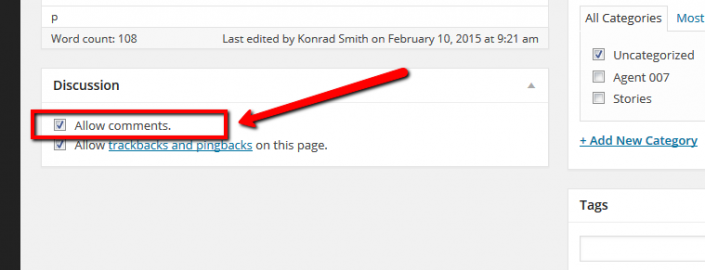
3. Finally, navigate to Dashboard > Comments > Forms, edit the Default Form make sure it's enabled for all post types, save it, then do Ctrl+F5 (twice) on front-end.
All customizations you've done before should be removed.
Topic starter
06/09/2019 5:10 pm
Thank you for your interest
Now working
thanks