
Notifications
Clear all

Topic starter
19/07/2018 6:40 pm
hi i have added a new field in the comment form using a single select radio button . in the comment form another fields are showing inside a box but the single select or multi select boxes are showing separately without it inside a box.how can i make that also inside a box
url to refer
https://www.how2reach.com/listing/bakel-fort/



20/07/2018 2:05 pm
Hi nikhilgkurup,
I'm sorry, but I don't follow you. Please explain using some screenshots.
Topic starter
20/07/2018 2:53 pm
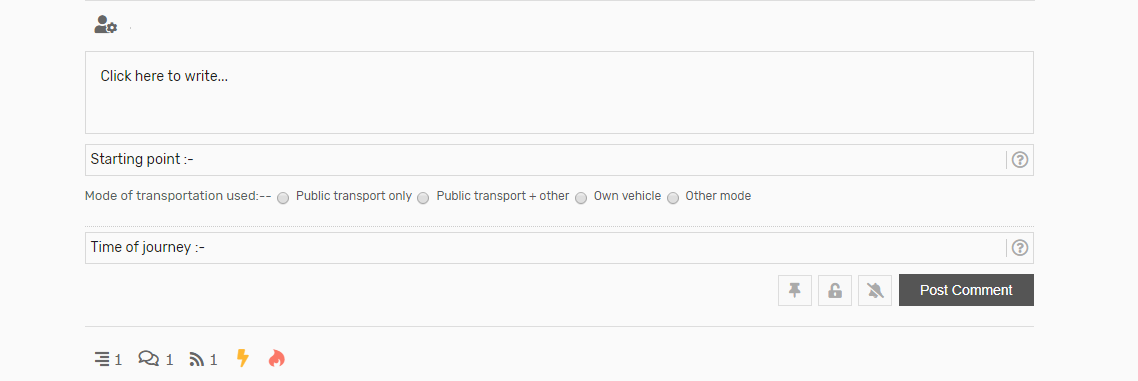
image is attached . in the comment form i use there are 4 fields . one is the default comment field .other 3 are added by me .they are starting point ,mode of transportation used and time of journey . out of which as you can see in the image starting point field and time of journey are inside a rectangular box border and looks fine . but the mode of transportation which is a single select button field doesnt have any border and looks odd. can we give that field too a border like others.

21/07/2018 2:03 pm
Hi @nikhilgkurup,
Other fields are not boxes, they are text fields (input areas). The single select radio buttons are not text fields, they don't have inside area for typing a text so they don't have such look and feel. The boxed view is not just a design, that's the native structure of text fields. You can't turn radio button to text field. You only can imitate it as a bordered are using a small CSS code like this:
#wpcomm .wpdiscuz-item.wpd-field-radio, #wpcomm .wpdiscuz-item.wpd-field-checkbox {
    border: 1px dotted #ccc;
    padding: 12px;
}
Please navigate to dashboard > Comments > Settings > Styling Tab, scroll down and put this code in Custom CSS Code textarea, then delete all caches and press Ctrl+F5 on website front.