
Notifications
Clear all

Topic starter
06/01/2019 2:47 am
Hello
My server host has recently informed me of the following issue:
mysql> SELECT COUNT() FROM wp_comments WHERE ( comment_approved = '1' ) AND comment_type != 'private' ORDER BY wp_comments.comment_date_gmt DESC ;
+----------+
| COUNT( ) |
+----------+
| 486669 |
+----------+
1 row in set (3.63 sec)
Effectively the comment system is continuously trying to calculate the total COUNT of all non-private comments, which takes several seconds per query.
Can you please let me know which of the WpDiscuz features would be causing this?

06/01/2019 12:35 pm
This SQl query need to generating comment threads for website visitors. The problem is in your table structure, not in the query. As far as I see your wp_comments table don't have appropriate indexes so it takes so long time. Please open phpMyAdmin Database manager of your hosting service > cPanel, navigate to WordPress database, press on SQL Tab and execute this query. It'll create some important table indexes to make this query very fast:
ALTER TABLE `wp_comments` ADD INDEX( `comment_approved`, `comment_type`);

ALTER TABLE `wp_comments` ADD INDEX( `comment_post_ID`, `comment_approved`);

ALTER TABLE `wp_comments` ADD INDEX( `comment_post_ID`, `comment_approved`, `comment_type`);
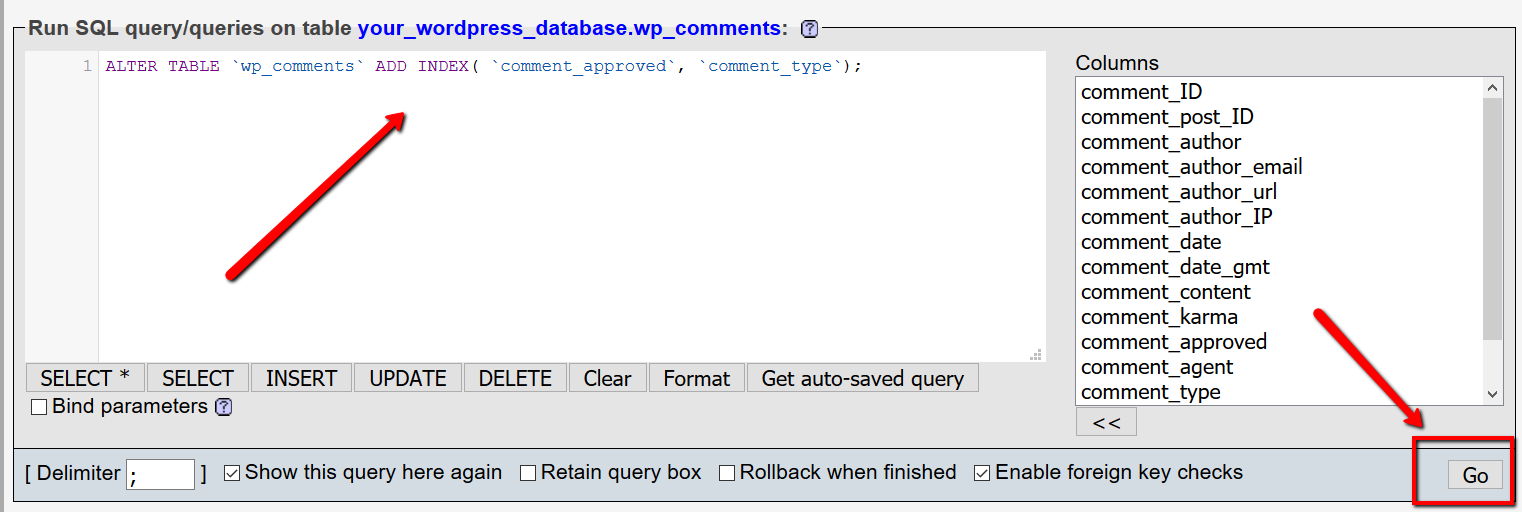
It may take a while, so you can execute them one by one with three times.
Topic starter
08/01/2019 4:37 am
Thank you i have asked my server hosts to enter this code.
Topic starter
08/01/2019 5:43 am
Hello
Please see the note from my server hosts. How can I respond?
We've tried to implement various indexes including the ones supplied by the developer, but unfortunately the indexes can not be added:
mysql> ALTER TABLE wp_comments ADD INDEX( comment_approved, comment_type);
ERROR 1067 (42000): Invalid default value for 'comment_date'
mysql> ALTER TABLE wp_comments ADD INDEX( comment_post_ID, comment_approved);
ERROR 1067 (42000): Invalid default value for 'comment_date'
mysql> ALTER TABLE wp_comments ADD INDEX( comment_post_ID, comment_approved, comment_type);
ERROR 1067 (42000): Invalid default value for 'comment_date'This is because the "comment_date" field is type "datetime", which according to the MySQL docs is limited to the range '1000-01-01 00:00:00' to '9999-12-31 23:59:59' (refer to https://dev.mysql.com/doc/refman/5.7/en/datetime.html ). The default value for the comment_date field is "0000-00-00 00:00:00" which is outside this range.
We could try altering the table to fix this default value; please check with your developer if this would be OK.
08/01/2019 12:24 pm
Hi @weninrome,
You should add this line before those SQLs.
SET SQL_MODE = "NO_AUTO_VALUE_ON_ZERO";
They should be executed together, like this:
SET SQL_MODE = "NO_AUTO_VALUE_ON_ZERO";
ALTER TABLE `wp_comments` ADD INDEX( `comment_approved`, `comment_type`);
ALTER TABLE `wp_comments` ADD INDEX( `comment_post_ID`, `comment_approved`);
ALTER TABLE `wp_comments` ADD INDEX( `comment_post_ID`, `comment_approved`, `comment_type`);